Version1.0.0
Requires WP5.8
Tested up to6.8
Slugprofit-margin-by-category-for-woocommerce
Changelog
  • Initial release
Profit Margin by Category for WooCommerce

Profit Margin by Category for WooCommerce

Profit Margin by Category for WooCommerce – Automatically add category-specific profit margins (percentage or fixed) to your WooCommerce products with intelligent hierarchical overrides, visual tree interface, and AJAX search. Perfect for managing pricing across large catalogs without touching individual products.

15.00

Lifetime License + Lifetime Updates

14-day money-back guarantee
Pay securely with Visa Mastercard American Express Discover Klarna Revolut Pay

Want more than one plugin? Your discount is applied automatically in the cart:

  • With 2 premium plugins in your cart → 10% off both

  • With 3 premium plugins15% off all of them

  • With 4 or more premium plugins20% off your plugins

Free plugins do not count towards the bundle and are not discounted.
The discount is applied automatically in the cart and at checkout, no coupon needed.

Do you think something is missing from this plugin?

Request a feature

Need a different customization on your website?

Submit a customization request

Profit Margin by Category for WooCommerce is a premium plugin that revolutionizes pricing management across your entire product catalog. Set category-specific profit margins (percentage or fixed amounts) with intelligent hierarchical overrides, allowing you to automatically adjust prices for thousands of products without touching individual product settings. Perfect for wholesalers, retailers, and multi-category stores seeking efficient, scalable pricing strategies!

Key Features

Hierarchical Margin System

  • Set percentage or fixed profit margins per category
  • Child categories automatically override parent margins
  • Multiple categories at same depth? Highest price wins
  • Unlimited category depth support

Dual Margin Types

  • Percentage margins (e.g., 20% markup)
  • Fixed amount margins (e.g., €5.00 per product)
  • Mix and match across categories
  • Decimal precision for exact pricing

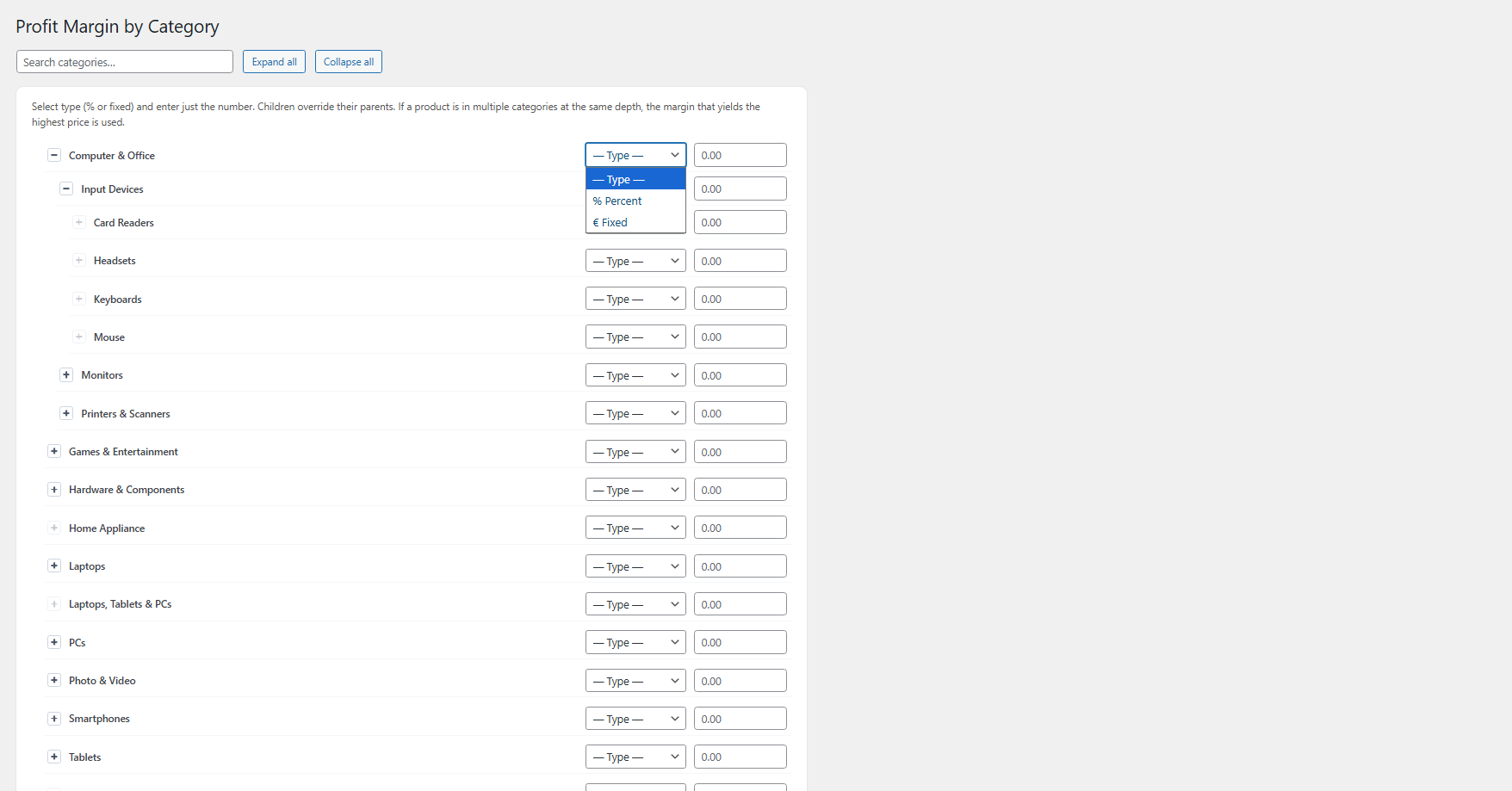
Intuitive Tree Interface

  • Visual category tree with expand/collapse functionality
  • AJAX-powered real-time search
  • Expand/collapse all with one click
  • Clean, organized view of entire category structure

Smart Price Calculation

  • Automatic price adjustment on frontend only
  • Admin prices remain unchanged (no database modifications)
  • Works with simple and variable products
  • Accurate min/max variation price ranges

Sale Price Intelligence

  • Preserves actual sale prices when they exist
  • Never fabricates fake sale prices
  • Applies margins to real sale prices
  • Maintains pricing integrity and customer trust

Variable Product Support

  • Full compatibility with product variations
  • Correct min/max price ranges for variable products
  • Individual variation price adjustments
  • Maintains WooCommerce variation cache integrity

Multilingual Ready

  • Full WPML compatibility
  • Polylang support included
  • Translatable dashboard and interface strings
  • Works seamlessly with multilingual stores

VGDEV Solutions Integration

  • Unified dashboard for all VGDEV plugins
  • Automatic update system
  • Secure license management
  • Professional lifetime support

Setup Instructions

  1. Install & Activate

    After purchasing the plugin:

    • Upload to /wp-content/plugins/profit-margin-by-category-for-woocommerce/
    • Activate through the WordPress Plugins menu
    • WooCommerce must be active before activation
    • Plugin automatically migrates any legacy settings
  2. Activate Your License

    Navigate to Settings > License and:

    • Enter your license key from purchase confirmation
    • Click Activate License
    • Verify activation success message appears
    • License enables all features and automatic updates
  3. Configure Category Margins

    Go to VGDEV Solutions > Profit Margin by Category:

    For Each Category:
    • Select margin type from dropdown: % Percent or € Fixed
    • Enter the margin amount (numbers only, no symbols)
    • Example: Enter "20" for 20% markup or "5.00" for €5 fixed margin
    • Leave blank for categories that don't need margins
    Using the Interface:
    • Click toggle buttons (▸) to expand/collapse subcategories
    • Use Search box to instantly find specific categories
    • Click Expand all button to view entire category tree
    • Click Collapse all button to minimize the view
    • Search automatically highlights matching categories and their parents
  4. Save Your Settings

    Click Save Settings at the bottom of the page:

    • Settings are validated and saved to database
    • Success message confirms changes were saved
    • Margins immediately active on frontend
    • Admin product prices remain unchanged
  5. Test on Frontend

    Verify your margins are working correctly:

    • Visit your store's product pages
    • Check that prices reflect the configured margins
    • Test with simple and variable products
    • Verify sale prices (if any) also have margins applied
    • Confirm variable products show correct price ranges

How It Works

Hierarchical Override Logic:

The plugin uses intelligent priority rules to determine which margin applies to each product:

  1. Child overrides parent: If both "Electronics" (20%) and "Smartphones" (15%) have margins, products in Smartphones use 15%
  2. Highest price wins: If a product is in both "Sale Items" (10%) and "Featured" (25%) at the same hierarchical level, it uses 25% (whichever yields higher price)
  3. Deepest category wins: More specific subcategories always take priority over their parent categories
  4. First match in chain: Within each category chain, the first margin found (starting from deepest child) is applied

Price Calculation Examples:

  • Percentage Margin:
    • Base product price: €100.00
    • Category margin: 20% (% Percent)
    • Final frontend price: €120.00
  • Fixed Margin:
    • Base product price: €100.00
    • Category margin: €5.00 (€ Fixed)
    • Final frontend price: €105.00
  • Variable Product:
    • Variation prices: €50, €75, €100
    • Category margin: 10%
    • Displayed range: €55.00 - €110.00

Admin vs Frontend Behavior:

  • Admin Area: Shows original base prices (no modifications)
  • Frontend Store: Shows automatically calculated prices with margins applied
  • Database: Product prices remain completely unchanged
  • Cart/Checkout: Uses frontend adjusted prices for order totals
  • License Check: Margins only apply when license is valid and active

Real-World Scenario:

Imagine you have this category structure:

  • Electronics (20% margin) → Computers (15% margin) → Laptops (25% margin)
  • A laptop in all three categories will use 25% (deepest child wins)
  • A desktop computer in "Computers" only will use 15%
  • A TV in "Electronics" only will use 20%

Why Choose Profit Margin by Category?

  • Save Hours of Manual Work - Update prices for thousands of products instantly without editing each one
  • Category-Level Control - Apply different pricing strategies to different product groups effortlessly
  • Intelligent Override System - Child categories automatically override parents for precise pricing control
  • No Database Changes - Your original product prices remain untouched, deactivate anytime without data loss
  • Variable Product Support - Works perfectly with product variations and shows accurate price ranges
  • Real Sale Prices Preserved - Never fabricates fake discounts, maintains customer trust and pricing integrity
  • AJAX-Powered Search - Find categories instantly in large catalogs with hundreds of categories
  • Multilingual Support - WPML and Polylang compatible for international and multi-language stores
  • Visual Tree Interface - See your entire category hierarchy at a glance with expand/collapse controls
  • Automatic Updates - License system ensures compatibility with latest WooCommerce versions
  • Professional Support - Backed by VGDev Solutions with lifetime dedicated support
  • Performance Optimized - Efficient price calculation with minimal impact on store performance

Perfect For

  • Wholesale Distributors - Different margins for trade vs retail categories
  • Multi-Brand Retailers - Brand-specific markup percentages across product lines
  • Department Stores - Category-based pricing strategies for clothing, electronics, home goods
  • Dropshipping Businesses - Quick margin application to imported product catalogs
  • B2B Marketplaces - Flexible pricing tiers based on product categories
  • Seasonal Businesses - Adjust margins by category for seasonal promotions
  • Large Catalogs - Stores with hundreds or thousands of products needing efficient price management
  • Franchise Operations - Standardized margin application across multiple product categories

System Requirements

  • WordPress 5.0 or higher
  • WooCommerce 6.0 or higher (must be active before plugin activation)
  • PHP 7.4 or higher
  • Valid license key for full functionality and updates

Transform Your Pricing Strategy Today

The Profit Margin by Category plugin includes lifetime updates and dedicated support. Take control of your store's pricing, save countless hours, and implement sophisticated category-based pricing strategies with just a few clicks!

Questions

Will this plugin change my actual product prices in the database?

No, absolutely not. The plugin applies margins dynamically on the frontend only using WooCommerce price filters. Your original product prices in the WordPress database remain completely unchanged. This means you can deactivate the plugin at any time and your store will immediately display the original prices without any data loss or corruption.

What happens if a product is in multiple categories?

The plugin uses smart priority rules to handle products in multiple categories:

  • Child overrides parent: Subcategories always take priority over their parent categories
  • Highest price wins: If a product is in multiple categories at the same hierarchical depth, the margin that produces the highest final price is automatically selected
  • First match in chain: Within each category ancestry chain, the deepest category's margin is applied

This ensures maximum profit while maintaining logical pricing structure across your catalog.

Can I use both percentage and fixed margins in my store?

Yes, you have complete flexibility! Each category can independently have either a percentage margin (e.g., 20%) or a fixed amount (e.g., €5.00). For example, you might use 25% markup for electronics, €10 fixed margin for furniture, and 15% for clothing. Mix and match margin types as needed across your entire category structure to match your business pricing strategy.

Does this work with WooCommerce variable products and variations?

Absolutely! The plugin is fully compatible with variable products and all their variations. It automatically adjusts prices for each variation and correctly calculates the min/max price ranges displayed on variable product pages. The plugin hooks into WooCommerce's variation price caches to ensure accurate pricing across all variation combinations. Each variation respects the category margins just like simple products do.

Will the plugin create fake "sale prices" to show my margins?

No, the plugin never fabricates artificial sale prices or fake discounts. It only adjusts the final selling price (get_price). If a product already has a genuine sale price configured in WooCommerce, the margin is applied to that sale price as well, maintaining the sale discount structure. This approach maintains pricing integrity, avoids misleading customers with fabricated discounts, and keeps your store compliant with e-commerce best practices.

Reviews

{{ reviewsTotal }}{{ options.labels.singularReviewCountLabel }}
{{ reviewsTotal }}{{ options.labels.pluralReviewCountLabel }}
{{ options.labels.newReviewButton }}
{{ userData.canReview.message }}
Profit Margin by Category for WooCommerce 15.00 Buy Now