Version1.0.1
Requires WP5.8
Tested up to6.8
Slugvgdev-woo-courier-center
Changelog
  • Initial release
  • Color selection for email tracking
Courier Center Voucher & Label for WooCommerce

Courier Center Voucher & Label for WooCommerce

Create Courier Center vouchers and PDF shipping labels directly from WooCommerce orders with support for COD, Saturday delivery, real-time tracking and automatic email notifications – streamline your Greek shipping workflow with REST API integration.

35.00

Lifetime License + Lifetime Updates

14-day money-back guarantee
Pay securely with Visa Mastercard American Express Discover Klarna Revolut Pay

Want more than one plugin? Your discount is applied automatically in the cart:

  • With 2 premium plugins in your cart → 10% off both

  • With 3 premium plugins15% off all of them

  • With 4 or more premium plugins20% off your plugins

Free plugins do not count towards the bundle and are not discounted.
The discount is applied automatically in the cart and at checkout, no coupon needed.

Do you think something is missing from this plugin?

Request a feature

Need a different customization on your website?

Submit a customization request

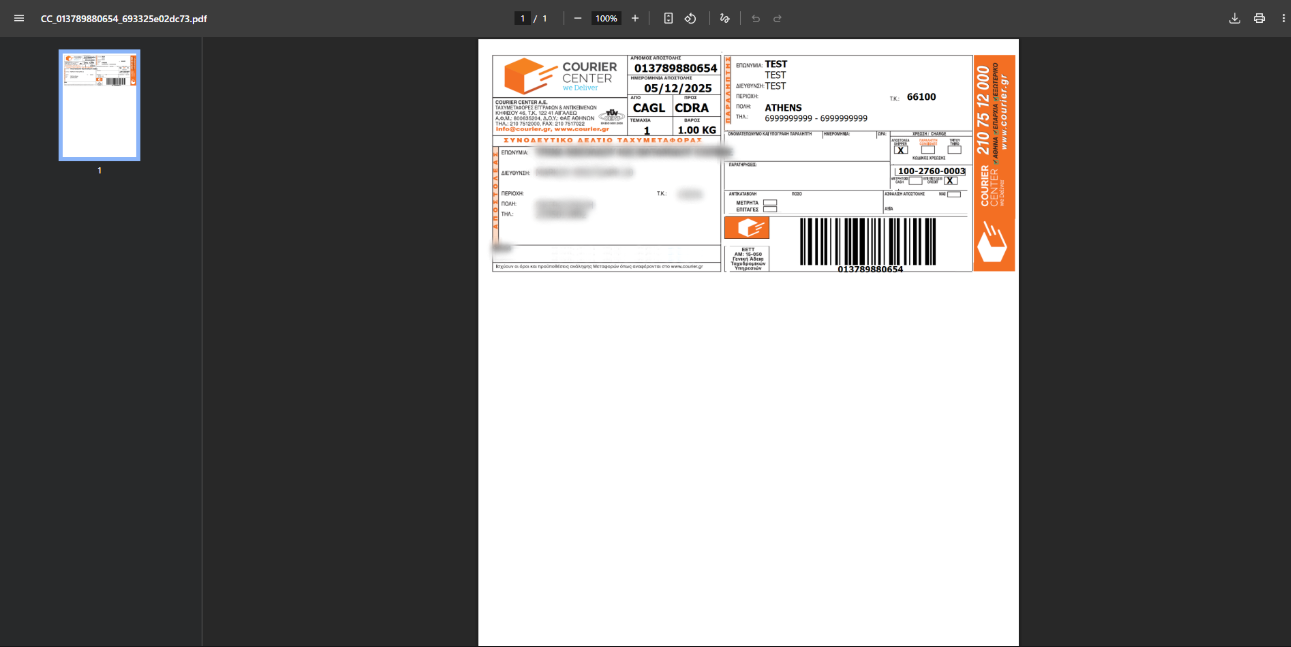
Courier Center Voucher & Label for WooCommerce connects your WooCommerce store directly with Courier Center's REST API services. Create courier vouchers, print PDF shipping labels, and manage deliveries without leaving WordPress. Features include multiple label formats, real-time tracking integration, and automatic email notifications to keep your customers informed.

Key Features

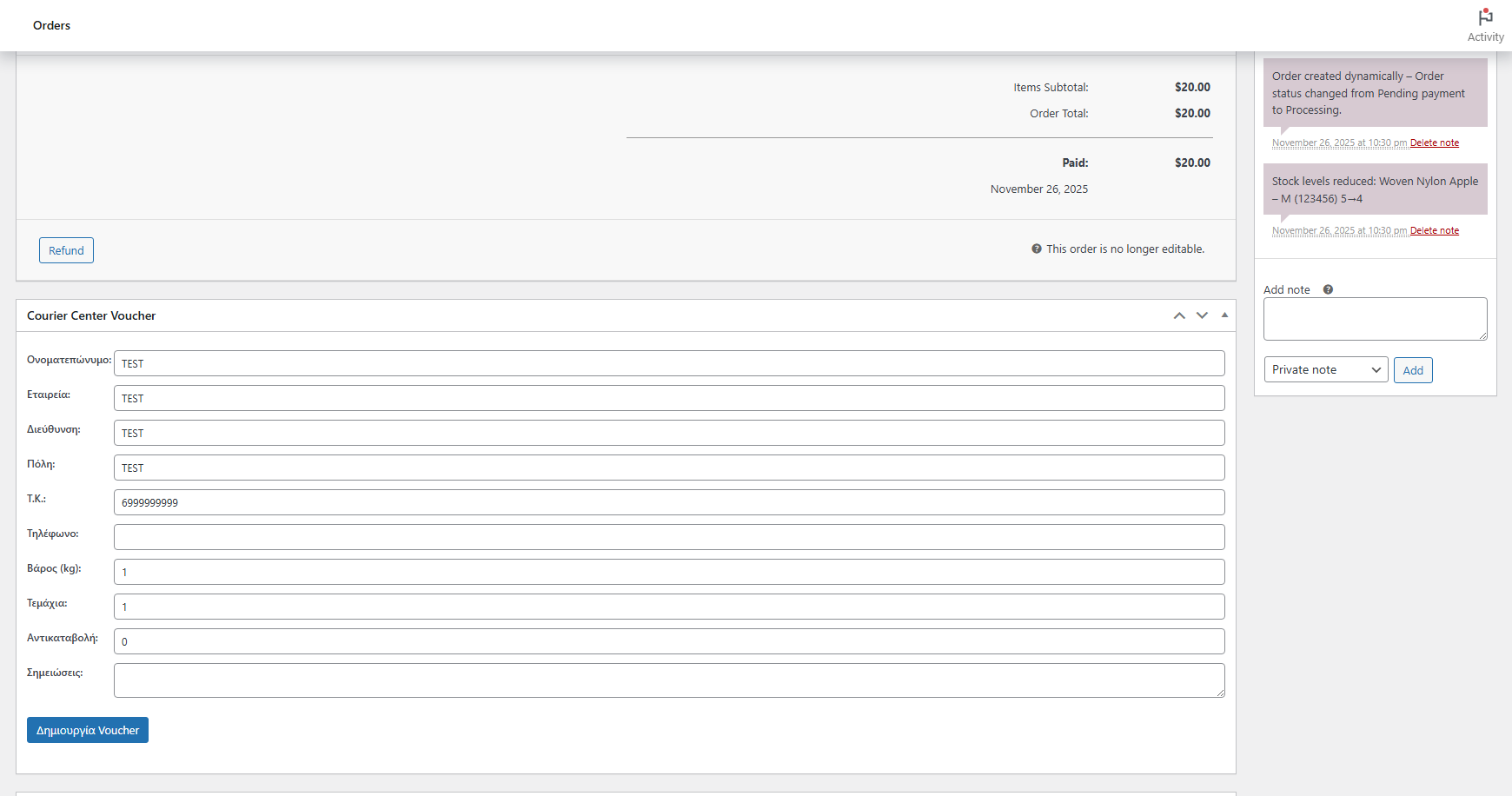
One-Click Voucher Creation

  • Create Courier Center vouchers directly from WooCommerce order screen
  • Quick voucher generation from orders list with modal form
  • All recipient details pre-filled from order data
  • Automatic shipment number from Courier Center API

Flexible Charge Options

  • Requestor - Sender pays for shipping costs
  • Consignee - Recipient pays upon delivery
  • Configure default charge type in settings
  • Override per voucher when creating shipments

Eight Label Formats

  • A4 - Standard office paper format
  • A4 Clean - Simplified A4 layout
  • Single PDF - One voucher per page
  • Single Clean - Clean single voucher layout
  • 100x150mm - Standard thermal label (normal & clean)
  • 100x170mm - Large thermal label (normal & clean)

Void Voucher Functionality

  • Cancel vouchers directly through Courier Center API
  • Calls /Shipment/Void endpoint automatically
  • Marks vouchers as voided in database
  • Removes order metadata when voucher cancelled

Courier Services Support

  • COD - Cash on Delivery with automatic amount detection
  • SATURDAY - Saturday delivery service option
  • Services selected per voucher based on order needs
  • Clear service indication on printed labels

REST API Integration

  • Modern REST API with JSON requests and responses
  • Endpoints: /Shipment (create), /Voucher (print), /Shipment/Void (cancel)
  • Fast and reliable communication with Courier Center servers
  • Automatic error handling with user-friendly messages

Real-Time Tracking

  • Direct tracking links to courier.gr website
  • Track shipment status from order screen
  • Real-time tracking information via API
  • Shipment number stored in order metadata

Smart Email Notifications

  • Automatically include tracking info in completed order emails
  • Professional email template with shipment details
  • Direct tracking link for customers
  • Enable/disable from plugin settings

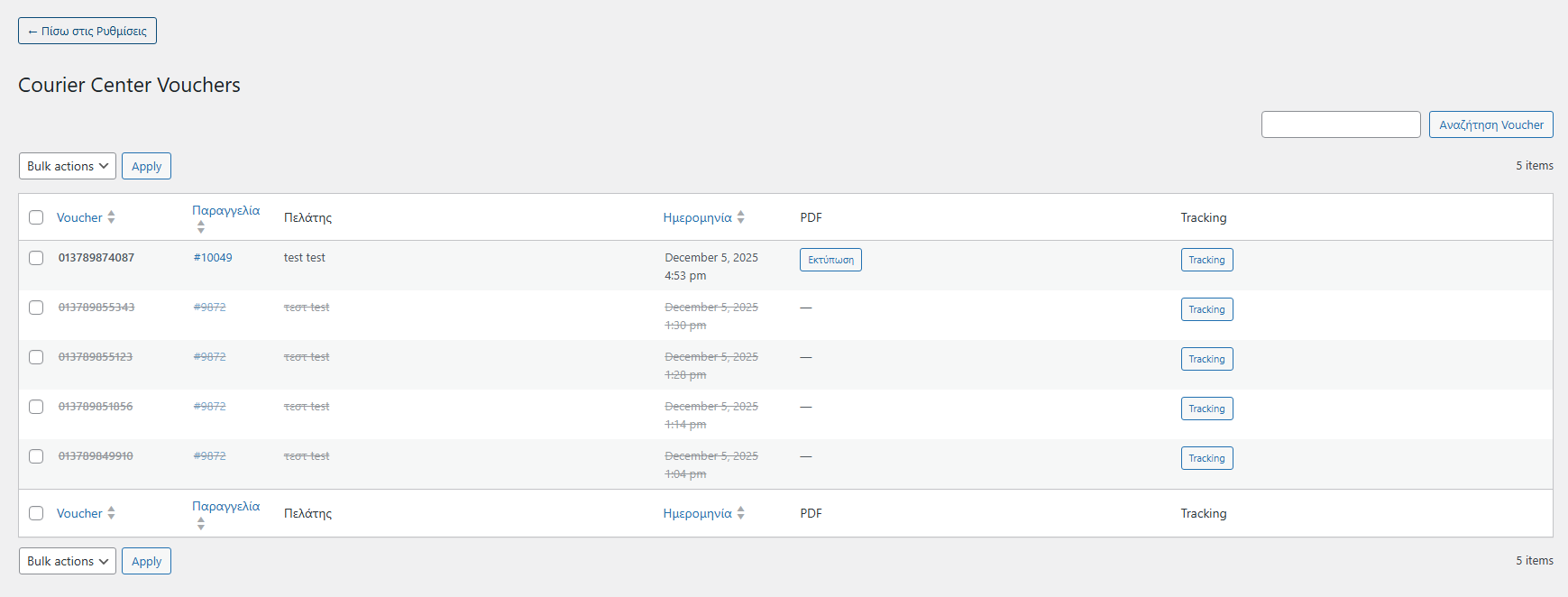
Voucher Management Dashboard

  • Dedicated admin page for all Courier Center vouchers
  • Create voucher lists for organizing shipments
  • Search and filter functionality for finding vouchers
  • View voucher details and print individual PDFs

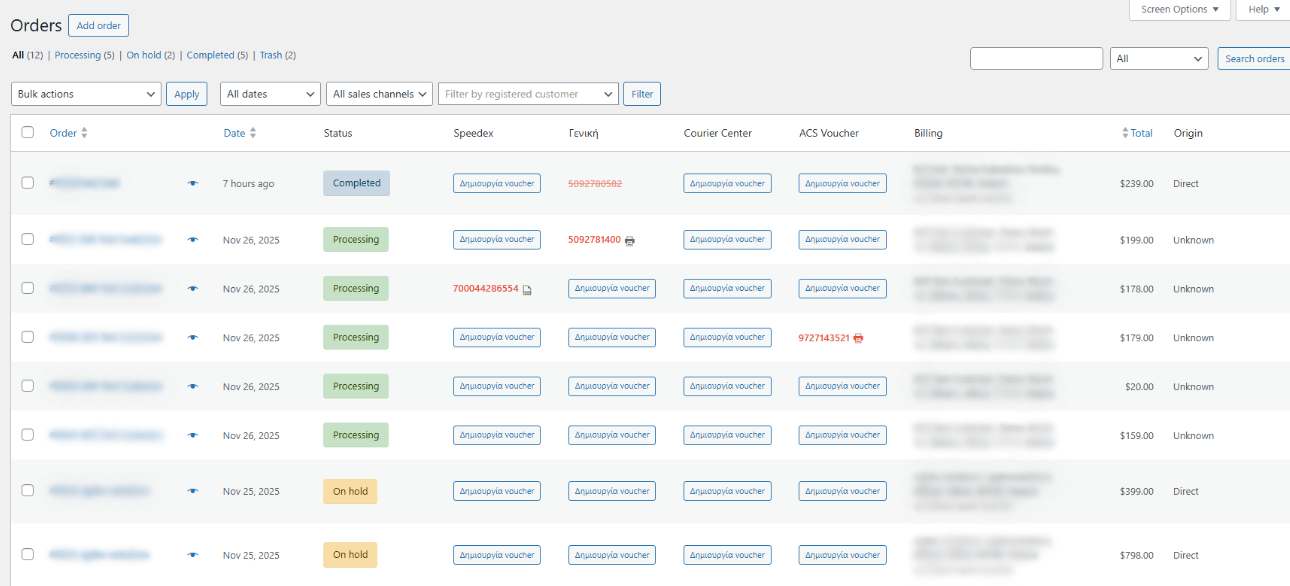
Order List Integration

  • Courier Center column in WooCommerce orders list
  • Quick access to tracking, print PDF, or create voucher
  • Visual indicators for voucher status
  • Automatic order status change after voucher creation

Greek Language Optimization

  • Automatic uppercase conversion without accents for addresses
  • Proper Greek character handling in names and addresses
  • Full Greek translation for admin interfaces
  • Optimized for Greek WooCommerce stores

Performance & Compatibility

  • Compatible with WooCommerce High-Performance Order Storage (HPOS)
  • Lightweight admin-only code with no frontend impact
  • Debug mode with detailed API logging
  • Secure file storage with dedicated uploads folder

Setup Instructions

  1. Install & Activate the Plugin

    After purchasing the plugin:

    • Go to Plugins > Add New > Upload Plugin
    • Upload the ZIP file and click Install Now
    • Click Activate
    • Ensure WooCommerce is installed and active
  2. Activate Your License

    Unlock updates and full functionality:

    • Navigate to the plugin's License tab
    • Paste your license key from purchase email
    • Click Activate License
    • Wait for confirmation
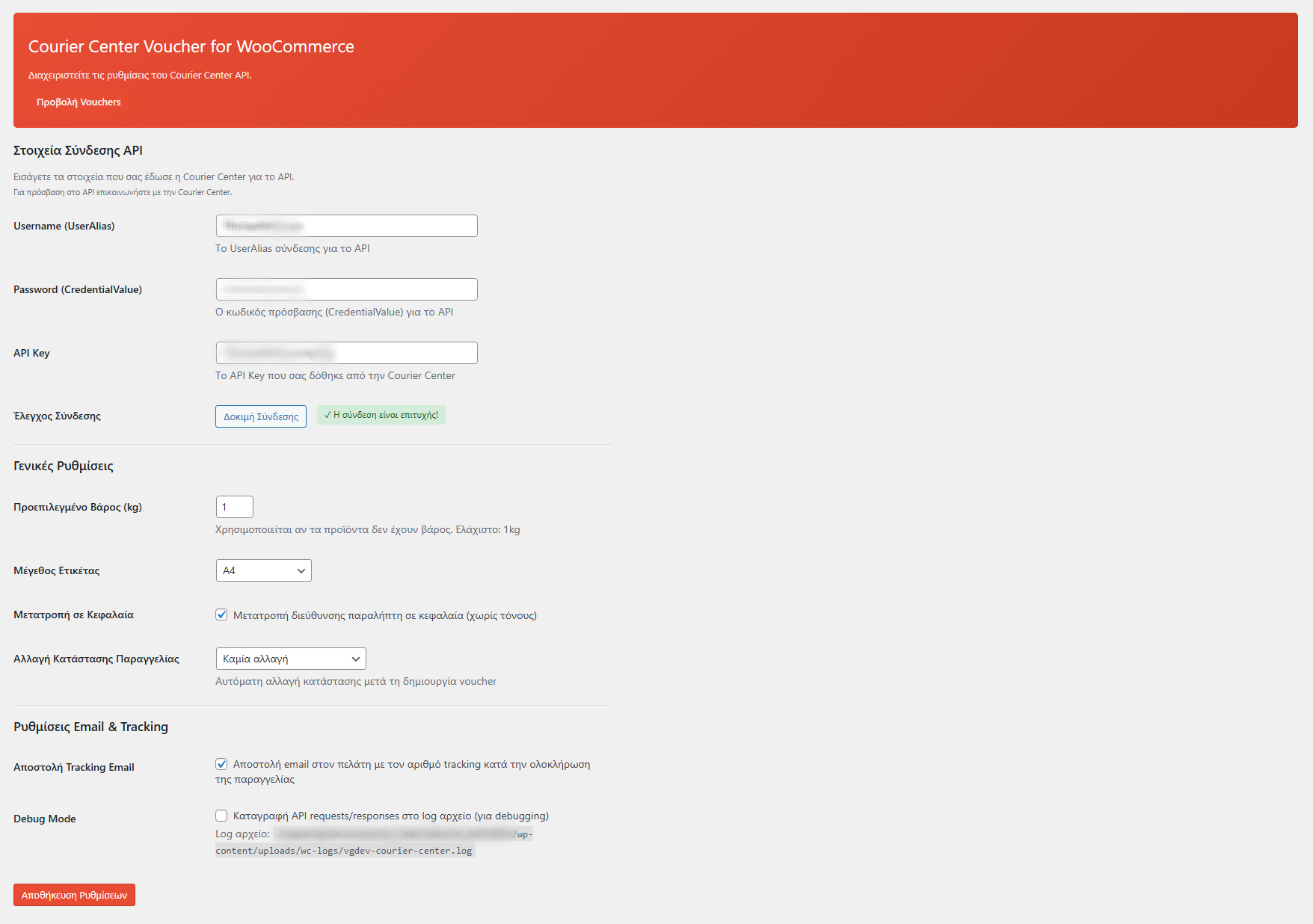
  3. Configure Courier Center API Credentials

    Enter your Courier Center REST API credentials:

    API Credentials Required:
    • Go to VGDev Solutions > Courier Center
    • Enter User Alias (username provided by Courier Center)
    • Enter Credential Value (password)
    • Enter API Key

    Note: Contact Courier Center to obtain your REST API credentials.

    Test Your Connection:
    • Click Test Connection to verify credentials
    • Successful connection confirms API access
    • Fix any credential errors before proceeding
  4. Configure Label & Order Settings

    Customize label format and order behavior:

    Label Settings:
    • Paper Size: Choose from 8 formats (A4, A4 Clean, Single, thermal labels)
    • Default Weight: Set default parcel weight in kg
    • Uppercase Conversion: Enable for Greek addresses without accents
    Order Automation:
    • Order Status Change: Auto-change status after voucher creation
    • Email Tracking: Include tracking in completed order emails
    • Debug Mode: Enable detailed API logging for troubleshooting

    Save settings when done.

  5. Create Your First Voucher

    Start shipping with Courier Center:

    • Open any WooCommerce order
    • Find the Courier Center metabox
    • Review pre-filled recipient information
    • COD amount auto-filled for COD orders
    • Select Saturday delivery if needed
    • Click Create Voucher
    • Shipment number and PDF link appear immediately

How It Works

For Store Owners:

  1. Customer places order in your WooCommerce store
  2. You open the order and click "Create Voucher"
  3. Plugin sends order details via REST API to Courier Center
  4. Courier Center returns shipment number
  5. PDF voucher generated based on selected paper size
  6. Voucher stored in database with shipment number
  7. Print label and give parcel to Courier Center courier

For Cancellations:

  • If order changes or customer cancels, click "Delete" on voucher
  • Plugin calls Courier Center's /Shipment/Void endpoint
  • Voucher marked as voided in database
  • Create new voucher if order is reinstated

Alternative: Quick Creation from Orders List:

  • From WooCommerce > Orders, click "Create voucher" button
  • Modal opens with pre-filled data
  • Adjust details and confirm
  • Voucher created without opening full order page

Why Choose Courier Center Voucher & Label for WooCommerce?

  • REST API Integration – Modern JSON-based API for fast, reliable communication.
  • Eight Label Formats – From A4 office paper to thermal labels, match any setup.
  • Flexible Charging – Choose whether sender or recipient pays shipping costs.
  • Void Functionality – Cancel vouchers directly through the API when needed.
  • Saturday Delivery – Offer weekend delivery options to your customers.
  • Full COD Support – Automatic cash on delivery detection and processing.
  • Greek-Optimized – Proper Greek character handling and localization.
  • HPOS Compatible – Future-proof with WooCommerce High-Performance Order Storage.
  • No Manual Entry – All data flows automatically from WooCommerce to Courier Center.
  • Real-Time Tracking – Keep customers informed with courier.gr tracking links.

Perfect For

  • Greek WooCommerce Stores – Any shop using Courier Center for shipping.
  • COD Businesses – Shops relying on cash on delivery payments.
  • Weekend Operations – Businesses offering Saturday delivery service.
  • Multi-Format Needs – Stores with different printing equipment (office & thermal).
  • Professional Sellers – Businesses needing flexible charge options (sender/recipient pays).
  • Growing Businesses – Scalable solution that grows with your order volume.

System Requirements

  • WordPress 5.8 or higher
  • WooCommerce 6.0 or higher (must be active)
  • PHP 7.4 or higher
  • Active Courier Center account with REST API access
  • Valid API credentials (User Alias, Credential Value, API Key)

Connect Your Store with Courier Center Today

Courier Center Voucher & Label for WooCommerce streamlines your shipping with REST API integration and multiple label formats. Create, print, void vouchers – all from inside WordPress.

Questions

How do I get Courier Center API credentials?

Contact Courier Center customer service directly to request REST API access for your account. You'll need to provide your company information and existing Courier Center business account details. Once approved, you'll receive three credentials: User Alias (username), Credential Value (password), and API Key. Enter these in the plugin settings to activate the integration and start creating vouchers automatically.

What is the difference between standard and clean label formats?

The plugin offers two layout styles for each label size. Standard layouts include the full Courier Center branding, borders, and all shipment details in a traditional courier label format. Clean layouts provide a minimalist design with just the essential information - recipient address, sender details, barcode, and shipment number - perfect for thermal printers where space is limited or when you prefer a simpler aesthetic.

What label formats and sizes are supported?

The plugin supports 8 different label formats to match any printing setup: A4 (standard office paper), A4 Clean (simplified layout), Single PDF (one per page), Single Clean, and four thermal label options - 100x150mm and 100x170mm in both standard and clean layouts. Choose your preferred format in settings, and all vouchers will be generated in that size automatically.

Does the plugin support Cash on Delivery orders?

Absolutely! When you create a voucher for an order using the WooCommerce COD payment method, the plugin automatically detects it and includes the COD amount in the voucher data sent to Courier Center. The courier will collect payment from the customer upon delivery and transfer it to your account according to your Courier Center agreement. All COD details appear clearly on the printed label.

Can I cancel a voucher after creating it?

Yes, you can void/cancel vouchers directly through the plugin using Courier Center's API. Click the "Delete" button on any voucher in the order screen or vouchers list. The plugin calls the API's /Shipment/Void endpoint and marks the voucher as cancelled in the database. Note that once voided, vouchers cannot be restored - you'll need to create a new voucher if required.

Reviews

{{ reviewsTotal }}{{ options.labels.singularReviewCountLabel }}
{{ reviewsTotal }}{{ options.labels.pluralReviewCountLabel }}
{{ options.labels.newReviewButton }}
{{ userData.canReview.message }}
Courier Center Voucher & Label for WooCommerce 35.00 Buy Now