




Version1.0.1
Requires WP5.8
Tested up to6.8
Slugdeposit-method-for-woocommerce
Changelog
  • Initial release
  • Works with Woocommerce Block Based Themes
Deposit Method for WooCommerce

Deposit Method for WooCommerce

Enable partial deposit payments on your WooCommerce store! Collect fixed deposit amounts at checkout with remaining balance due upon arrival. Features multi-gateway support (offer both deposit and full payment options), customizable labels and messages, automatic calculations, order email integration, and admin dashboard visibility. Includes flexible shortcode for WooCommerce Blocks placement. Perfect for hotels, bookings, events, and high-value products. WPML/Polylang compatible for international stores. Increase booking conversions with professional deposit management!

20.00

Lifetime License + Lifetime Updates

14-day money-back guarantee
Pay securely with Visa Mastercard American Express Discover Klarna Revolut Pay

Want more than one plugin? Your discount is applied automatically in the cart:

  • With 2 premium plugins in your cart → 10% off both

  • With 3 premium plugins15% off all of them

  • With 4 or more premium plugins20% off your plugins

Free plugins do not count towards the bundle and are not discounted.
The discount is applied automatically in the cart and at checkout, no coupon needed.

Do you think something is missing from this plugin?

Request a feature

Need a different customization on your website?

Submit a customization request

Deposit Method for WooCommerce is a premium payment gateway helper that enables partial deposit payments on your WooCommerce store. Perfect for hotels, vacation rentals, event bookings, and high-value products, this plugin allows customers to pay a fixed deposit amount at checkout while the remaining balance is due upon arrival or delivery. With customizable labels, multi-gateway support, and seamless email integration, you can offer flexible payment terms that increase conversions while securing bookings!

Key Features

Fixed Deposit System

  • Set a fixed deposit amount (e.g., €50) for selected payment methods
  • Remaining balance calculated automatically
  • Customers only charged deposit at checkout
  • Clear breakdown of deposit and remaining amounts

Multi-Gateway Support

  • Select which payment gateways use the deposit system
  • Different gateways can charge full amount or deposit
  • Works with all WooCommerce-compatible payment methods
  • Easy multi-select interface for gateway configuration

Customizable Messaging

  • Custom labels for "Deposit" and "Remaining Upon Arrival"
  • Personalized checkout notice explaining deposit terms
  • Use %deposit% placeholder for dynamic amounts
  • All text fully translatable via WPML/Polylang

Complete Order Integration

  • Deposit breakdown in order confirmation emails
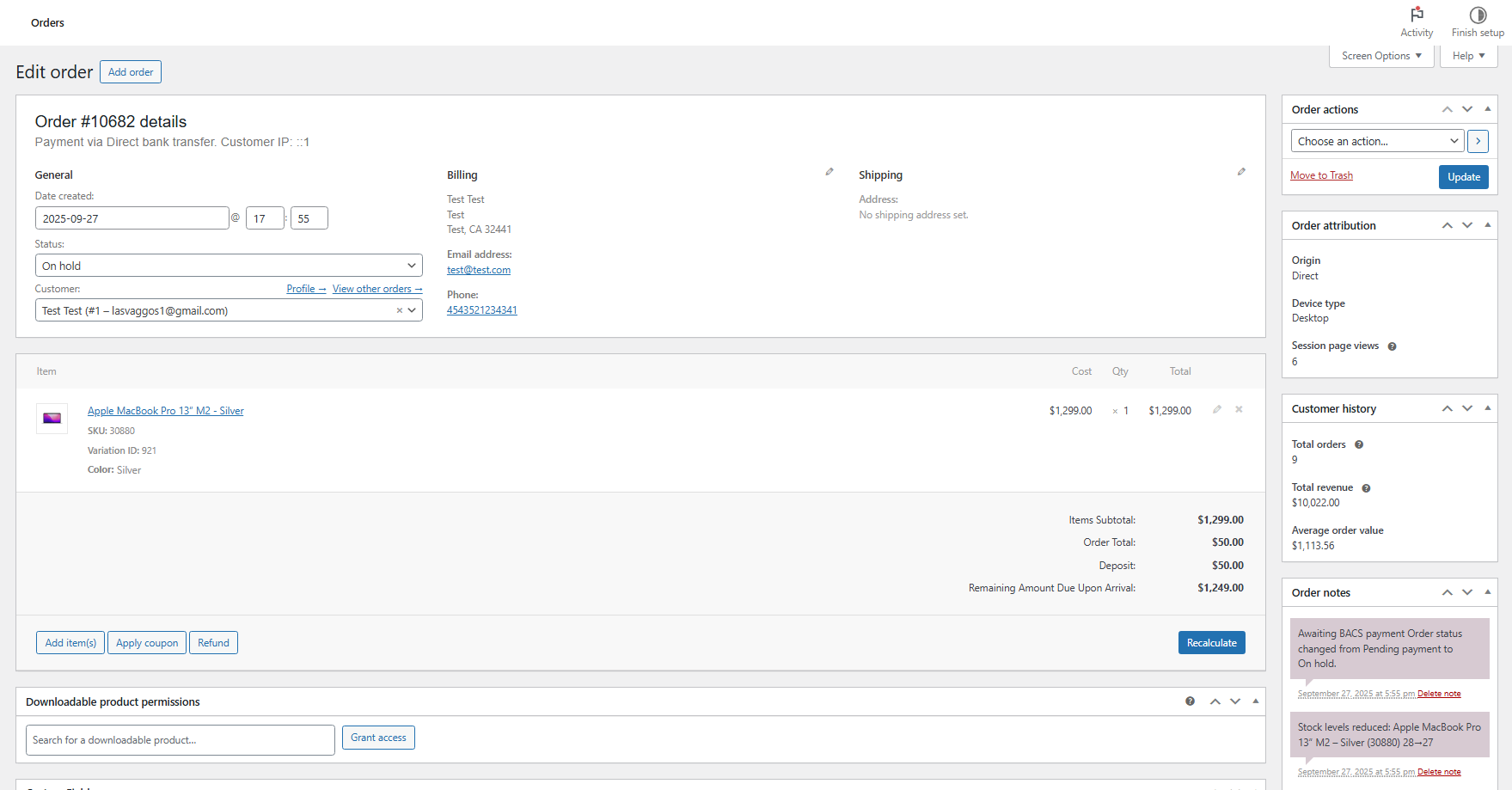
  • Admin order view shows deposit and remaining amounts
  • Order totals automatically adjusted to deposit amount
  • Meta data stored for reference and reporting

Flexible Shortcode System

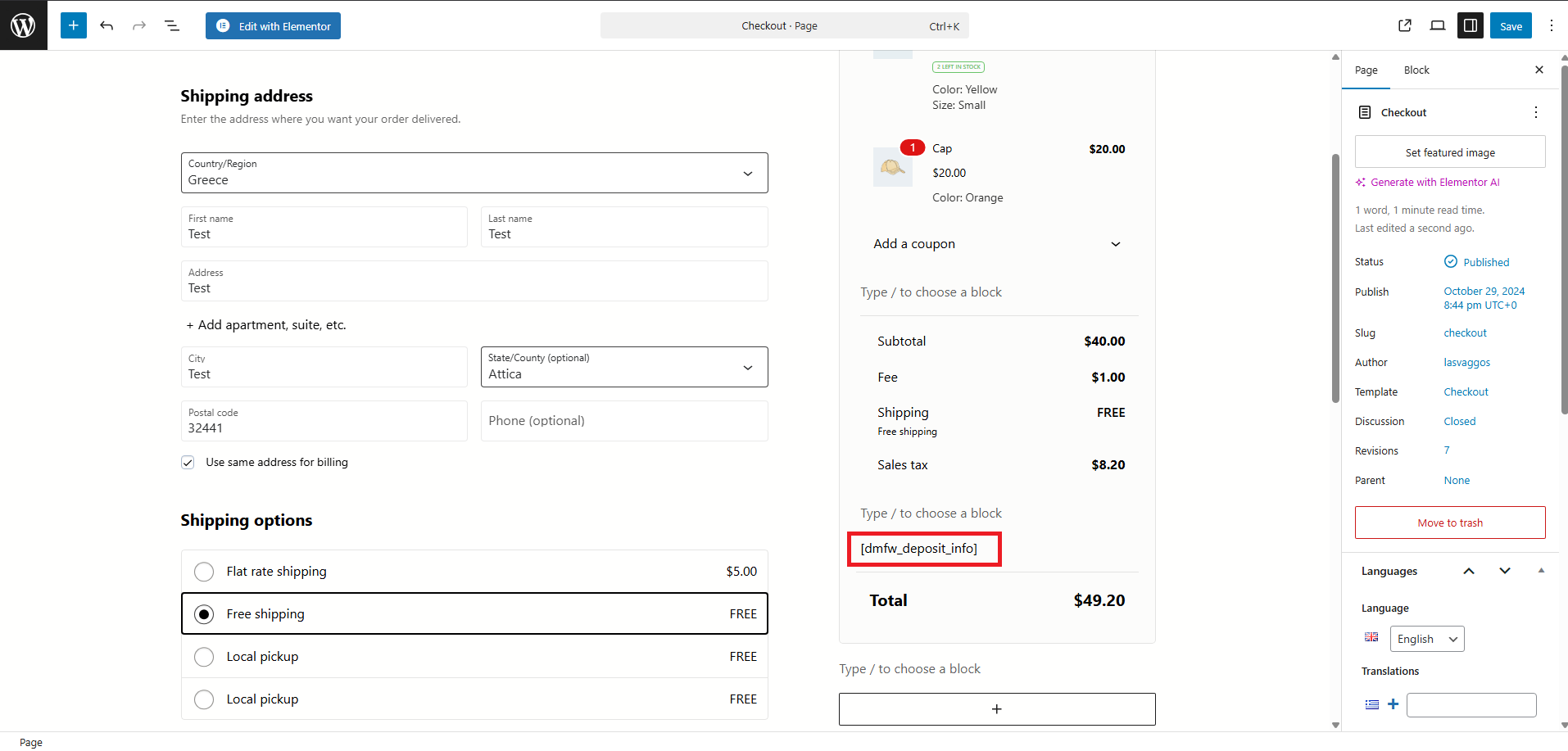
  • Display deposit info anywhere with [dmfw_deposit_info]
  • Perfect for WooCommerce Blocks custom placements
  • Shows deposit notice, deposit amount, and remaining balance
  • Works in classic and block-based checkout/cart

WooCommerce Blocks Compatible

  • Shortcode works seamlessly in Cart and Checkout Blocks
  • Add via Shortcode block for custom placement
  • Compatible with modern block-based checkout experience
  • Maintains functionality across all WooCommerce versions

Smart Checkout Updates

  • Automatic checkout refresh when payment method changes
  • Deposit notice appears only for selected gateways
  • Real-time totals adjustment based on chosen method
  • Seamless user experience during checkout

Multilingual Ready

  • Full WPML integration with string translation
  • Polylang compatibility for multilingual stores
  • All labels and messages translatable
  • Automatic registration of dynamic strings

Setup Instructions

  1. Install & Activate

    After purchasing the plugin:

    • Upload to /wp-content/plugins/deposit-method-for-woocommerce/
    • Activate through the WordPress Plugins menu
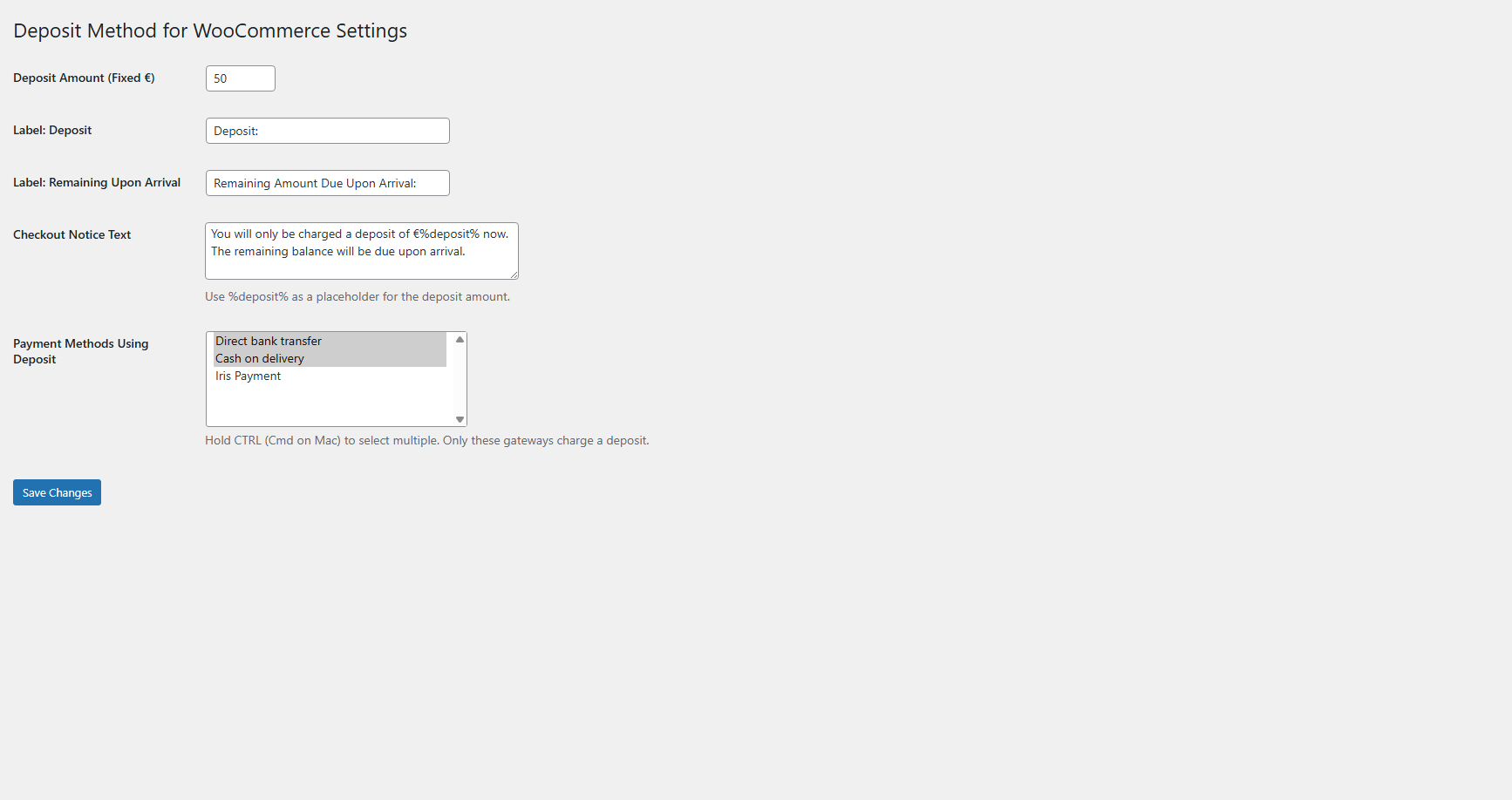
    • Navigate to VGDEV Solutions > Deposit Method for WooCommerce
  2. Configure Deposit Amount

    In the plugin settings page:

    Basic Settings:
    • Deposit Amount (Fixed €): Enter your fixed deposit amount (e.g., 50.00)
    • This amount will be charged at checkout for selected payment methods
    • Supports decimal values for precise amounts
    • Remaining balance is automatically calculated
  3. Select Payment Gateways

    Choose which payment methods will use the deposit system:

    Payment Methods Configuration:
    • Payment Methods Using Deposit: Multi-select dropdown of active gateways
    • Hold CTRL (Cmd on Mac) to select multiple gateways
    • Only selected methods will charge deposit amount
    • Other methods will charge the full order total
    • Perfect for offering deposit option alongside full payment
  4. Customize Labels & Messages

    Personalize all customer-facing text:

    Customization Options:
    • Label: Deposit: Text shown before deposit amount (default: "Deposit:")
    • Label: Remaining Upon Arrival: Text for remaining balance (default: "Remaining Upon Arrival:")
    • Checkout Notice Text: Informational message explaining deposit terms
    • Use %deposit% placeholder to insert deposit amount dynamically
    • All text fields support HTML formatting if needed
  5. Use Shortcode (Optional)

    For custom placement in checkout or cart:

    • Use shortcode: [dmfw_deposit_info]
    • Add via Shortcode block in WooCommerce Cart/Checkout Blocks
    • Works in classic checkout, pages, posts, and widgets
    • Displays deposit notice, deposit amount, and remaining balance
    • Perfect for custom checkout layouts and block-based themes
  6. Save & Test

    Click Save Changes and verify functionality:

    • Add products to cart and proceed to checkout
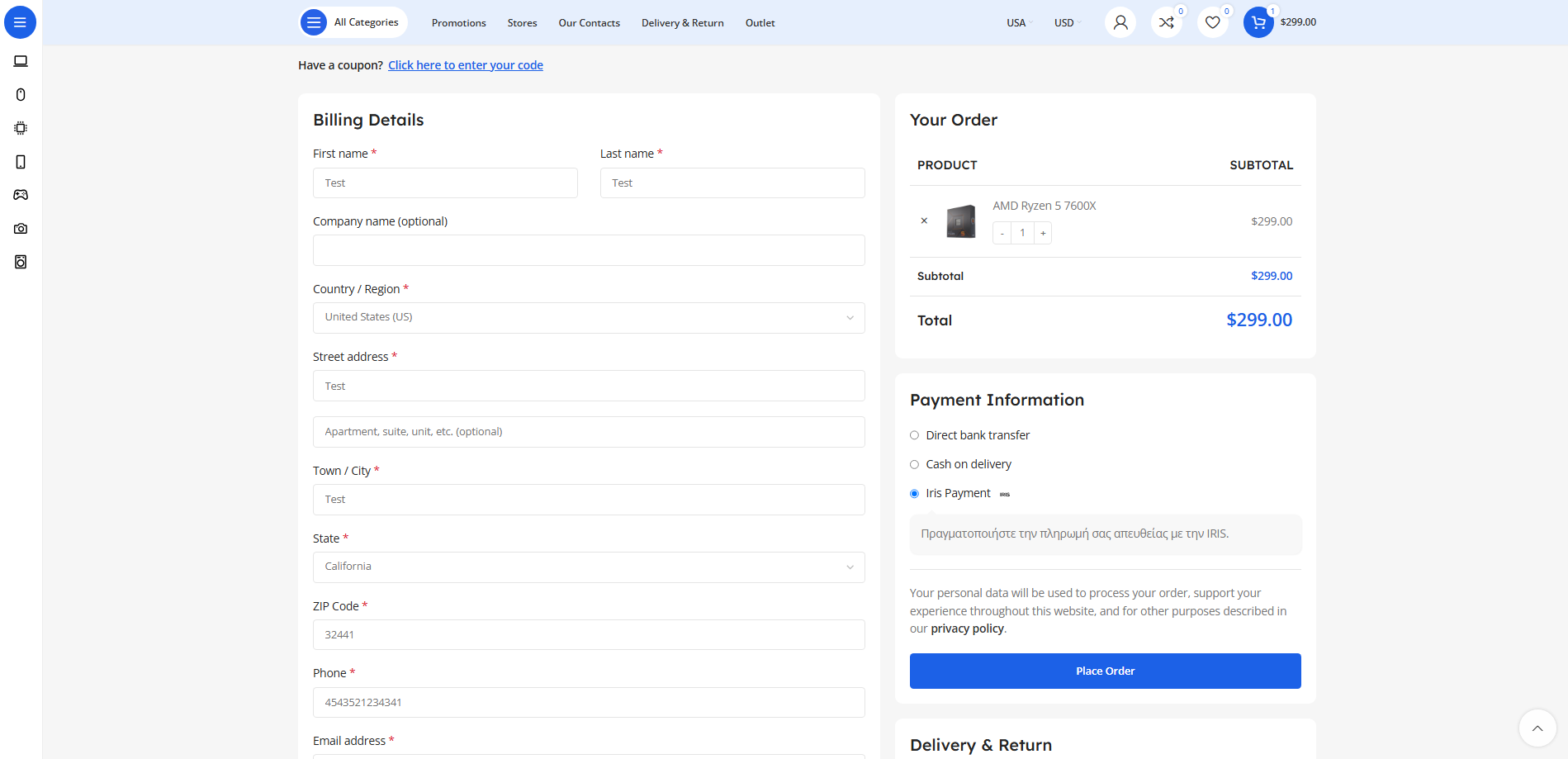
    • Select a payment method configured for deposit
    • Verify deposit notice appears with correct amounts
    • Check order review totals show deposit and remaining balance
    • Complete test order and verify email shows deposit breakdown
    • Check admin order view displays deposit information correctly

How It Works

Customer Checkout Experience:

  1. Customer adds products to cart and proceeds to checkout
  2. Selects a payment method configured for deposit payments
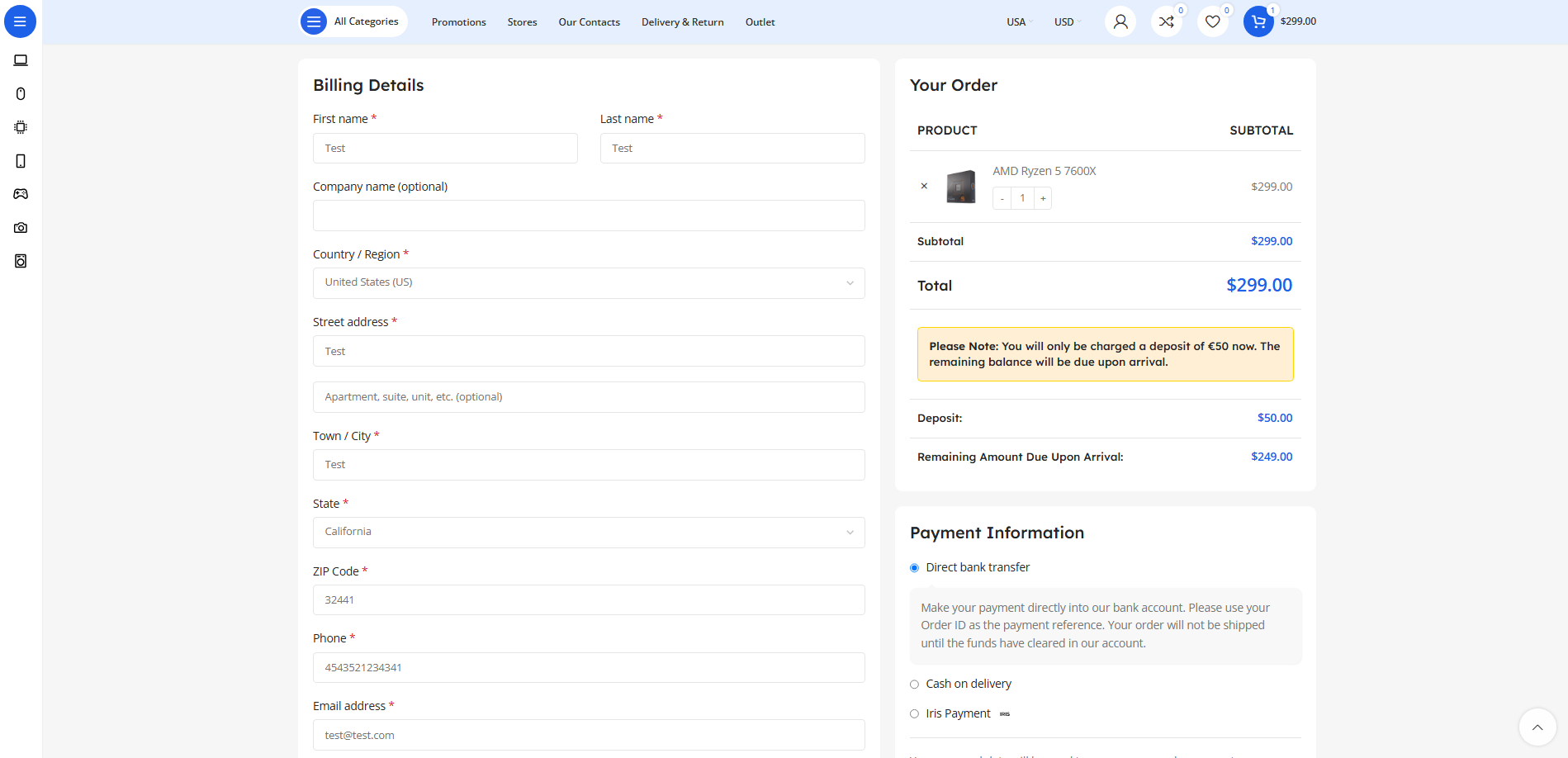
  3. Sees highlighted notice explaining deposit terms with exact amount
  4. Order review shows three lines:
    • Original cart total
    • Deposit amount (what they'll pay now)
    • Remaining balance due upon arrival/delivery
  5. Completes payment for deposit amount only

Payment Method Switching:

  1. Customer changes payment method during checkout
  2. Checkout automatically refreshes (classic cart)
  3. If new method uses deposit, notice and totals appear
  4. If new method doesn't use deposit, full amount charged
  5. Seamless experience without manual refresh

Order Confirmation:

  1. Customer receives order confirmation email
  2. Email includes deposit breakdown in order totals section
  3. Shows deposit paid and remaining balance clearly
  4. No modification of default WooCommerce email text
  5. Professional presentation of payment terms

Admin Order Management:

  • Admin views order in WooCommerce dashboard
  • Order details page shows deposit and remaining amounts
  • Meta data stored for reporting and reference
  • Clear visibility of payment structure for fulfillment team

Why Choose Deposit Method for WooCommerce?

  • Increase Booking Conversions - Lower upfront payment reduces checkout abandonment
  • Secure Reservations - Collect deposits to reduce no-shows and secure bookings
  • Flexible Payment Terms - Offer deposit option alongside full payment methods
  • Multi-Gateway Support - Works with any WooCommerce payment gateway
  • Professional Presentation - Clear deposit breakdown in checkout and emails
  • Zero Code Required - Simple settings interface, no technical knowledge needed
  • Fully Customizable - Personalize all labels, messages, and notice text
  • WooCommerce Blocks Ready - Shortcode works perfectly in block-based checkout
  • Multilingual Support - WPML and Polylang compatible for international stores
  • Email Integration - Automatic deposit breakdown in order confirmation emails
  • Admin Visibility - Clear deposit information in order dashboard
  • Automatic Calculations - Remaining balance computed automatically from cart total

Perfect For

  • Hotels & Vacation Rentals - Collect booking deposits, balance due at check-in
  • Event Venues & Catering - Secure event bookings with upfront deposits
  • High-Value Products - Offer deposit payment for expensive items
  • Service Providers - Booking deposits for consultations, appointments
  • Rental Businesses - Equipment rental deposits with balance at pickup
  • Custom Orders - Down payments for made-to-order products

System Requirements

  • WordPress 5.0 or higher
  • WooCommerce 5.0 or higher (tested with latest versions)
  • PHP 7.4 or higher
  • At least one active WooCommerce payment gateway

Start Accepting Deposits Today

The Deposit Method plugin includes lifetime updates and dedicated support. Increase booking conversions, secure reservations, and offer flexible payment terms with professional deposit management for your WooCommerce store!

Questions

Can I use different deposit amounts for different products or categories?

The current version uses a fixed deposit amount (e.g., €50) that applies to all orders using the selected payment gateways, regardless of cart contents. This simplified approach works well for businesses with consistent booking or reservation deposits. The remaining balance is automatically calculated by subtracting the deposit from the cart total (including fees, taxes, and discounts).

Can I offer both deposit payment and full payment options at checkout?

Yes! This is one of the plugin's key features. You can select specific payment gateways that will charge only the deposit (e.g., "Pay Deposit - Bank Transfer") while leaving other gateways to charge the full amount (e.g., "Pay in Full - Credit Card"). Customers see both options at checkout and choose their preferred payment method. The deposit notice only appears when they select a deposit-enabled gateway.

Does this work with WooCommerce Blocks (Cart and Checkout blocks)?

Yes! While the automatic display works best with classic checkout, the plugin includes a flexible shortcode [dmfw_deposit_info] that works perfectly in WooCommerce Blocks. Simply add a Shortcode block to your Cart or Checkout block layout, insert the shortcode, and customers will see the deposit notice, deposit amount, and remaining balance. This makes it fully compatible with modern block-based themes.

How does the remaining balance get collected?

The plugin handles the deposit collection at checkout but does not automatically process the remaining balance. The remaining amount is clearly displayed in order emails and the admin dashboard. You'll collect the remaining balance through your existing processes (cash on arrival, terminal payment at pickup, manual invoice, etc.). This gives you full control over when and how the remaining payment is collected based on your business model.

Is the plugin multilingual and compatible with WPML or Polylang?

Absolutely! The plugin has full multilingual support. All UI strings, custom labels, and notice messages are automatically registered with WPML String Translation and Polylang. This means you can translate "Deposit:", "Remaining Upon Arrival:", and your custom checkout notice through your preferred multilingual plugin's interface. The translated text will display automatically based on the customer's selected language, perfect for international hotels and booking sites.

Reviews

{{ reviewsTotal }}{{ options.labels.singularReviewCountLabel }}
{{ reviewsTotal }}{{ options.labels.pluralReviewCountLabel }}
{{ options.labels.newReviewButton }}
{{ userData.canReview.message }}
Deposit Method for WooCommerce 20.00 Buy Now