




Version1.0.0
Requires WP5.8
Tested up to6.8
Sluginvoice-receipt-choice-for-woocommerce
Changelog
  • Initial release
Invoice Receipt Choice for WooCommerce

Invoice Receipt Choice for WooCommerce

Invoice Receipt Choice for WooCommerce – Professional invoice/receipt selector for Greek e-commerce stores. Automatically collect complete company tax details (AFM, DOY, business address, email, phone) when customers choose invoice at checkout. Smart conditional fields, customer data memory, HPOS compatible, multilingual ready. Perfect for Greek WooCommerce businesses serving both individual customers and companies. Works with classic checkout only.

15.00

Lifetime License + Lifetime Updates

14-day money-back guarantee
Pay securely with Visa Mastercard American Express Discover Klarna Revolut Pay

Want more than one plugin? Your discount is applied automatically in the cart:

  • With 2 premium plugins in your cart → 10% off both

  • With 3 premium plugins15% off all of them

  • With 4 or more premium plugins20% off your plugins

Free plugins do not count towards the bundle and are not discounted.
The discount is applied automatically in the cart and at checkout, no coupon needed.

Do you think something is missing from this plugin?

Request a feature

Need a different customization on your website?

Submit a customization request

Invoice Receipt Choice for WooCommerce is a professional checkout enhancement plugin designed for Greek businesses. Add an invoice/receipt selector to your WooCommerce checkout and automatically collect complete company tax details (AFM, DOY, business address) when customers choose invoice. Perfect for Greek e-commerce stores that need to comply with tax regulations and provide proper documentation options to both individual and business customers!

⚠️ Important: This plugin works exclusively with the classic WooCommerce checkout shortcode [woocommerce_checkout]. It is not compatible with WooCommerce Checkout Blocks. Designed specifically for Greek stores.

Key Features

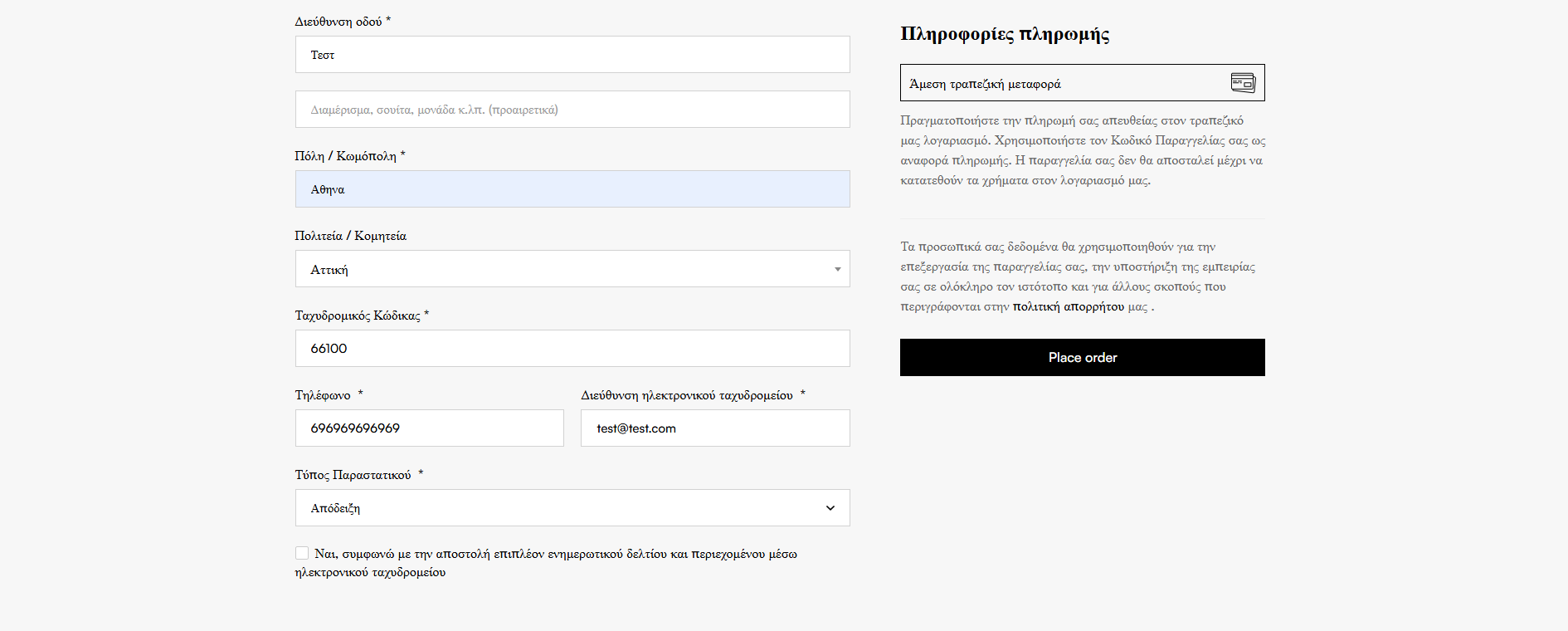
Invoice/Receipt Selector

  • Simple dropdown at checkout: "Απόδειξη" or "Τιμολόγιο"
  • Appears in billing section before address fields
  • Required field - customers must choose one option
  • Smart conditional field display based on selection

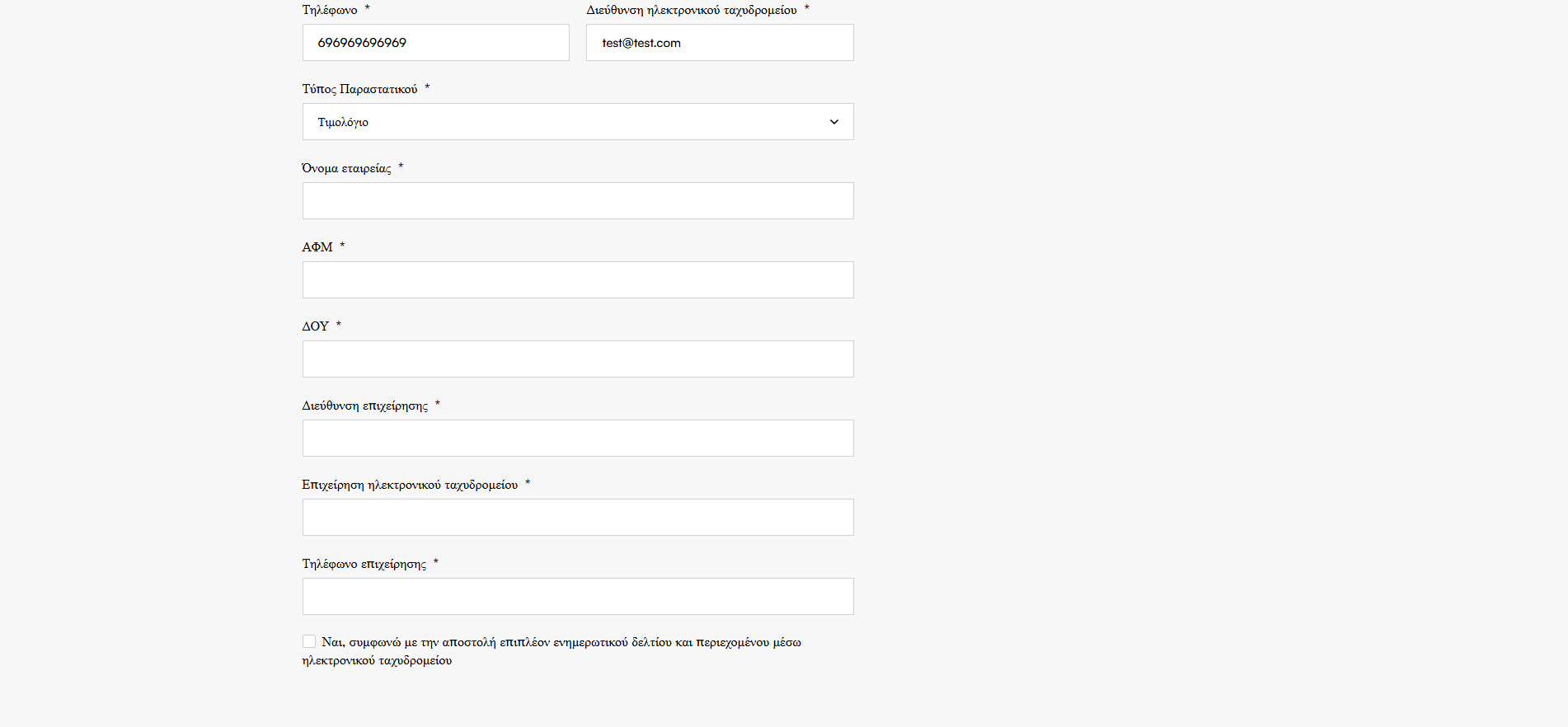
Automatic Company Fields

  • Fields appear only when "Τιμολόγιο" selected
  • Company Name (Όνομα εταιρίας)
  • VAT Number - AFM (ΑΦΜ)
  • Tax Office - DOY (ΔΟΥ)
  • Business Address (Διεύθυνση επιχείρησης)
  • Business Email (Email επιχείρησης)
  • Business Phone (Τηλέφωνο επιχείρησης)

Smart Required Field Logic

  • Company fields optional when "Απόδειξη" selected
  • All company fields become required when "Τιμολόγιο" chosen
  • jQuery-based instant show/hide without page reload
  • Server-side validation ensures data integrity

Customer Data Memory

  • Saves company details to user meta after first invoice order
  • Auto-fills company fields on future orders
  • Customers don't re-enter business info each time
  • Speeds up repeat purchases for business clients

Complete Order Integration

  • Invoice type stored in order metadata
  • All company details saved with order
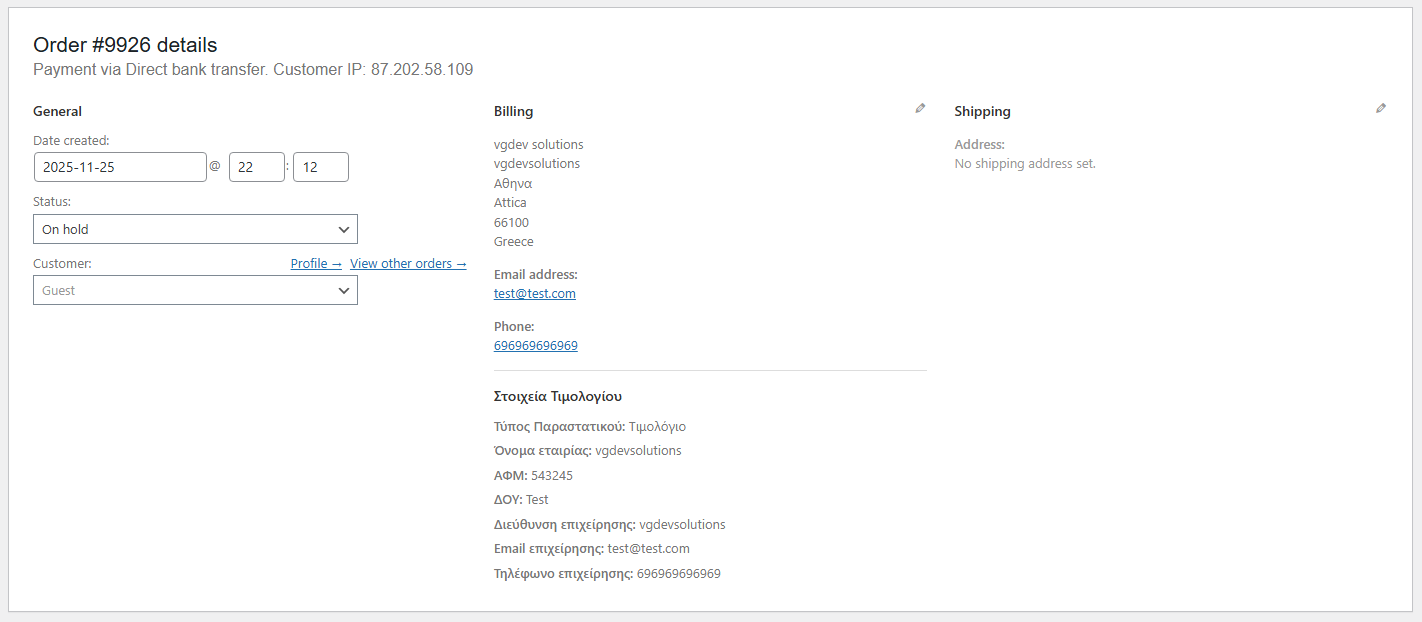
  • Display in admin order details page (after billing address)
  • HPOS (High-Performance Order Storage) compatible

Email & Order Details Display

  • Invoice type shown in order confirmation emails
  • Company details included in emails for invoice orders
  • Dedicated section in customer's order view
  • Both HTML and plain text email formats supported

Fully Customizable Labels

  • All field labels editable from settings page
  • Greek default labels included (Τύπος Παραστατικού, etc.)
  • Easy translation for bilingual stores
  • Change terminology to match your business style

Multilingual Ready

  • Complete WPML integration with string translation
  • Polylang support for multilingual checkout
  • All labels automatically registered for translation
  • Perfect for Greek/English bilingual stores

Setup Instructions

  1. Install & Activate License

    After purchasing and installing the plugin:

    • Upload to /wp-content/plugins/invoice-receipt-choice-for-woocommerce/
    • Activate through the WordPress Plugins menu
    • Plugin automatically redirects you to settings page on first activation
    • Navigate to Settings > License to activate your license key
    • Critical: All checkout features are disabled until license is activated
  2. Customize Field Labels (Optional)

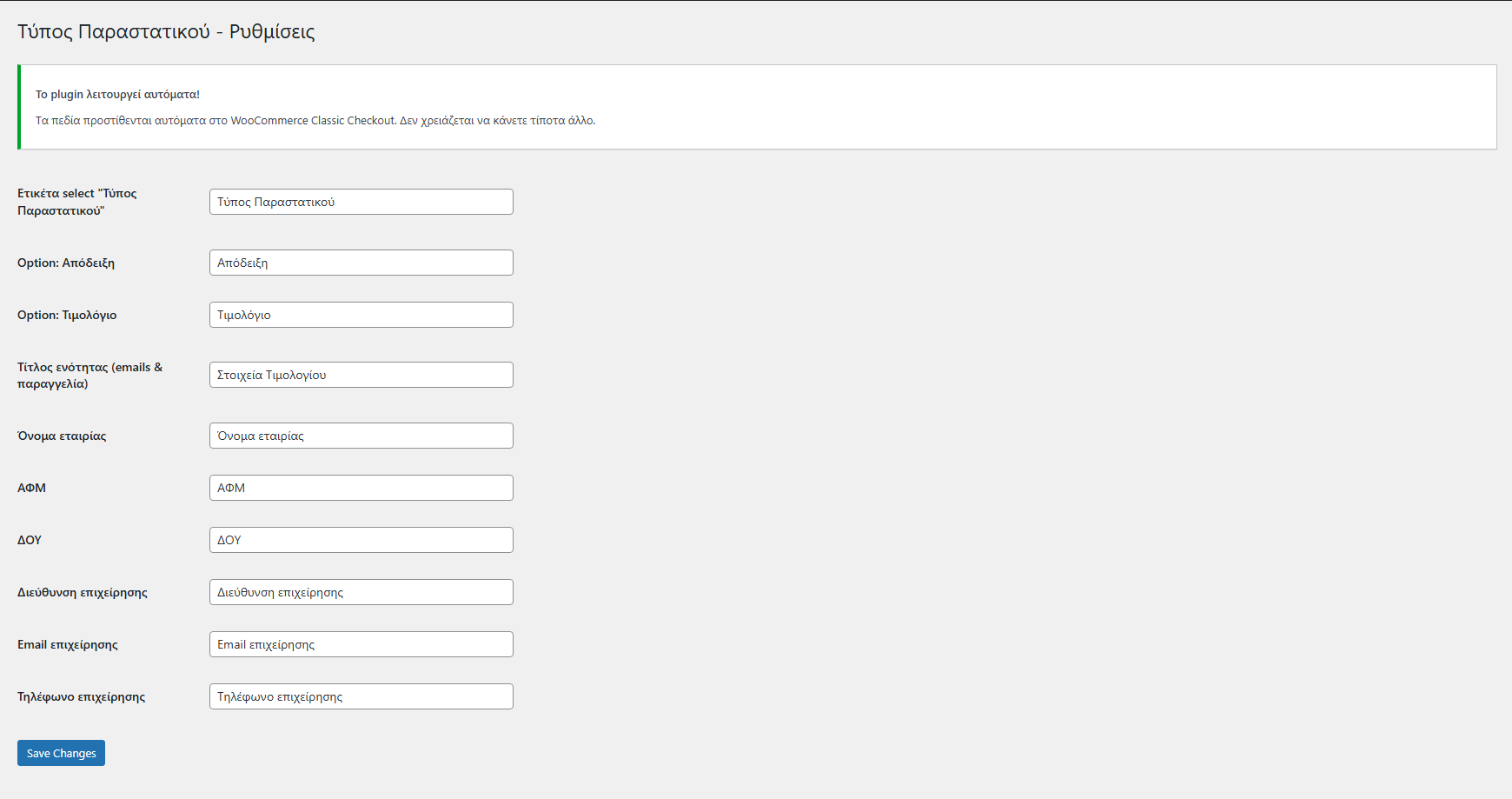
    Go to WooCommerce > Τύπος Παραστατικού settings:

    • Invoice Type Select Label: Main dropdown label (default: "Τύπος Παραστατικού")
    • Receipt Option: Text for receipt option (default: "Απόδειξη")
    • Invoice Option: Text for invoice option (default: "Τιμολόγιο")
    • Section Title: Heading in emails/order details (default: "Στοιχεία Τιμολογίου")
    • Company Fields: Labels for all six company fields (company name, AFM, DOY, etc.)
    • Click Save Changes to apply

    Note: Default Greek labels work perfectly for Greek stores. Only customize if you need different terminology.

  3. Verify Checkout Compatibility

    Ensure your site uses classic WooCommerce checkout:

    • Go to your checkout page in WordPress pages
    • Verify it contains [woocommerce_checkout] shortcode
    • Not compatible with: WooCommerce Checkout Blocks
    • If using blocks, switch to classic checkout for this plugin
    • Most Greek WooCommerce stores use classic checkout by default
  4. Test the Checkout Flow

    Verify everything works correctly:

    • Add a product to cart and proceed to checkout
    • Verify "Τύπος Παραστατικού" dropdown appears in billing section
    • Select "Απόδειξη" - company fields should remain hidden
    • Switch to "Τιμολόγιο" - six company fields should instantly appear
    • Try submitting without filling company fields - should show validation errors
    • Complete an invoice order with all company details
    • Check order confirmation email for invoice section
    • View order in admin - verify company details display after billing address
  5. Configure for WPML/Polylang (If Multilingual)

    For Greek/English bilingual stores:

    • WPML: Go to WPML > String Translation
    • Search for domain: "vgdev-invoice-type"
    • Translate all field labels to English (or other languages)
    • Polylang: Strings automatically registered
    • Go to Languages > Strings translation
    • Find "VGDEV Invoice Type" group and translate
  6. Access License Settings

    Manage your license activation:

    • Go to Settings > License
    • Or navigate via VGDEVsolutions > Invoice Receipt Choice > License Settings
    • Enter your license key and activate
    • License status displayed in plugin settings page
    • Features disabled if license expires - renew to restore functionality

How It Works

Customer Checkout Experience:

  1. Customer adds products to cart and proceeds to checkout
  2. In billing section, sees "Τύπος Παραστατικού" dropdown
  3. Dropdown shows two options: "Απόδειξη" or "Τιμολόγιο"
  4. If customer selects "Απόδειξη":
    • Company fields remain hidden
    • Proceeds with standard personal billing info
    • Places order normally - receipt selected
  5. If customer selects "Τιμολόγιο":
    • Six company fields instantly appear via jQuery
    • All fields marked as required with red asterisk
    • Must fill: Company Name, AFM, DOY, Address, Email, Phone
    • If any field empty, checkout validation prevents order
  6. Customer completes order with invoice option and company details
  7. Company info saved to user meta for future orders

Order Processing & Storage:

  • Invoice Type: Stored as _vgdev_invoice_type order metadata (values: "apodeixi" or "timologio")
  • Company Details: Six fields stored with prefix _vgdev_:
    • _vgdev_company_name
    • _vgdev_vat_number (AFM)
    • _vgdev_tax_office (DOY)
    • _vgdev_company_address
    • _vgdev_company_email
    • _vgdev_company_phone
  • User Meta: Company details also saved to user profile with keys like billing_vgdev_company_name
  • HPOS Compatible: Uses $order->update_meta_data() for High-Performance Order Storage

Admin Order Display:

  • Open any order in WooCommerce admin
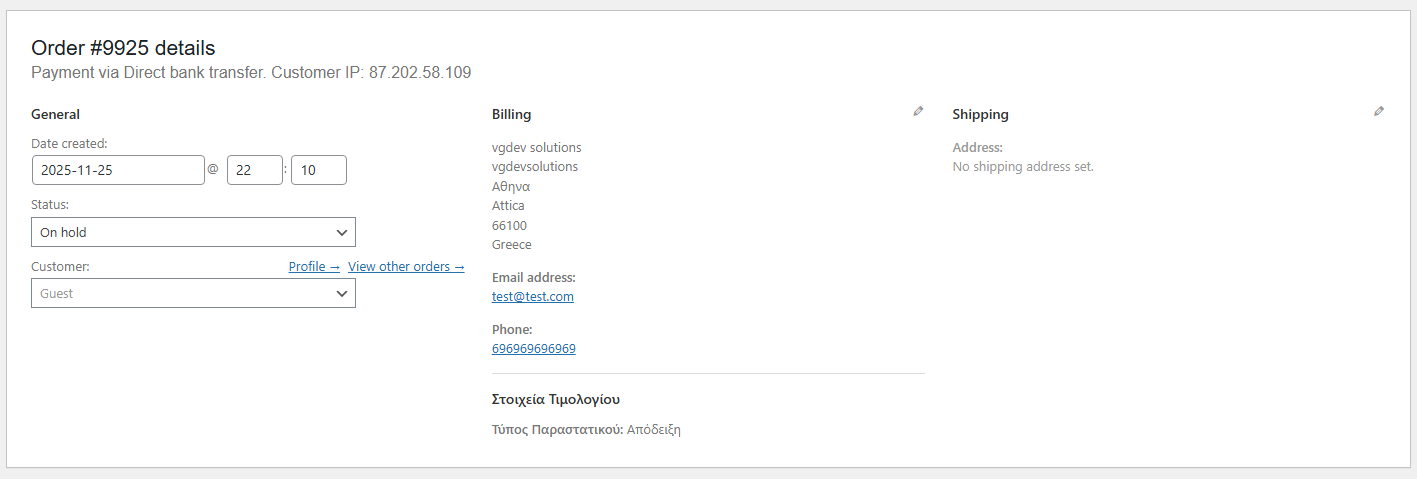
  • In billing address panel, after standard address fields:
  • New section appears: "Στοιχεία Τιμολογίου" (or your custom label)
  • Shows invoice type (Απόδειξη or Τιμολόγιο)
  • If invoice, displays all six company fields in organized format
  • Styled with padding, borders, and clear labels for easy reading

Email Integration:

  • All WooCommerce order emails (new order, processing, completed) include invoice section
  • Section appears in billing details area of email
  • Both HTML and plain text formats supported
  • For receipt orders: Only shows "Τύπος Παραστατικού: Απόδειξη"
  • For invoice orders: Shows type plus all company details
  • Uses customizable labels from settings

Customer Order View:

  • On My Account > Orders > View Order page
  • Dedicated section "Στοιχεία Τιμολογίου" displayed after customer details
  • Formatted as table with labels and values
  • Customers can verify their invoice details were captured correctly

Why Choose Invoice Receipt Choice for WooCommerce?

  • Greek Tax Compliance - Proper collection of AFM, DOY, and company details
  • Professional Documentation - Clear distinction between receipts and invoices
  • Smart Conditional Fields - Company fields only appear when needed
  • Zero Configuration - Works automatically after license activation
  • Customer Memory - Business clients don't re-enter details on repeat orders
  • Complete Integration - Displays in admin, emails, and customer order view
  • Validation Protection - Server-side checks ensure no incomplete invoice data
  • HPOS Compatible - Works with WooCommerce's modern order storage
  • jQuery-Powered UX - Instant field show/hide without page reloads
  • Fully Customizable - All labels editable for your business terminology
  • Multilingual Ready - WPML and Polylang support for bilingual stores
  • User-Friendly Admin - Simple settings page, automatic setup
  • Professional Support - Backed by VGDev Solutions with lifetime updates

Perfect For

  • Greek E-commerce Businesses - Stores needing compliant invoice documentation
  • B2B & B2C Sellers - Serve both individual customers and companies
  • Professional Services - Consultants, agencies, SaaS providers requiring invoices
  • Wholesale Distributors - Businesses selling primarily to companies
  • Tax-Compliant Stores - Businesses requiring proper AFM/DOY documentation
  • Accounting Integration - Stores that export order data to accounting software
  • Bilingual Shops - Greek/English stores serving local and international clients
  • WooCommerce Classic Checkout Users - Stores using traditional checkout (not blocks)

System Requirements

  • WordPress 5.0 or higher
  • WooCommerce 5.0 or higher (tested with latest versions)
  • PHP 7.4 or higher
  • Classic WooCommerce Checkout: Uses [woocommerce_checkout] shortcode
  • Not compatible with WooCommerce Checkout Blocks
  • Valid license key for all features
  • jQuery (included in WordPress)

What's Included

  • Complete Plugin Installation - Ready to upload and activate
  • VG License Client - Secure licensing and automatic update system
  • Greek Default Labels - Professional Greek terminology pre-configured
  • jQuery Toggle Script - Smooth show/hide for company fields
  • Custom CSS Styling - Professional field styling for checkout
  • WPML/Polylang Integration - String registration for translations
  • HPOS Compatibility - Works with High-Performance Order Storage
  • Email Templates - HTML and plain text invoice sections
  • Admin Order Display - Styled company details panel
  • Settings Page - User-friendly label customization interface
  • VGDEVsolutions Dashboard - Unified admin hub for all VGDEV plugins
  • Lifetime Updates - Compatible with future WordPress and WooCommerce versions
  • Professional Support - Dedicated assistance from VGDev Solutions team

Simplify Greek Invoice Management

The Invoice Receipt Choice for WooCommerce plugin includes lifetime updates and dedicated support. Provide professional documentation options, comply with Greek tax regulations, and collect complete company details automatically. Perfect for Greek e-commerce businesses serving both individuals and companies!

Questions

Where exactly does the invoice information appear in order emails?

The invoice section is strategically placed in WooCommerce email templates:

  • Location: In the "Billing Details" section of order emails
  • Hook Used: woocommerce_email_customer_details (priority 15)
  • Emails Included: New order, Processing, Completed, Customer invoice
  • HTML Format: Styled section with field labels and values
  • Plain Text: Clean text format for plain text email clients
  • Receipt Orders: Shows only "Τύπος Παραστατικού: Απόδειξη"
  • Invoice Orders: Shows type + all six company fields

Both store admins and customers receive complete invoice details in order notifications.

Can I use this plugin with WooCommerce Checkout Blocks?

No, this plugin is designed exclusively for classic WooCommerce checkout:

  • Compatible: Classic checkout using [woocommerce_checkout] shortcode
  • Not Compatible: WooCommerce Checkout Blocks (the new block-based checkout)
  • Why?: Checkout blocks use different field registration system (Block API vs checkout fields filter)
  • How to Check: Edit your checkout page - if you see shortcode, you're using classic checkout
  • Greek Stores: Most Greek WooCommerce stores use classic checkout by default

If your store uses checkout blocks, you'll need to switch to classic checkout for this plugin to work.

Do company fields appear even when customers select "Απόδειξη" (Receipt)?

No, the plugin uses smart conditional display logic:

  • Receipt Selected: Company fields remain completely hidden (CSS display: none)
  • Invoice Selected: All six company fields instantly appear via jQuery
  • Toggle Behavior: Customers can switch between options and fields show/hide in real-time
  • No Page Reload: Field visibility changes instantly without refreshing page
  • Clean UX: Customers only see what they need based on their selection

This prevents form clutter and provides a clean checkout experience for individual customers choosing receipt.

Are company fields required when "Τιμολόγιο" (Invoice) is selected?

Yes, the plugin implements dual-layer validation:

  • Frontend (jQuery): Fields marked with required attribute and red asterisk when invoice selected
  • Backend (PHP): Server-side validation checks all six company fields
  • If Any Empty: WooCommerce displays error notices: "Το πεδίο [field name] είναι υποχρεωτικό όταν επιλέγετε Τιμολόγιο"
  • Cannot Bypass: Order placement prevented until all fields filled
  • Fields Checked: Company Name, AFM, DOY, Address, Email, Phone

This ensures you never receive incomplete invoice orders that would cause tax compliance issues.

Does the plugin remember company details for repeat business customers?

Yes! The plugin includes intelligent customer data memory:

  • First Invoice Order: Customer enters all company details at checkout
  • Saved to User Meta: All six fields stored with keys like billing_vgdev_company_name
  • Future Orders: When logged-in customer returns, WooCommerce auto-fills company fields
  • Editable: Customers can update details if company info changed
  • Convenience: Business clients appreciate not re-entering AFM, DOY every order

Note: This only works for logged-in customers. Guest checkouts won't have data pre-filled.

Reviews

{{ reviewsTotal }}{{ options.labels.singularReviewCountLabel }}
{{ reviewsTotal }}{{ options.labels.pluralReviewCountLabel }}
{{ options.labels.newReviewButton }}
{{ userData.canReview.message }}
Invoice Receipt Choice for WooCommerce 15.00 Buy Now