




Version1.0.1
Requires WP6.0
Tested up to6.8
Slugminimum-order-amount-for-woocommerce
Changelog
  • Initial release
  • Now works with Woocommerce Block Based too
Minimum Order Amount for WooCommerce

Minimum Order Amount for WooCommerce

Protect your profit margins with WooCommerce minimum order enforcement! Set minimum cart subtotals, display customizable error messages with dynamic placeholders, hide checkout buttons, and redirect customers below threshold. Features real-time AJAX updates, WooCommerce Blocks support, triple-layer validation, multilingual compatibility (WPML/Polylang), shortcode flexibility, and Woodmart theme integration. Easy setup, no API configuration required – just set your minimum amount and customize messages. HPOS compatible for future-proof performance!

10.00

Lifetime License + Lifetime Updates

14-day money-back guarantee
Pay securely with Visa Mastercard American Express Discover Klarna Revolut Pay

Want more than one plugin? Your discount is applied automatically in the cart:

  • With 2 premium plugins in your cart → 10% off both

  • With 3 premium plugins15% off all of them

  • With 4 or more premium plugins20% off your plugins

Free plugins do not count towards the bundle and are not discounted.
The discount is applied automatically in the cart and at checkout, no coupon needed.

Do you think something is missing from this plugin?

Request a feature

Need a different customization on your website?

Submit a customization request

Minimum Order Amount for WooCommerce is a premium plugin that enforces minimum cart value requirements on your WooCommerce store. Protect your margins, encourage larger purchases, and reduce small orders with intelligent validation, customizable error messages, and seamless integration with both classic cart and WooCommerce Blocks. Perfect for stores that need to maintain minimum order values while providing clear customer communication!

Key Features

Smart Minimum Amount Control

  • Set minimum cart subtotal required for checkout
  • Based on product subtotal (excluding shipping)
  • Easy decimal value support for precise amounts
  • Independent enable/disable for each validation method

Triple-Layer Protection

  • Display error messages on cart and checkout pages
  • Hide "Proceed to Checkout" button when below minimum
  • Automatic redirect from checkout to cart page
  • Configure each layer independently for maximum flexibility

Dynamic Messaging System

  • Customizable error messages with placeholders
  • Use %min_amount% and %cart_total% variables
  • Real-time AJAX updates without page refresh
  • Different messages for cart, checkout block, and redirect

WooCommerce Blocks Ready

  • Full compatibility with Cart and Checkout Blocks
  • Real-time updates using WooCommerce Store API
  • Works seamlessly with classic cart and modern blocks
  • Subscribe to cart changes for instant feedback

Flexible Shortcode System

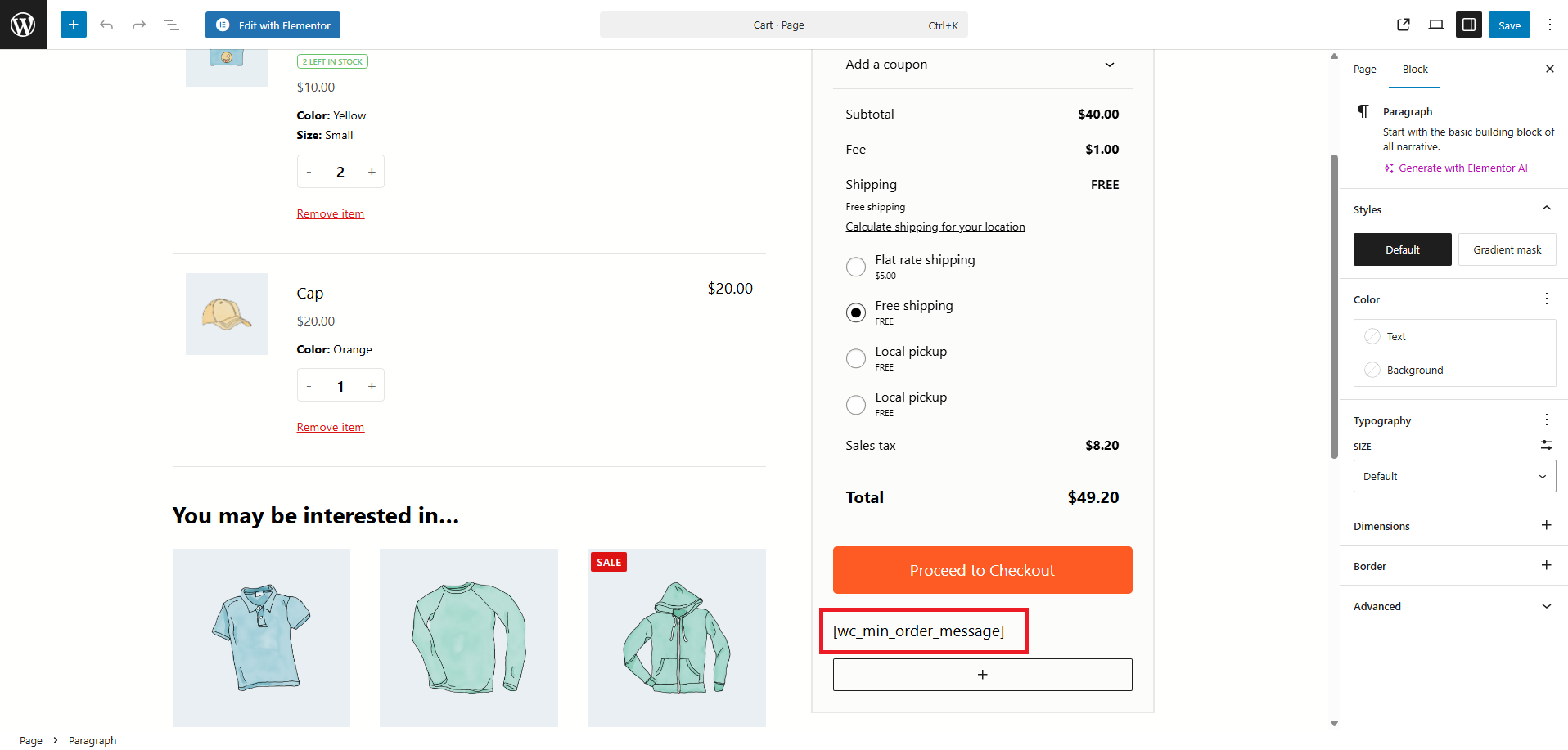
  • Display minimum order message anywhere with [wc_min_order_message]
  • Perfect for Cart Block custom placements
  • Works in posts, pages, and widgets
  • Automatic dynamic updates included

Multilingual Support

  • Full WPML compatibility with string translation
  • Polylang integration for multilingual stores
  • All messages translatable through preferred plugin
  • Automatic registration of dynamic strings

Theme Compatibility

  • Works with any WooCommerce-compatible theme
  • Special Woodmart theme integration (checkout steps lock)
  • Prevents checkout step navigation below minimum
  • Respects theme cart and checkout layouts

High-Performance Architecture

  • HPOS (High-Performance Order Storage) compatible
  • Lightweight JavaScript with smart caching
  • No database queries on every page load
  • Efficient AJAX endpoint for real-time updates

Setup Instructions

  1. Install & Activate

    After purchasing the plugin:

    • Upload to /wp-content/plugins/minimum-order-amount-for-woocommerce/
    • Activate through the WordPress Plugins menu
    • Find it under VGDEV Solutions > Minimum Order or WooCommerce > Minimum Order
  2. Configure Basic Settings

    In the Minimum Order settings page:

    Set Your Minimum Amount:
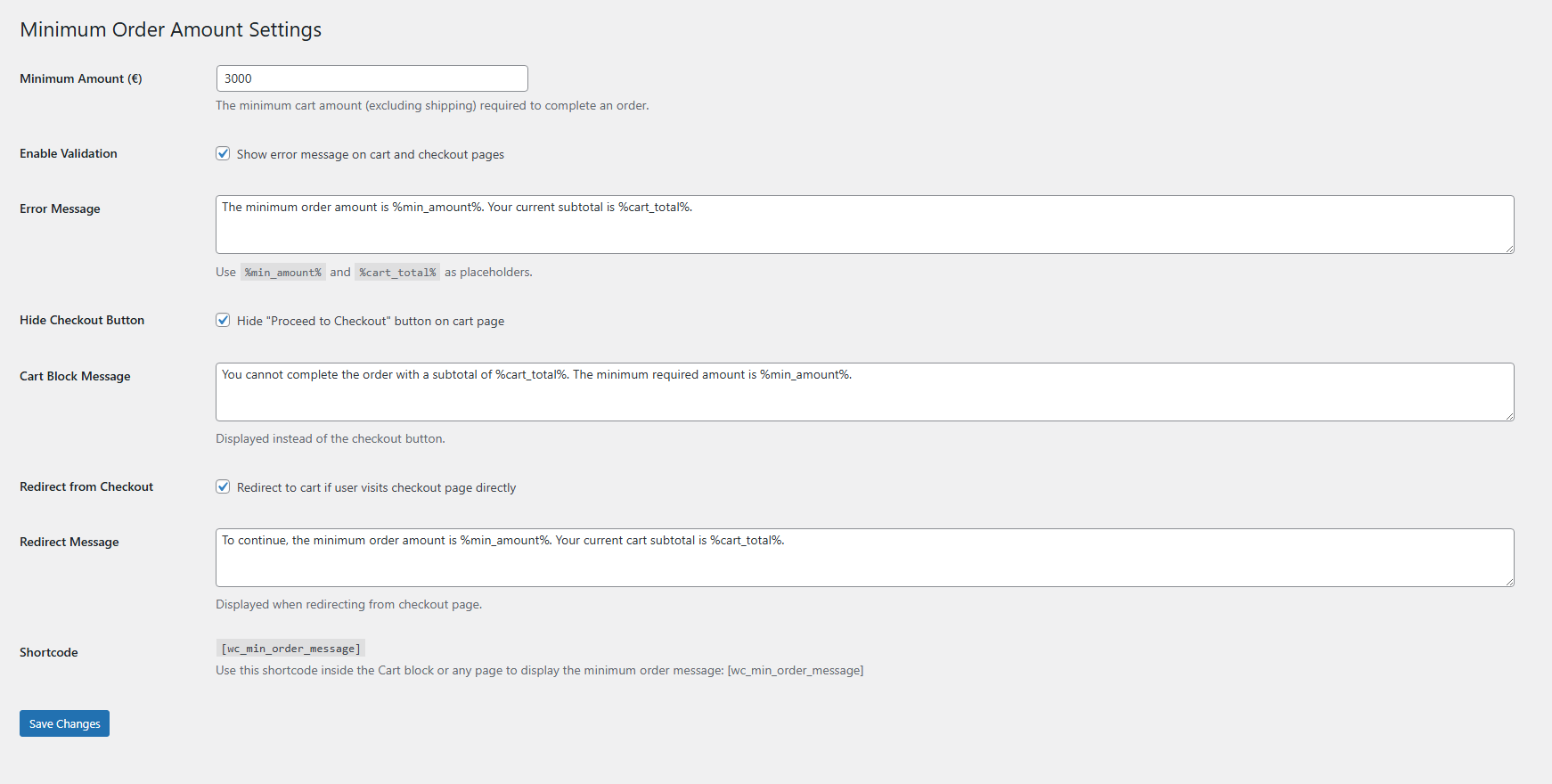
    • Minimum Amount (€): Enter your required minimum cart subtotal
    • Supports decimal values (e.g., 15.50, 20.00, 49.99)
    • Based on cart subtotal excluding shipping costs
    Choose Validation Methods:
    • Enable Validation: Show error messages on cart/checkout pages
    • Hide Checkout Button: Remove "Proceed to Checkout" when below minimum
    • Redirect from Checkout: Redirect users who access checkout directly
    • Enable all three for maximum protection or mix and match
  3. Customize Error Messages

    Personalize messages for your customers:

    Available Message Fields:
    • Error Message: Shown on cart and checkout when validation is enabled
    • Cart Block Message: Displayed instead of checkout button
    • Redirect Message: Shown when redirecting from checkout to cart
    Message Placeholders:
    • %min_amount% - Displays your minimum required amount with currency
    • %cart_total% - Shows current cart subtotal with currency
    • Both placeholders update in real-time as cart changes
    • Example: "The minimum order is %min_amount%. You have %cart_total%."
  4. Use Shortcode (Optional)

    For custom placements in Cart Block or anywhere:

    • Use shortcode: [wc_min_order_message]
    • Add via Shortcode block in Cart Block layout
    • Works in posts, pages, widgets, and page builders
    • Displays dynamic minimum order message with real-time updates
  5. Save & Test

    Click Save Changes and verify functionality:

    • Add products below minimum amount to cart
    • Verify error message appears and updates in real-time
    • Check that checkout button is hidden (if enabled)
    • Try accessing checkout URL directly to test redirect
    • Test with WooCommerce Blocks if using block-based cart

How It Works

Cart Below Minimum:

  1. Customer adds products totaling less than minimum amount
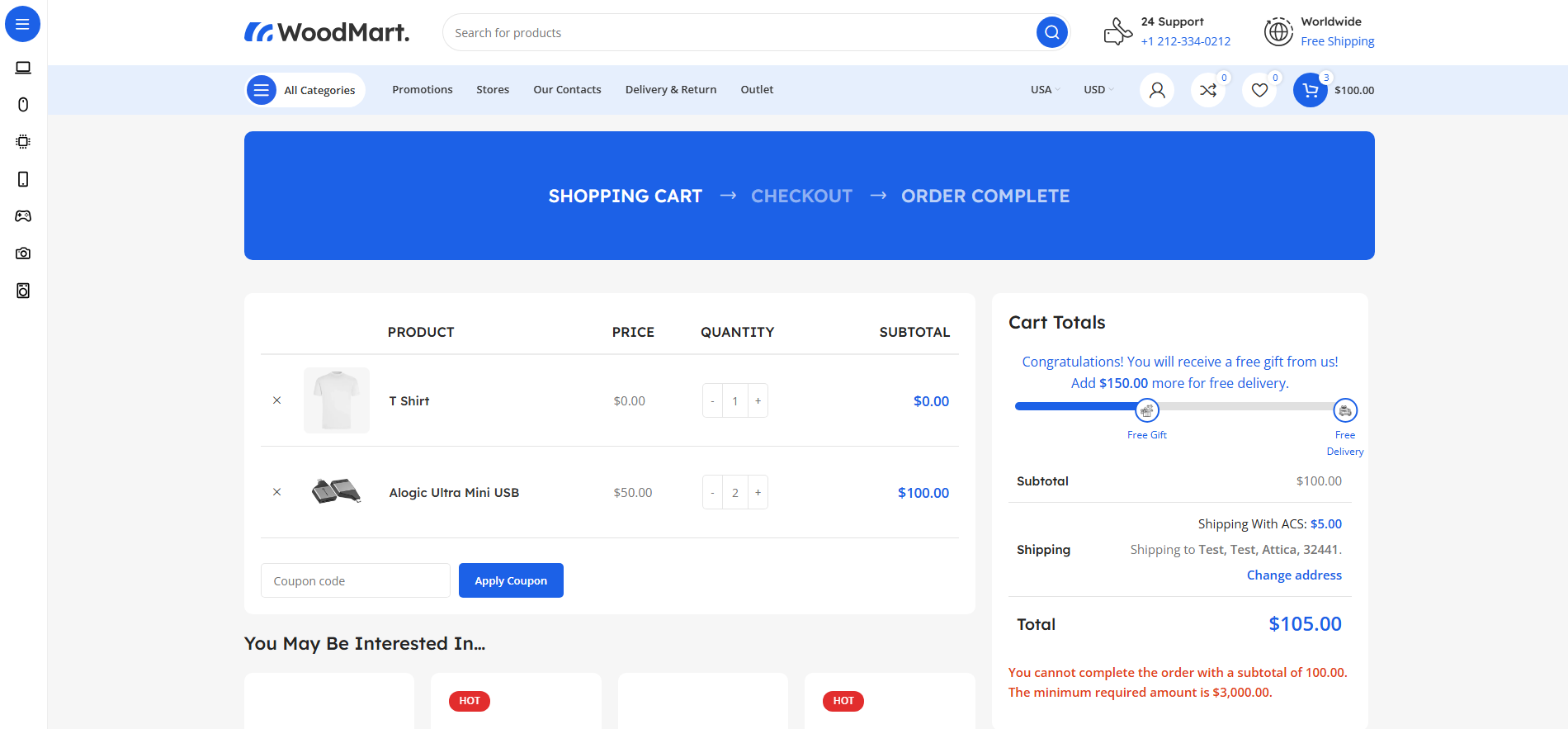
  2. Error message appears showing required amount and current total
  3. "Proceed to Checkout" button hidden (if enabled)
  4. Alternative message displayed instead of checkout button

Real-Time Updates:

  1. Customer adds or removes products from cart
  2. All error messages update instantly via AJAX
  3. No page refresh required for validation
  4. Works with both classic cart and WooCommerce Blocks

Checkout Access Protection:

  1. Customer tries to access checkout page directly (URL typing or bookmark)
  2. Plugin checks cart subtotal against minimum requirement
  3. If below minimum, automatic redirect to cart page
  4. Clear error message explains why they were redirected

Cart Reaches Minimum:

  • Error messages automatically disappear
  • Checkout button becomes visible and functional
  • Customer can proceed to checkout normally
  • Woodmart checkout steps unlock (if applicable)

Why Choose Minimum Order Amount?

  • Protect Your Profit Margins - Ensure every order meets your minimum profitability threshold
  • Reduce Processing Costs - Minimize expenses on small orders that don't cover operational costs
  • Encourage Larger Purchases - Motivate customers to add more items to reach minimum
  • Triple-Layer Protection - Validation, button hiding, and redirect work together seamlessly
  • Real-Time Updates - AJAX-powered instant feedback without page refreshes
  • WooCommerce Blocks Compatible - Works perfectly with modern block-based carts
  • Fully Customizable Messages - Personalize all text to match your brand voice
  • Multilingual Ready - WPML and Polylang support for international stores
  • No API Configuration - Simple settings interface, no complex setup required
  • Shortcode Flexibility - Display messages anywhere with easy shortcode
  • Theme Agnostic - Works with any WooCommerce-compatible theme
  • HPOS Compatible - Future-proof with High-Performance Order Storage support

System Requirements

  • WordPress 5.8 or higher
  • WooCommerce 5.0 or higher (tested up to WooCommerce 8.0+)
  • PHP 7.4 or higher
  • HPOS (High-Performance Order Storage) compatible
  • jQuery enabled (standard WordPress)

Protect Your Margins Today

The Minimum Order Amount plugin includes lifetime updates and professional support. Start enforcing minimum cart values, reduce processing costs, and encourage larger purchases with intelligent validation and clear customer communication!

Questions

Does the minimum amount include shipping costs?

No, the plugin calculates the minimum based on cart subtotal only (product prices and quantities), excluding shipping costs. This is the standard WooCommerce approach and ensures customers understand they need to add more products, not just pay for shipping. Shipping is typically calculated later in the checkout process based on destination and selected shipping method.

Does this work with WooCommerce Blocks (Cart and Checkout blocks)?

Absolutely! The plugin is fully compatible with WooCommerce Blocks. It includes sophisticated JavaScript that subscribes to the WooCommerce Store API to detect cart changes in real-time. All error messages, validations, and the shortcode work seamlessly in both classic cart/checkout pages and the modern block-based cart. You can also use the [wc_min_order_message] shortcode inside Cart Block for custom placement.

Can I customize the error messages?

Yes! The plugin provides three separate message fields: one for cart/checkout validation errors, one for the cart block message (shown instead of the checkout button), and one for checkout redirect messages. Each message supports two placeholders: %min_amount% (displays your minimum required amount) and %cart_total% (shows current cart subtotal). These placeholders automatically update in real-time as customers modify their cart.

Is the plugin multilingual and compatible with WPML or Polylang?

Yes! The plugin has full multilingual support. All UI strings, settings labels, and your custom error messages are automatically registered with WPML String Translation and Polylang. This means you can translate everything through your preferred multilingual plugin's interface. The translated messages will display automatically based on the customer's selected language.

What happens if a customer tries to access the checkout page directly via URL?

If you have "Redirect from Checkout" enabled, the plugin will automatically check the cart subtotal when someone accesses the checkout page. If the cart is below your minimum amount, they'll be instantly redirected to the cart page and shown your custom redirect message explaining why. This prevents customers from bypassing the checkout button hide feature by typing the checkout URL directly or using a bookmark.

Reviews

{{ reviewsTotal }}{{ options.labels.singularReviewCountLabel }}
{{ reviewsTotal }}{{ options.labels.pluralReviewCountLabel }}
{{ options.labels.newReviewButton }}
{{ userData.canReview.message }}
Minimum Order Amount for WooCommerce 10.00 Buy Now