




Version1.0.0
Requires WP6.0
Tested up to6.8
Slugpayment-methods-by-shipping-method-for-woocommerce
Changelog
  • Initial release
Payment Methods by Shipping Method for WooCommerce

Payment Methods by Shipping Method for WooCommerce

Show or hide WooCommerce payment methods based on selected shipping! Create unlimited rules with visual builder – select shipping method, choose payment gateways to control, and set show/hide action. Features multi-select support, shipping zone compatibility, real-time updates, and works with all payment/shipping plugins. Perfect for restricting Cash on Delivery, requiring online payment for express shipping, or preventing payment-shipping conflicts. HPOS compatible, multilingual ready (WPML/Polylang). Reduce fraud and control checkout with strategic payment gateway visibility!

15.00

Lifetime License + Lifetime Updates

14-day money-back guarantee
Pay securely with Visa Mastercard American Express Discover Klarna Revolut Pay

Want more than one plugin? Your discount is applied automatically in the cart:

  • With 2 premium plugins in your cart → 10% off both

  • With 3 premium plugins15% off all of them

  • With 4 or more premium plugins20% off your plugins

Free plugins do not count towards the bundle and are not discounted.
The discount is applied automatically in the cart and at checkout, no coupon needed.

Do you think something is missing from this plugin?

Request a feature

Need a different customization on your website?

Submit a customization request

Payment Methods by Shipping Method for WooCommerce is a premium plugin that gives you complete control over which payment gateways appear based on the customer's selected shipping method. Create unlimited conditional rules to show or hide specific payment methods when certain shipping options are chosen. Perfect for managing Cash on Delivery restrictions, offering special payment terms for express shipping, or implementing complex payment-shipping relationships. Features an intuitive rule builder, multi-select capabilities, shipping zone support, and WPML/Polylang compatibility for international stores!

Key Features

Unlimited Conditional Rules

  • Create as many shipping-to-payment rules as needed
  • Each rule targets one shipping method
  • Control multiple payment gateways per rule
  • Choose "Show" or "Hide" action for each rule

Intuitive Rule Builder

  • Visual table-based rule management interface
  • Add new rules with one click
  • Remove unwanted rules instantly
  • No coding or complex configuration required

Complete Shipping Method Support

  • Works with all core WooCommerce shipping methods
  • Supports shipping zone instances (e.g., Flat Rate: Zone 1)
  • Compatible with third-party shipping plugins
  • Recognizes shipping method variations and zones

Multi-Select Payment Control

  • Select multiple payment gateways per rule
  • Hold Ctrl/Cmd for multi-selection
  • Control all payment methods from one interface
  • Works with any WooCommerce payment gateway

Show/Hide Logic

  • "Show" action: Display only selected payment methods
  • "Hide" action: Remove selected payment methods
  • Flexible logic for different business scenarios
  • Mix show and hide rules for complex requirements

Real-Time Checkout Updates

  • Payment methods update as shipping selection changes
  • Works seamlessly during checkout process
  • No page refresh required for rule application
  • Smooth customer experience

HPOS Compatible

  • High-Performance Order Storage (HPOS) support
  • Future-proof WooCommerce compatibility
  • Optimized for latest WooCommerce versions
  • Tested with WooCommerce 8.0+

Multilingual Ready

  • Full WPML integration with string translation
  • Polylang compatibility for multilingual stores
  • All UI strings translatable
  • Perfect for international e-commerce

Setup Instructions

  1. Install & Activate

    After purchasing the plugin:

    • Upload to /wp-content/plugins/payment-methods-by-shipping-method-for-woocommerce/
    • Activate through the WordPress Plugins menu
    • Navigate to VGDEV Solutions > Payment by Shipping
  2. Understand Rule Logic

    Before creating rules, understand the two action types:

    "Show" Action (Whitelist):
    • Displays ONLY the payment methods you select
    • All other payment gateways are hidden
    • Best for restricting to specific payment options
    • Example: Show only "Cash on Delivery" for "Local Pickup"
    "Hide" Action (Blacklist):
    • Hides the payment methods you select
    • All other payment gateways remain visible
    • Best for removing problematic combinations
    • Example: Hide "Cash on Delivery" for "Express Shipping"
  3. Create Your First Rule

    In the Payment by Shipping settings page:

    Rule Configuration:
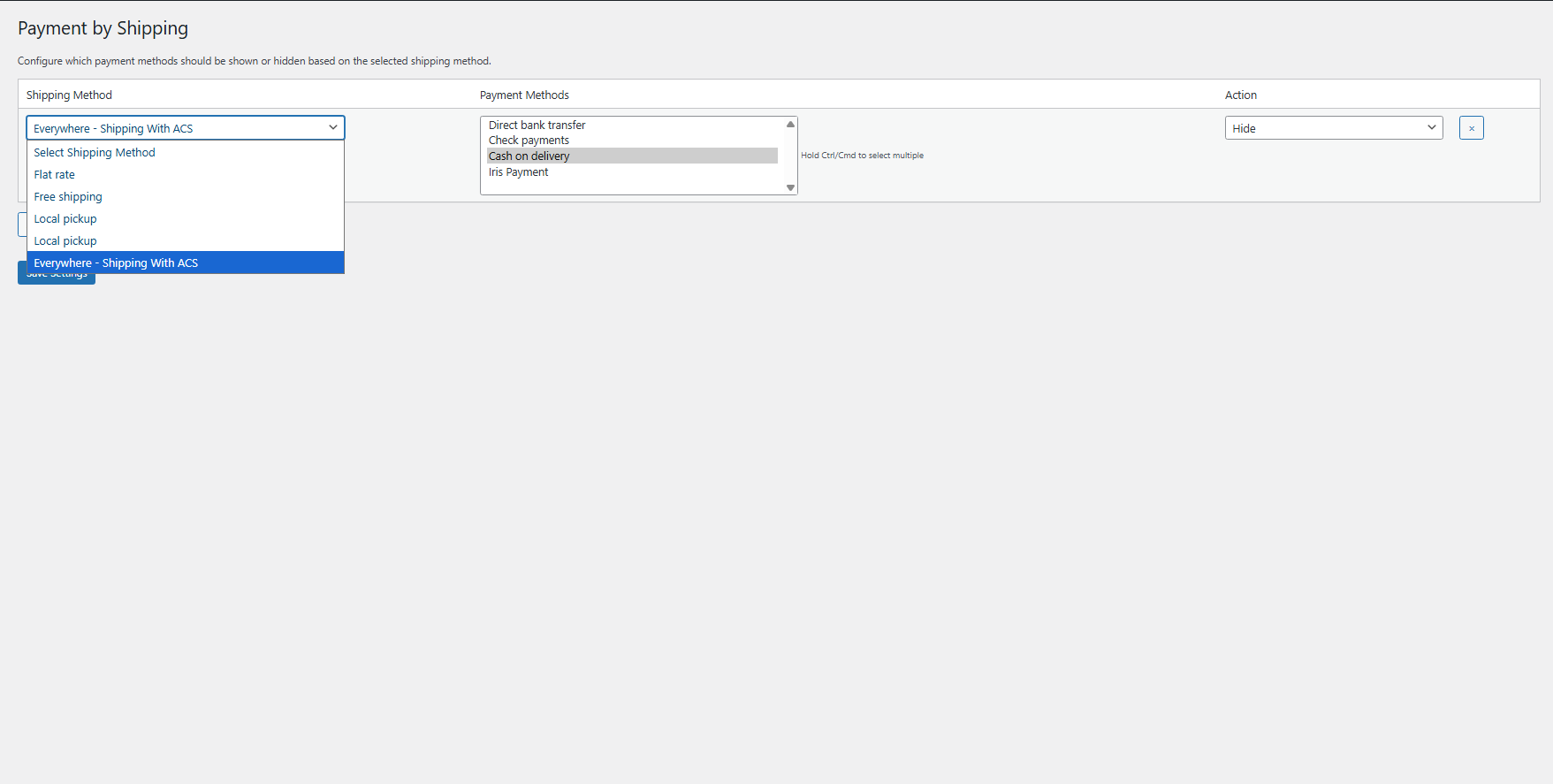
    • Shipping Method: Select the shipping method that triggers this rule
    • Payment Methods: Multi-select payment gateways to control (hold Ctrl/Cmd)
    • Action: Choose "Show" or "Hide" based on your needs
    • Click Save Settings to activate the rule

    The first row is created automatically. Add more rules by clicking "Add Rule" button.

  4. Add Multiple Rules

    Create complex payment-shipping relationships:

    Example Scenarios:
    • Scenario 1: Local Pickup → Show only Cash on Delivery
    • Scenario 2: Express Shipping → Hide Cash on Delivery
    • Scenario 3: Free Shipping → Show Bank Transfer & Credit Card only
    • Scenario 4: International Shipping → Hide all payment methods except PayPal
    • Click Add Rule to create a new row
    • Fill in shipping method, payment methods, and action
    • Use the × button to remove unwanted rules
    • Save all rules together with one click
  5. Test Your Rules

    Verify everything works correctly:

    • Add products to cart and proceed to checkout
    • Select different shipping methods one by one
    • Verify payment methods appear/disappear based on your rules
    • Test all shipping-payment combinations
    • Check behavior when no rules match selected shipping
    • Verify seamless transitions between shipping methods

How It Works

Customer Selects Shipping Method:

  1. Customer adds products to cart and proceeds to checkout
  2. Chooses a shipping method from available options
  3. Plugin checks if selected shipping method matches any rules
  4. If match found, applies "Show" or "Hide" action to payment gateways
  5. Payment methods list updates automatically

"Show" Rule Applied:

  1. Customer selects shipping method configured with "Show" rule
  2. Plugin displays ONLY the payment methods specified in rule
  3. All other payment gateways are hidden from checkout
  4. Customer can only choose from allowed payment methods
  5. Example: Local Pickup shows only Cash on Delivery

"Hide" Rule Applied:

  1. Customer selects shipping method configured with "Hide" rule
  2. Plugin removes the payment methods specified in rule
  3. All other payment gateways remain visible
  4. Customer chooses from remaining payment options
  5. Example: Express Shipping hides Cash on Delivery

Customer Changes Shipping Method:

  • Customer switches to different shipping option
  • Plugin re-evaluates rules for new shipping method
  • Payment methods update in real-time
  • No page refresh required
  • Seamless checkout experience maintained

Why Choose Payment Methods by Shipping Method?

  • Complete Control - Manage exact payment-shipping relationships for your business model
  • Reduce COD Fraud - Restrict Cash on Delivery to specific shipping methods or zones
  • Improve Cash Flow - Encourage online payments for express or international shipping
  • Unlimited Rules - Create as many conditional relationships as your business requires
  • Simple Interface - Visual rule builder requires no coding knowledge
  • Flexible Logic - Mix "Show" and "Hide" rules for complex scenarios
  • Real-Time Updates - Payment options update instantly as shipping changes
  • Shipping Zone Support - Works with zone-based shipping instances
  • Third-Party Compatible - Supports all WooCommerce payment and shipping plugins
  • HPOS Ready - Future-proof with High-Performance Order Storage support
  • Multilingual Support - WPML and Polylang compatible for global stores
  • License Protected - Secure licensing system with automatic updates

Perfect For

  • COD Restriction - Limit Cash on Delivery to specific shipping zones or methods
  • Express Shipping - Require online payment for premium shipping options
  • International Orders - Show only PayPal/credit cards for cross-border shipping
  • Local Pickup - Allow only Cash on Delivery for in-store collection
  • Free Shipping - Encourage bank transfers for free shipping orders
  • Fraud Prevention - Reduce COD fraud by zone-based restrictions

System Requirements

  • WordPress 5.0 or higher
  • WooCommerce 3.0 or higher (tested up to WooCommerce 8.0+)
  • PHP 7.2 or higher
  • At least one active shipping method and one payment gateway
  • HPOS (High-Performance Order Storage) compatible

Take Control of Payment-Shipping Logic

The Payment Methods by Shipping Method plugin includes lifetime updates and dedicated support. Create sophisticated payment gateway rules, reduce COD fraud, improve cash flow, and deliver the perfect checkout experience for every shipping scenario!

Questions

What happens if I create conflicting rules (both show and hide for the same shipping method)?

The plugin processes rules in the order they appear in your settings. If you create multiple rules for the same shipping method, the last matching rule takes precedence. However, we recommend avoiding conflicting rules by using either "Show" OR "Hide" for each shipping method, not both. The "Show" action is typically cleaner as it explicitly whitelists allowed payment methods, while "Hide" is better for removing specific problematic combinations.

Does this work with shipping zones and shipping method instances?

Yes! The plugin fully supports WooCommerce shipping zones and recognizes shipping method instances. When you configure rules, you'll see options like "Zone Name - Flat Rate" for zone-specific shipping methods. The plugin matches both exact shipping method IDs and instance-based IDs (e.g., "flat_rate:6"), ensuring rules apply correctly to zone-specific shipping options. This gives you granular control over payment methods for different geographical zones.

What happens if a customer's selected shipping method doesn't match any rules?

If the selected shipping method doesn't match any of your configured rules, all enabled payment gateways will be displayed as normal - the plugin doesn't interfere. This ensures your checkout always functions, even if you haven't created rules for every shipping method. You only need to create rules for shipping methods where you want to control payment gateway visibility.

Can I use this to restrict Cash on Delivery based on shipping zones?

Absolutely! This is one of the most common use cases. Since the plugin recognizes zone-based shipping instances, you can create rules like: "International Shipping Zone - Flat Rate" → Hide "Cash on Delivery" to prevent COD for international orders, while keeping COD available for domestic shipping. You can create separate rules for each shipping zone, giving you precise control over COD availability based on delivery location.

Is the plugin multilingual and compatible with WPML or Polylang?

Yes! The plugin has full multilingual support. All UI strings in the admin interface (settings page labels, buttons, messages) are automatically registered with WPML String Translation and Polylang. You can translate the entire admin interface through your preferred multilingual plugin. The rules themselves work based on shipping and payment method IDs, so they apply consistently across all languages without needing translation.

Reviews

{{ reviewsTotal }}{{ options.labels.singularReviewCountLabel }}
{{ reviewsTotal }}{{ options.labels.pluralReviewCountLabel }}
{{ options.labels.newReviewButton }}
{{ userData.canReview.message }}
Payment Methods by Shipping Method for WooCommerce 15.00 Buy Now