





Version1.0.0
Requires WP5.8
Tested up to6.8
Slugvg-watermark-for-woocommerce
Changelog
  • 1.0.0 Initial release
Product Image Watermark for WooCommerce

Product Image Watermark for WooCommerce

Professional on-the-fly watermarking for WooCommerce without touching original images. Features four placement modes (single, cross, diagonal, tile) with customizable scale, opacity, position, and spacing. Watermarks all image sizes including srcset and lazy-loading attributes. Smart caching for optimal performance. Supports PNG, JPG, and SVG watermarks. Context-based controls for different page types. Protect your product photography from unauthorized use while maintaining appeal across shop, product pages, galleries, cart, and checkout.

20.00

Lifetime License + Lifetime Updates

14-day money-back guarantee
Pay securely with Visa Mastercard American Express Discover Klarna Revolut Pay

Want more than one plugin? Your discount is applied automatically in the cart:

  • With 2 premium plugins in your cart → 10% off both

  • With 3 premium plugins15% off all of them

  • With 4 or more premium plugins20% off your plugins

Free plugins do not count towards the bundle and are not discounted.
The discount is applied automatically in the cart and at checkout, no coupon needed.

Do you think something is missing from this plugin?

Request a feature

Need a different customization on your website?

Submit a customization request

Product Image Watermark for WooCommerce is a premium plugin that protects your product images with professional on-the-fly watermarking without ever touching your original files. Apply watermarks dynamically to all WooCommerce product images across shop pages, product archives, single product galleries, related products, upsells, cross-sells, cart, and checkout. Features four placement modes (single, cross, diagonal, tile), full customization of scale, opacity, position, and margin, comprehensive image size coverage including srcset attributes, automatic caching for optimal performance, and support for PNG, JPG, and SVG watermark images. Perfect for protecting your product photography from unauthorized use!

Key Features

Non-Destructive Watermarking

  • Original images remain completely untouched
  • Watermarks applied on-the-fly during display
  • No permanent changes to your media library
  • Deactivate anytime with no image damage

Four Placement Modes

  • Single: One watermark at chosen position
  • Cross: Horizontal + vertical pattern through center
  • Diagonal: Watermarks along diagonal lines
  • Tile: Complete coverage with tiled pattern

Comprehensive Image Coverage

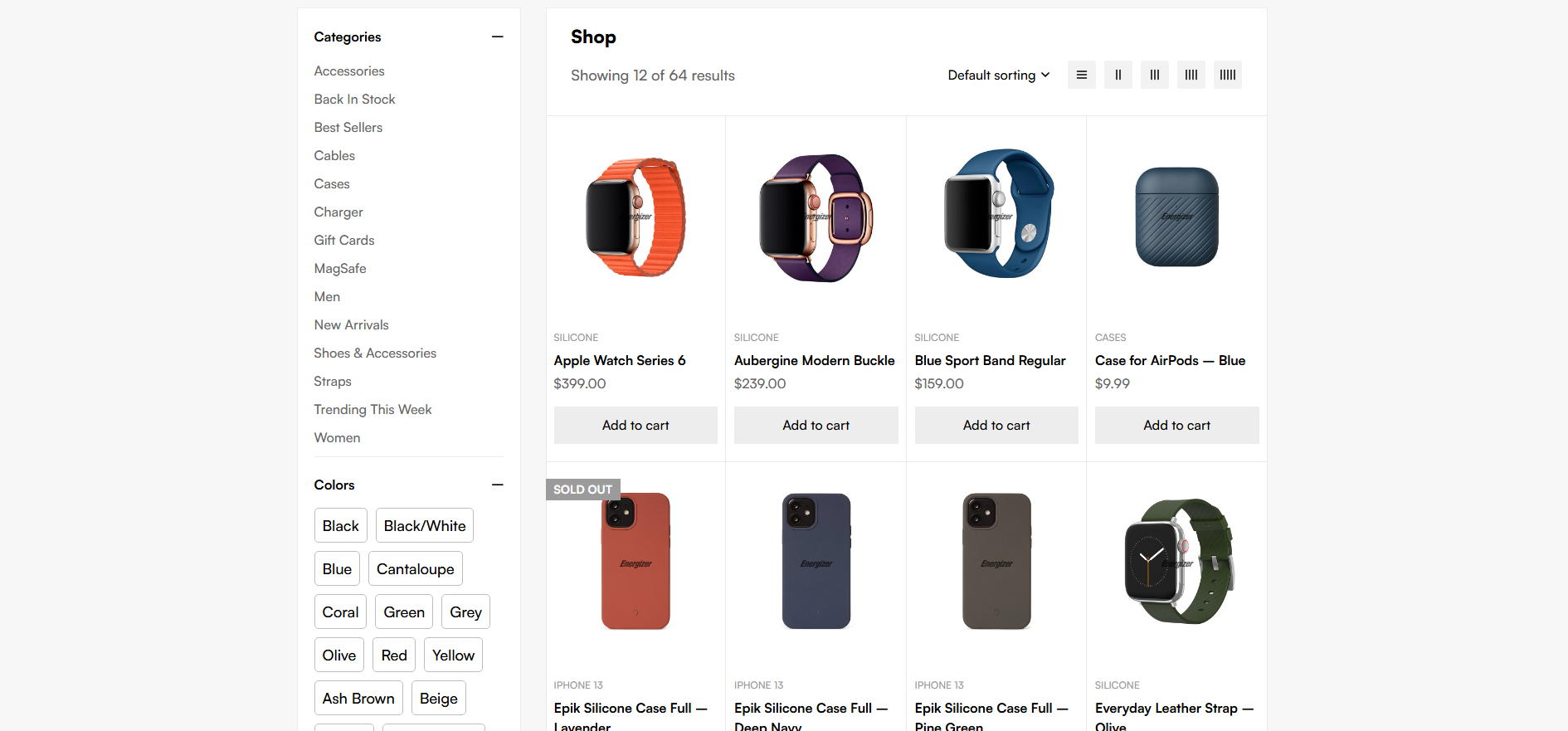
  • Shop and archive loop images
  • Single product main image and gallery
  • Related products, upsells, and cross-sells
  • Cart and checkout thumbnails
  • All image sizes including thumbnails, medium, large, full
  • Responsive srcset attributes

Media Library Integration

  • Built-in WordPress media picker
  • Supports PNG, JPG, and SVG watermarks
  • PNG transparency fully preserved
  • SVG support via Imagick (when available)

Full Style Customization

  • Scale: 1-100% of image width
  • Opacity: 0-100% transparency control
  • Position: 9 placement options (for single mode)
  • Margin: Customizable edge spacing in pixels
  • Pattern gap: Spacing between watermarks in pattern modes

Context-Based Controls

  • Enable/disable on single product pages
  • Enable/disable on shop and archive pages
  • Enable/disable on cart and checkout
  • Enable/disable on other pages

Smart Filtering Options

  • Watermark ALL image sizes option
  • Minimum width threshold (skip small images)
  • Product images only mode (strict WooCommerce)
  • Automatic site icon exclusion

Performance & Caching

  • Watermarked images cached in /uploads/vgwm-cache/
  • Cache regenerates only when settings change
  • One-click cache clearing
  • Dual engine support: Imagick + GD fallback

Setup Instructions

  1. Install & Activate

    After purchasing the plugin:

    • Upload to /wp-content/plugins/vg-watermark-for-woocommerce/
    • Activate through the WordPress Plugins menu
    • WooCommerce must be active before activation
    • Navigate to VGDEVsolutions > Watermark
  2. Activate Your License

    Enable full functionality with your license key:

    • Go to Settings > License (or click the activation notice)
    • Enter your license key from purchase confirmation
    • Click Activate License
    • Front-end watermarking activates upon successful license validation
  3. Upload Your Watermark Image

    Choose your watermark logo or text image:

    Best Practices:
    • Use PNG format with transparent background for best results
    • Create watermark at least 500px wide for quality scaling
    • Include your logo, brand name, or copyright text
    • Light watermarks work best on dark products, dark on light
    • SVG supported if your server has Imagick with SVG support
    Upload Process:
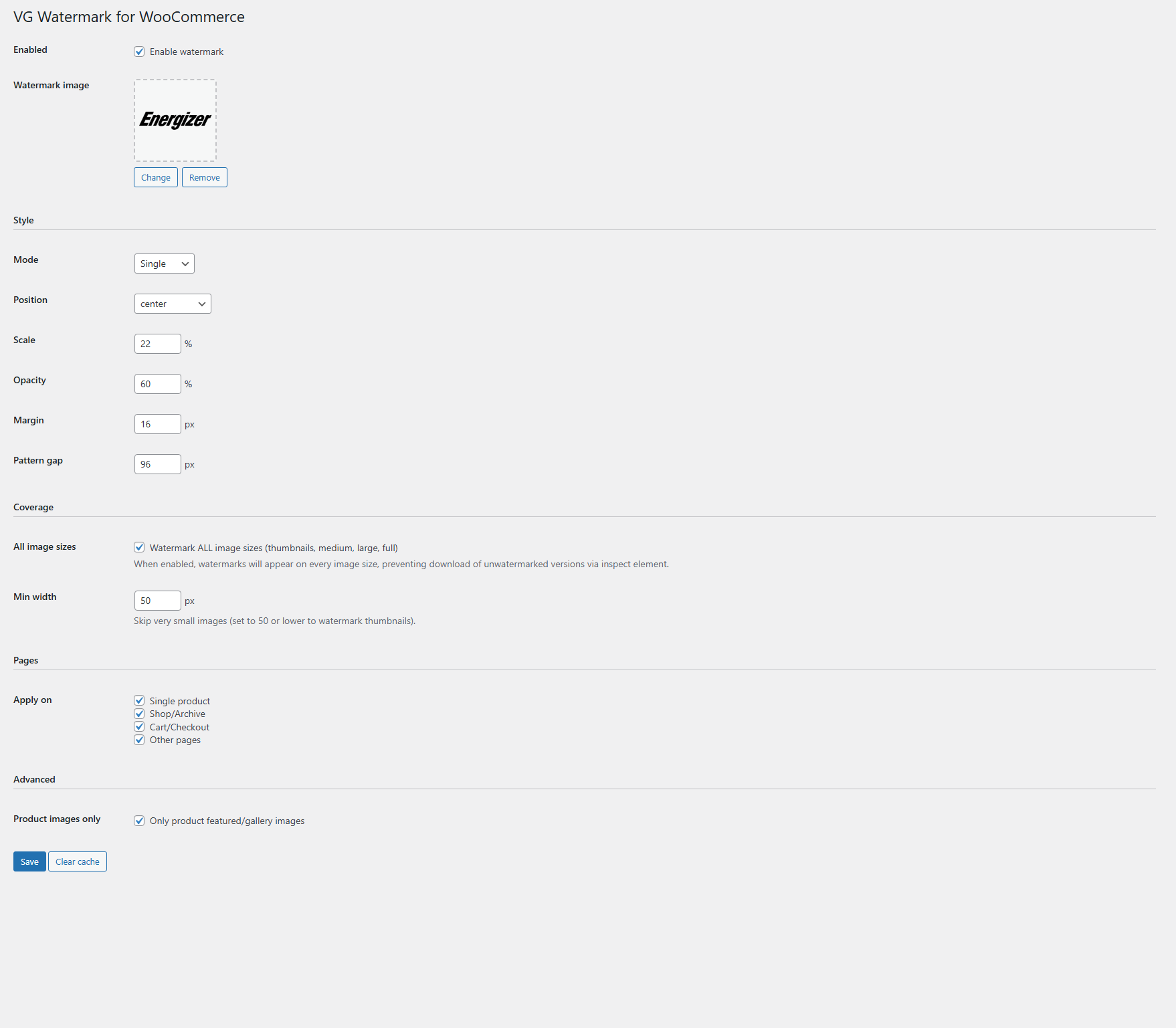
    • Click Select button in Watermark image field
    • Choose from existing media library or upload new image
    • Preview appears immediately after selection
    • Click Change to select different image anytime
    • Click Remove to clear watermark selection
  4. Configure Style Settings

    Customize watermark appearance and placement:

    Mode Selection:
    • Single: Best for subtle corner watermarks (shows position dropdown)
    • Cross: Creates horizontal and vertical lines through center
    • Diagonal: Diagonal pattern for moderate coverage
    • Tile: Full coverage across entire image surface
    Fine-Tuning:
    • Scale: Set between 10-30% for subtle watermarks, 40-60% for prominent
    • Opacity: 40-60% allows image visibility, 80-100% for strong protection
    • Position: Choose from 9 positions (only for Single mode)
    • Margin: 10-20px keeps watermark away from edges
    • Pattern gap: 50-150px controls spacing in Cross/Diagonal/Tile modes
  5. Set Coverage Options

    Control where and which images receive watermarks:

    • All image sizes: Check to watermark thumbnails, medium, large, and full sizes
    • Min width: Set to 50px or lower to include small thumbnails, 300px+ to skip them
    • Apply on: Check Single product, Shop/Archive, Cart/Checkout, and Other pages as needed
    • Product images only: Check to limit watermarks strictly to WooCommerce product images
  6. Save & Test

    Activate your settings and verify results:

    • Click Save button at bottom of settings page
    • Visit your store frontend and check product images
    • Verify watermarks appear on shop pages, product pages, cart
    • Test different image sizes and responsive layouts
    • Use Clear cache button if you change watermark image or settings
    • Adjust scale, opacity, or mode if watermark is too subtle or too prominent

How It Works

On-The-Fly Processing:

  1. Customer visits your WooCommerce store
  2. When product image is requested, plugin intercepts the URL
  3. System checks if watermarked version exists in cache directory
  4. If cached version exists and is current, it's served immediately
  5. If not cached, plugin loads original image and watermark
  6. Watermark is scaled, positioned, and composited with configured opacity
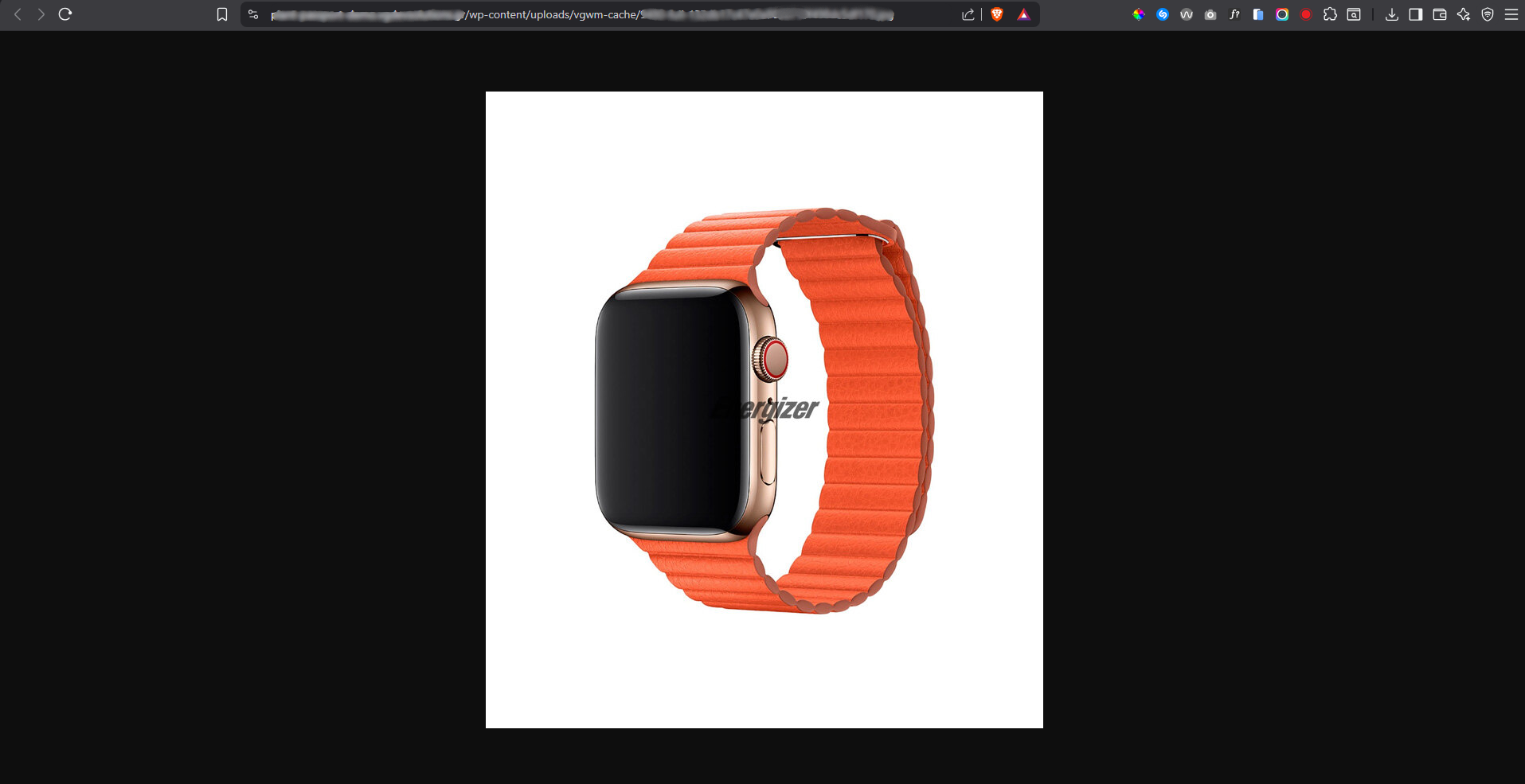
  7. Final watermarked image is saved to cache and displayed to customer
  8. Original image in media library remains completely untouched

Dual Engine System:

  • Primary: Imagick
    • Used when available on server (most modern hosts)
    • Superior quality with better color handling
    • Supports SVG watermarks
    • Better transparency and alpha channel processing
  • Fallback: GD Library
    • Used when Imagick not available
    • Supports PNG, JPG, WebP, GIF watermarks
    • Reliable on all WordPress hosting
    • Good quality for most use cases

Comprehensive Filter System:

The plugin uses 9 different WordPress and WooCommerce filters to ensure complete coverage:

  • wp_get_attachment_image_src - Main image source URLs
  • wp_get_attachment_url - Raw attachment URLs
  • wp_calculate_image_srcset - Responsive srcset attributes
  • wp_get_attachment_image_attributes - All image attributes including data-src
  • woocommerce_gallery_image_html_attachment_image_params - Gallery params
  • woocommerce_gallery_image_html - Gallery HTML output
  • woocommerce_product_get_image - Loop/archive images
  • post_thumbnail_html - Featured images
  • Output buffer - Final catch-all for any missed images

Cache Management:

  • Cached files stored in: /wp-content/uploads/vgwm-cache/
  • Each cached file includes settings signature in filename
  • Changing any setting (scale, opacity, mode, etc.) invalidates cache
  • New watermarked versions generated automatically with new settings
  • Use Clear cache button to manually remove all cached files
  • Cache directory created automatically on first watermark generation

Why Choose Product Image Watermark for WooCommerce?

  • Zero Image Damage - Originals never modified, safe to deactivate anytime
  • Complete Protection - Covers ALL image sizes including srcset, prevents download of unwatermarked versions
  • Professional Results - Multiple placement modes for subtle or prominent branding
  • Flexible Watermarks - PNG transparency support creates polished, professional appearance
  • Performance Optimized - Smart caching system ensures fast page loads
  • Context Control - Choose exactly where watermarks appear (shop, product pages, cart, etc.)
  • Easy Management - WordPress media picker integration for simple watermark changes
  • No Manual Work - Automatically applies to all product images, present and future
  • Dual Engine Support - Works reliably with Imagick or GD library
  • Variable Product Compatible - Watermarks appear on all product variations and galleries
  • Responsive Ready - Handles mobile, tablet, desktop with proper srcset support
  • License Protected - Automatic updates and dedicated support included

Perfect For

  • Product Photographers - Protect custom product photography from unauthorized use
  • Handmade Product Sellers - Prevent design theft from craft marketplaces
  • Dropshipping Stores - Brand supplier images with your logo
  • Jewelry Stores - Protect high-value product images from competitors
  • Fashion Retailers - Safeguard clothing and accessory photography
  • Electronics Stores - Prevent image scraping by competitor sites
  • Furniture Dealers - Protect expensive product photography investments
  • Art & Print Shops - Watermark digital art and print previews

System Requirements

  • WordPress 5.0 or higher
  • WooCommerce 3.0 or higher (must be active)
  • PHP 7.2 or higher
  • Valid license key for frontend watermarking and updates

Protect Your Product Images Today

The Product Image Watermark for WooCommerce plugin includes lifetime updates and dedicated support. Stop image theft, protect your photography investments, and maintain professional branding across your entire WooCommerce store with zero damage to original files!

Questions

Will this plugin modify my original product images?

Absolutely not! The plugin uses on-the-fly watermarking technology, which means your original images in the WordPress media library remain completely untouched. Watermarks are applied dynamically when images are displayed on your site, and the watermarked versions are stored in a separate cache directory (/uploads/vgwm-cache/). You can deactivate the plugin at any time and your original images will still be perfect and intact.

Does this cover all image sizes, including thumbnails and responsive images?

Yes! When you enable the "Watermark ALL image sizes" option, the plugin watermarks every single WordPress image size - including thumbnails, medium, large, and full sizes. It also handles responsive srcset attributes, data-src lazy loading, and WooCommerce-specific image attributes like data-large_image for lightboxes. This comprehensive coverage prevents customers from using browser inspect tools to download unwatermarked versions from srcset or lazy-loading attributes.

Which watermark modes should I use for different protection levels?

Choose your mode based on desired protection level: Single mode is ideal for subtle branding with one watermark in a corner - least intrusive but easiest to crop out. Cross mode creates horizontal and vertical lines through the center - good balance of visibility and protection. Diagonal mode places watermarks along diagonal lines - harder to remove than single placement. Tile mode covers the entire image with repeating watermarks - maximum protection, impossible to remove without destroying image. For valuable product photography, Tile or Diagonal with 40-60% opacity provides strong protection while maintaining image appeal.

What happens to performance with on-the-fly watermarking?

The plugin is designed for optimal performance through intelligent caching. When a watermarked image is first generated, it's saved to the cache directory. All subsequent requests for that image serve the cached version instantly with zero processing overhead - just like serving a regular image. The cache only regenerates when you change settings (scale, opacity, mode, etc.) or upload a new watermark. You can also manually clear the cache to force regeneration. Most stores will experience no noticeable performance impact.

Can I use an SVG file as my watermark?

SVG watermarks are supported if your server has the Imagick PHP extension with SVG support enabled (most modern WordPress hosts do). When you select an SVG watermark, the plugin will display a notice in the admin if your server doesn't support it, and you should use PNG or JPG instead. PNG format with transparent background is generally the best choice as it works everywhere, provides excellent quality, and supports transparency for professional-looking watermarks that blend naturally with your products.

Reviews

{{ reviewsTotal }}{{ options.labels.singularReviewCountLabel }}
{{ reviewsTotal }}{{ options.labels.pluralReviewCountLabel }}
{{ options.labels.newReviewButton }}
{{ userData.canReview.message }}
Product Image Watermark for WooCommerce 20.00 Buy Now