Version1.4
Requires WP5.8
Tested up to6.8
Slugiris-checkout-gateway-for-woocommerce
Changelog
  • 1.0
  • * Initial release of the Checkout Gateway for IRIS plugin.
  • 1.1
  • * Fixed the email message on the completed order template.
  • * Updated email functionality for on-hold orders to display full payment details (reference text, VAT number, account holder, and QR code).
  • * Added payment cancellation handling using a GET parameter.
  • 1.2
  • * Added compatibility with WooCommerce Cart/Checkout Blocks.
  • * Added setting to customize the completed order email message.
  • * Updated the checkout page payment logo.
  • 1.3
  • *Refactored WooCommerce Cart/Checkout Blocks integration to follow the latest Blocks payment method registration pattern.
  • *Ensured the IRIS gateway is correctly registered as a compatible payment method in the Checkout Block (when enabled in WooCommerce → Payments).
  • *Updated the frontend Blocks script (iris-blocks.js) to load via wcSettings and wcBlocksRegistry and reliably display the IRIS title/description inside the Checkout Block.
  • *Minor internal cleanup and stability improvements for block-based checkouts.
  • 1.4
  • *Security: Patched a security issue reported by Patchstack
IRIS Checkout Gateway for WooCommerce

IRIS Checkout Gateway for WooCommerce

Accept IRIS instant payments in your WooCommerce store. Automated order management with QR codes, payment instructions, and WooCommerce Blocks support. Also available on the official WordPress.org plugin repository.

FREE

Lifetime License + Lifetime Updates

14-day money-back guarantee
Pay securely with Visa Mastercard American Express Discover Klarna Revolut Pay

Want more than one plugin? Your discount is applied automatically in the cart:

  • With 2 premium plugins in your cart → 10% off both

  • With 3 premium plugins15% off all of them

  • With 4 or more premium plugins20% off your plugins

Free plugins do not count towards the bundle and are not discounted.
The discount is applied automatically in the cart and at checkout, no coupon needed.

Do you think something is missing from this plugin?

Request a feature

Need a different customization on your website?

Submit a customization request

The IRIS Checkout Gateway for WooCommerce is a premium payment gateway plugin that seamlessly integrates IRIS instant payment services into your WooCommerce store. Designed specifically for Greek businesses, this plugin enables customers to pay quickly and securely through IRIS, with automatic order status management and comprehensive payment instructions.

Key Features

Complete Payment Integration

  • Add IRIS as a payment method during checkout
  • Automatic order status management (on-hold until payment confirmation)
  • Stock reduction upon order placement
  • Customizable payment gateway title and description

Professional Payment Instructions

  • Display VAT number (ΑΦΜ) and account holder information
  • Custom QR code for instant scanning and payment
  • Configurable payment reference instructions
  • Automatic order ID integration for payment tracking

WooCommerce Blocks Compatible

  • Full support for Cart and Checkout Blocks
  • Modern, streamlined checkout experience
  • Compatible with latest WooCommerce versions

Email Integration

  • Payment details included in order confirmation emails
  • Custom messages for on-hold orders
  • Configurable completed order notifications
  • Professional email formatting with QR codes

Customization Options

  • Customizable labels for all payment information
  • Optional payment logo display
  • Flexible payment instructions text
  • Personalized thank you page content

Setup Instructions

  1. Activate the Plugin

    After purchasing and downloading the plugin:

    • Upload the plugin files to /wp-content/plugins/checkout-gateway-iris/
    • Activate the plugin through WordPress Plugins menu
    • Navigate to WooCommerce > Settings > Payments
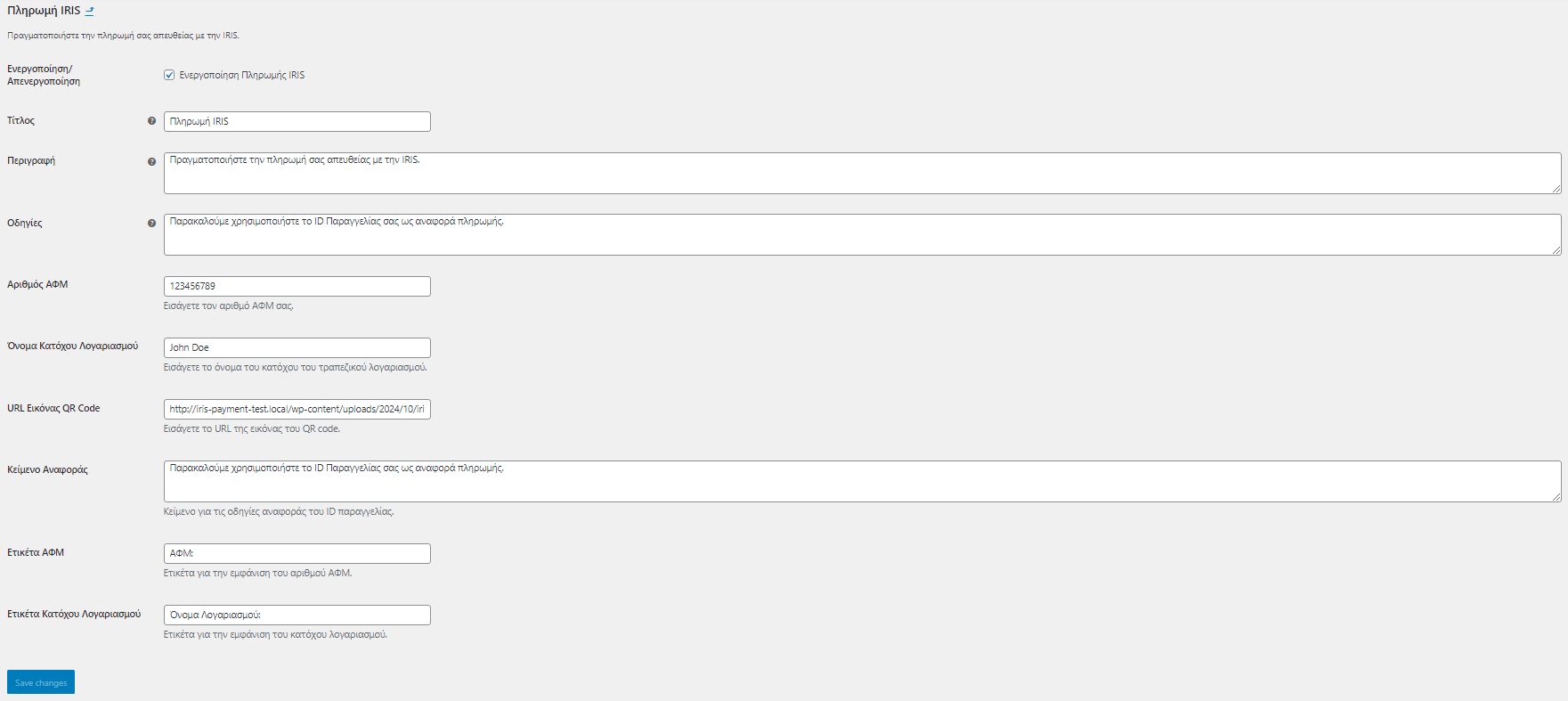
  2. Configure IRIS Payment Gateway

    Click on IRIS Payment Gateway in the Payments tab and configure:

    Basic Settings:
    • Enable/Disable: Check to enable IRIS payments
    • Display Logo: Choose whether to show the IRIS logo at checkout
    • Title: The name displayed to customers (e.g., "Pay with IRIS")
    • Description: Payment instructions shown during checkout
    Payment Information:
    • VAT Number (ΑΦΜ): Enter your business VAT number
    • Account Holder Name: Your bank account holder's name
    • QR Code URL: Upload a QR code image to your media library and paste the URL
    Labels & Text:
    • VAT Label: Customize the label before VAT number (default: "ΑΦΜ:")
    • Account Holder Label: Customize the label before account holder name
    • Reference Text: Instructions for payment reference (e.g., "Please use Order ID as payment reference")
    • Instructions: Text shown on the thank you page
    • Completed Order Message: Custom message for completed order emails
  3. Save Changes

    Click Save Changes to activate your settings.

Customer Experience

During Checkout:

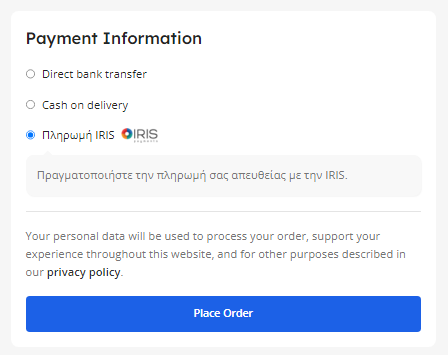
  1. Customer selects "Pay with IRIS" as payment method
  2. Sees your custom description and instructions
  3. Completes the order placement

After Order:

  1. Order automatically changes to "On Hold" status
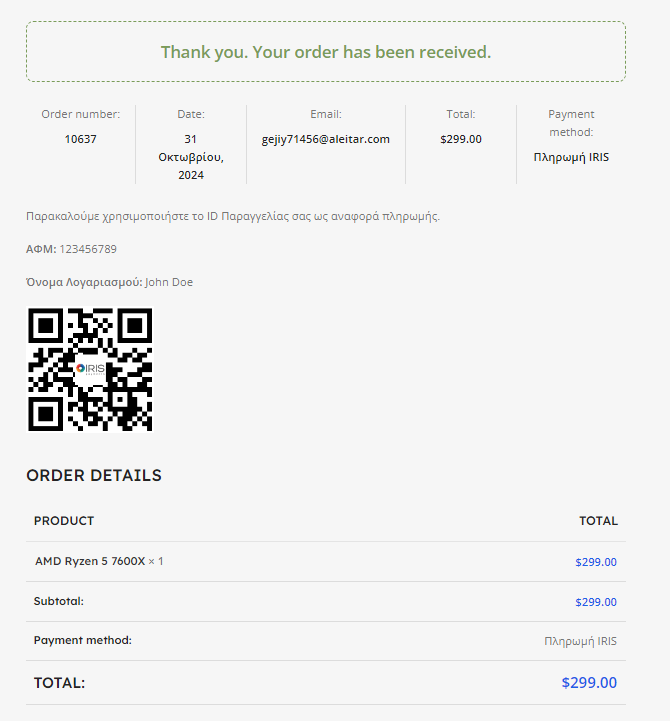
  2. Customer receives order confirmation email with:
    • Your VAT number
    • Account holder name
    • QR code for payment
    • Order ID for payment reference
  3. Thank you page displays the same payment information

Order Confirmation:

  • After verifying payment in your bank, manually change order status to "Completed"
  • Customer receives completed order notification with your custom message

Why Choose IRIS Checkout Gateway?

  • No Technical Configuration Required - Simple setup, no API keys or complex integrations
  • Automatic Payment Tracking - Use Order IDs as payment references
  • Professional Appearance - QR codes and formatted payment instructions
  • Email Integration - Payment details automatically included in all relevant emails
  • Flexible Customization - Adapt all text and labels to your business needs
  • Blocks Compatible - Works with modern WooCommerce checkout blocks
  • Lifetime Updates - Compatible with latest WooCommerce versions

System Requirements

  • WordPress 5.0 or higher
  • WooCommerce 6.0 or higher
  • PHP 7.4 or higher

Lifetime Support & Updates

This plugin includes lifetime support and updates. Our team is ready to help you with any questions or customization needs.

Questions

How does the IRIS Checkout Gateway work?

The IRIS Checkout Gateway integrates seamlessly with WooCommerce to accept IRIS instant payments. When a customer selects IRIS as their payment method and completes the order, the system automatically sets the order to "On Hold" status. The customer receives an email with your VAT number, account holder name, QR code, and payment instructions. After you manually verify the payment in your bank account, you can change the order status to "Completed" in WooCommerce, which triggers the order fulfillment process.

Do I need API credentials or technical setup for IRIS integration?

No! Unlike traditional payment gateways, the IRIS Checkout Gateway doesn't require API keys, webhooks, or complex technical configurations. You simply enter your business details (VAT number, account holder name), upload a QR code for payments, and customize the text displayed to customers. The plugin handles all the order management automatically, making it perfect for businesses that want a simple, no-fuss payment solution.

Is the plugin compatible with WooCommerce Blocks (Cart & Checkout Blocks)?

Yes! The IRIS Checkout Gateway is fully compatible with both the classic WooCommerce checkout and the new WooCommerce Cart and Checkout Blocks. Whether you're using the traditional shortcode-based checkout or the modern block-based experience, the plugin works seamlessly. The payment method will appear in the blocks checkout with your configured title, description, and logo.

Can I customize the payment instructions and text shown to customers?

Absolutely! The plugin offers extensive customization options. You can modify: Payment gateway title and description at checkout Instructions displayed on the thank you page VAT number and account holder labels Payment reference instructions Completed order message in emails Whether to display the IRIS logo All text fields support Greek and English, allowing you to create a professional payment experience tailored to your brand.

What happens when a customer cancels or doesn't complete the payment?

When a customer places an order with IRIS payment, the order is automatically set to "On Hold" status and stock is reduced. If the customer doesn't complete the payment within your specified timeframe, you can manually cancel the order in WooCommerce, which will restore the stock. The plugin also includes a payment cancellation handler - if customers navigate away or cancel during the payment process, they're redirected back to the cart with the order marked as cancelled. This prevents abandoned orders from cluttering your system.

Reviews

{{ reviewsTotal }}{{ options.labels.singularReviewCountLabel }}
{{ reviewsTotal }}{{ options.labels.pluralReviewCountLabel }}
{{ options.labels.newReviewButton }}
{{ userData.canReview.message }}
IRIS Checkout Gateway for WooCommerce FREE Buy Now