




Version1.0.0
Requires WP5.8
Tested up to6.8
Slugskroutz-smart-cart-for-woocommerce
Changelog
  • Initial release
Skroutz Smart Cart for WooCommerce

Skroutz Smart Cart for WooCommerce

Skroutz Smart Cart for WooCommerce – Professional integration that automatically creates WooCommerce orders from Skroutz Smart Cart purchases. Features include webhook API, automatic product matching by SKU, accept/reject order management, PDF voucher generation, bulk operations, email notifications, and automatic stock synchronization. Perfect for Greek merchants selling on Skroutz marketplace.

40.00

Lifetime License + Lifetime Updates

14-day money-back guarantee
Pay securely with Visa Mastercard American Express Discover Klarna Revolut Pay

Want more than one plugin? Your discount is applied automatically in the cart:

  • With 2 premium plugins in your cart → 10% off both

  • With 3 premium plugins15% off all of them

  • With 4 or more premium plugins20% off your plugins

Free plugins do not count towards the bundle and are not discounted.
The discount is applied automatically in the cart and at checkout, no coupon needed.

Frequently bought together

Pick what you like and add them to your cart in one click.

Do you think something is missing from this plugin?

Request a feature

Need a different customization on your website?

Submit a customization request

Skroutz Smart Cart for WooCommerce is the complete professional integration solution that seamlessly connects Skroutz's Smart Cart shopping system with your WooCommerce store. Welcome the new generation of online shopping with automatic order creation, professional fulfillment management, PDF voucher generation, and comprehensive order lifecycle handling from acceptance to dispatch!

Key Features

Automatic Order Synchronization

  • Orders from Skroutz Smart Cart appear instantly in WooCommerce
  • Customer details automatically imported and formatted
  • Orders prefixed with "SKR" for easy Skroutz identification
  • Skroutz order code stored in metadata for tracking

Real-Time Webhook Integration

  • RESTful API endpoint receives Skroutz notifications
  • Secure authentication via Skroutz API key
  • Instant processing without manual intervention
  • Automatic stock reduction upon order receipt

Complete Order Lifecycle Management

  • Accept orders with pickup location and time window selection
  • Reject orders with detailed reason codes
  • Handle cancelled, rejected, and expired orders automatically
  • Real-time order status synchronization with Skroutz

Interactive Meta Box Interface

  • Dedicated Skroutz section in WooCommerce order details
  • View Skroutz order status and details
  • Accept/reject forms with jQuery UI dialog modals
  • One-click access to courier vouchers

Automatic PDF Voucher System

  • Courier vouchers fetched upon order acceptance
  • Vouchers stored in organized upload directory
  • Direct download links in order meta box
  • FPDI library for professional PDF handling

Intelligent Product Matching

  • Automatic SKU-based product identification
  • Variable product matching by size attributes
  • Configurable size attribute slug (pa_size, pa_megethos)
  • Handles simple, variable, and variation products

Setup Instructions

  1. Purchase, Install & Activate License

    Getting started is simple:

    • Purchase the plugin from VGDEVsolutions
    • Upload to /wp-content/plugins/skroutz-smart-cart-for-woocommerce/
    • Activate through the WordPress Plugins menu
    • Navigate to Settings > License to activate your license key
    • All Skroutz Smart Cart features require valid license activation
  2. Get Your Skroutz API Key

    Log into your Skroutz merchant dashboard:

    • Navigate to Settings or API Configuration section
    • Generate or copy your API authentication bearer token
    • Keep this key secure - it provides full access to your Skroutz orders
    • This key authenticates webhook requests and API communications
  3. Configure Plugin Settings

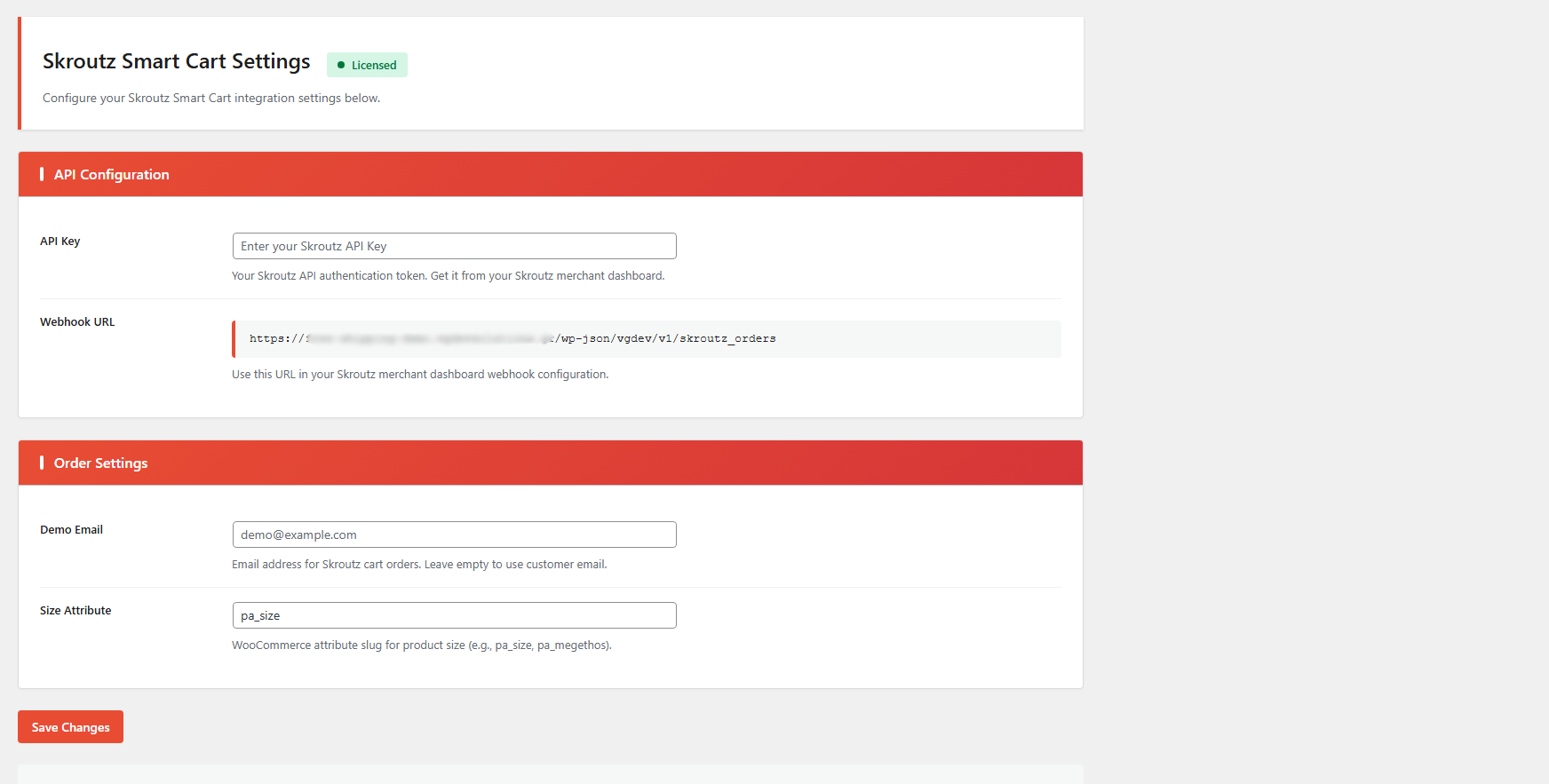
    Go to VGDEVsolutions > Skroutz Smart Cart:

    API Configuration:
    • API Key: Paste your Skroutz API authentication bearer token
    • Webhook URL: Copy the displayed REST endpoint URL for next step
    • Format: https://yoursite.com/wp-json/vgdev/v1/skroutz_orders
    Order Settings:
    • Size Attribute: WooCommerce attribute slug for size matching (default: pa_size)
    • Change to pa_megethos for Greek attribute names
    • Must match the attribute used in your variable products
  4. Configure Skroutz Webhook

    In your Skroutz merchant dashboard:

    • Navigate to Smart Cart Settings or Webhooks
    • Add a new webhook endpoint
    • Paste the webhook URL from plugin settings
    • Select event types: New Order, Order Cancelled, Order Rejected
    • Save webhook configuration in Skroutz
    • Test webhook connection if Skroutz provides testing functionality
  5. Ensure Product SKUs Match

    Critical for automatic product matching:

    • Every WooCommerce product must have a SKU assigned
    • SKUs must exactly match your Skroutz product feed (case-sensitive)
    • For variable products, each variation needs its own unique SKU
    • Alternatively, use format: parent-sku-termID for auto-matching
    • Test with sample products before going live
    • Check WooCommerce logs for any SKU matching errors
  6. Test the Complete Integration

    Verify all functionality works correctly:

    • Place a test order through Skroutz Smart Cart
    • Verify order appears in WooCommerce within seconds
    • Check customer name is prefixed with "SKR"
    • Confirm products matched correctly with quantities
    • Verify stock levels updated automatically
    • Test order acceptance with pickup window selection
    • Confirm voucher PDF is fetched and accessible
    • Test order rejection with reason codes

How It Works

Complete Order Flow from Skroutz to WooCommerce:

  1. Customer completes purchase via Skroutz Smart Cart
  2. Skroutz sends webhook POST request with event type "new_order"
  3. Plugin validates license and authenticates request
  4. Order data parsed and logged in WooCommerce logs
  5. Check if order already exists by Skroutz order code
  6. Products matched by SKU or parent-termID format
  7. Variable products matched using configured size attribute
  8. WooCommerce order created with status "Processing"
  9. Customer name prefixed with "SKR" for identification
  10. Billing and shipping addresses populated
  11. Stock levels automatically reduced
  12. Skroutz order code stored for future reference
  13. Order appears with Skroutz icon in orders list

Order Acceptance Process:

  1. Admin opens order in WooCommerce dashboard
  2. Skroutz Smart Cart meta box displays order status
  3. If order not yet accepted, acceptance form appears
  4. Admin selects pickup time window from dropdown (fetched from Skroutz)
  5. Number of parcels and pickup location auto-filled
  6. Admin saves order to trigger acceptance
  7. Plugin sends acceptance POST request to Skroutz API
  8. Upon success, Skroutz order status changes to "accepted"
  9. Courier voucher URL retrieved from Skroutz response
  10. Voucher PDF downloaded and saved to wp-content/uploads/skroutz/
  11. Voucher filename stored in order metadata
  12. Download link appears in meta box for admin access

Order Rejection Process:

  • Admin clicks "Reject" link in meta box
  • jQuery UI dialog modal opens with rejection form
  • All line items listed with reason dropdown for each
  • Rejection reasons fetched from Skroutz API
  • Some reasons require "available quantity" field
  • Form dynamically shows/hides quantity input based on reason
  • Admin selects reason for each line item to reject
  • Clicks "Submit" to send rejection to Skroutz
  • Plugin sends rejection POST request with line items and reasons
  • Skroutz processes rejection and notifies customer
  • WooCommerce order status should be manually updated to "Cancelled"

Automatic Order Cancellation:

  • Skroutz sends webhook when order cancelled/rejected/expired
  • Plugin receives event with order state update
  • Finds corresponding WooCommerce order by Skroutz code
  • Automatically updates order status to "Cancelled"
  • Order note added: "Order cancelled on skroutz"
  • Keeps WooCommerce synchronized with Skroutz state

Why Choose Skroutz Smart Cart for WooCommerce?

  • Massive Time Savings - No manual order entry from Skroutz dashboard to WooCommerce
  • Zero Order Checking - Manage all orders from one dashboard, no need to log into Skroutz
  • Automatic Stock Sync - Inventory updates immediately prevent overselling and errors
  • Unified Order Management - Handle Skroutz and regular orders in the same WooCommerce interface
  • Complete Lifecycle Handling - Accept, reject, and manage orders through entire fulfillment process
  • Professional Voucher System - Automatic courier voucher download and storage
  • Visual Order Identification - Skroutz icon in orders list with "SKR" prefix on customer names
  • Smart Product Matching - Intelligent SKU and variation matching with multiple format support
  • Size Attribute Flexibility - Configure for Greek or English attribute names
  • Error Logging - WooCommerce logs track all webhook requests for troubleshooting
  • API Security - Secure bearer token authentication with Skroutz
  • Lifetime Support - Professional assistance from VGDev Solutions

Perfect For

  • Greek E-commerce Stores - Businesses selling products on Skroutz marketplace
  • Skroutz Merchants - Retailers already using Skroutz Smart Cart for sales
  • Multi-Channel Sellers - Stores managing orders from multiple sources in WooCommerce
  • High-Volume Operations - Businesses processing many Skroutz orders daily
  • Fashion & Apparel Stores - Products with size variations requiring accurate matching
  • Electronics Retailers - Technical products with precise SKU requirements
  • WooCommerce Stores - Any WordPress store using WooCommerce and selling on Skroutz
  • Fulfillment Centers - Operations needing efficient order processing workflows
  • Growing Businesses - Merchants scaling up Skroutz sales and needing automation

System Requirements

  • WordPress 5.0 or higher
  • WooCommerce 5.0 or higher (tested with latest versions)
  • PHP 7.4 or higher with cURL extension enabled
  • Valid license key for all features
  • Active Skroutz merchant account with Smart Cart enabled
  • Skroutz API bearer token (from merchant dashboard)
  • Products must have SKUs matching Skroutz feed exactly
  • FPDI library included for PDF handling
  • SSL certificate recommended for webhook security
  • Write permissions for wp-content/uploads/skroutz/ directory

What's Included

  • Complete Plugin Installation - Ready to upload and activate
  • FPDI PDF Library - Professional voucher handling included via Composer
  • VG License Client - Secure licensing and automatic update system
  • REST API Endpoint - Webhook receiver for Skroutz integration
  • jQuery UI Dialogs - Professional modal interfaces for order rejection
  • WooCommerce Logger Integration - Complete request logging for debugging
  • Modern Admin CSS - Professional card-based settings interface
  • Custom Meta Box - Dedicated order management interface in WooCommerce
  • Lifetime Updates - Compatible with future WordPress and WooCommerce versions
  • Professional Support - Dedicated assistance from VGDev Solutions team

Embrace the Smart Cart Revolution

The Skroutz Smart Cart for WooCommerce plugin includes lifetime updates and dedicated support. Stop wasting time on manual order entry, eliminate stock errors, and process Skroutz Smart Cart orders automatically with complete professional integration. Join the new generation of efficient e-commerce!

Questions

How does the plugin know which WooCommerce product matches the Skroutz order item?

The plugin uses a two-step matching process for maximum accuracy:

  • SKU Matching: First, it searches for products by SKU. Your WooCommerce product SKUs must exactly match the SKUs in your Skroutz product feed.
  • Variation Matching: For variable products (e.g., clothing with sizes), the plugin then looks for the specific variation by matching the size attribute. You configure which attribute slug to use (default is pa_size, but can be changed to pa_megethos for Greek stores).

Critical: Ensure all products have SKUs and that SKUs are identical between WooCommerce and Skroutz. Case-sensitivity matters!

What happens if a product SKU from Skroutz doesn't exist in my WooCommerce store?

If the plugin cannot find a matching product by SKU, the order creation will fail or that particular line item will be skipped (depending on configuration). You'll receive an error notification. To prevent this:

  • Always maintain SKU consistency between Skroutz feed and WooCommerce
  • Regularly audit your product catalog to ensure no missing SKUs
  • Test with a few products before enabling full integration
  • Check order notes for any import warnings or errors

The plugin logs errors for troubleshooting, so you can identify and fix SKU mismatches quickly.

Can I accept or reject individual items in a multi-item order?

Yes! The plugin supports partial order acceptance and rejection at the line item level:

  • Partial Acceptance: You can specify exact quantities to accept for each line item. For example, if a customer ordered 5 units but you only have 3 in stock, you can accept 3.
  • Partial Rejection: Select specific items to reject while accepting others. Each rejected item requires a reason code (out of stock, pricing error, etc.).
  • Available Quantity: When rejecting, you can specify how many units you actually have available, helping Skroutz suggest alternatives to the customer.

This flexibility is handled through the accept/reject forms in the order meta box, with separate fields for each line item.

How are the automatically generated PDF vouchers/receipts created and stored?

The plugin includes the FPDI (PDF) library for professional voucher generation:

  • Automatic Generation: When you accept an order through the meta box, a voucher PDF is automatically created
  • Storage Location: Vouchers are saved to wp-content/uploads/skroutz/ directory (automatically created on plugin activation)
  • File Naming: PDFs are named with the WooCommerce order ID and Skroutz code for easy identification
  • Bulk Printing: Use the bulk action "Print Skroutz Vouchers" to generate/download vouchers for multiple orders at once
  • Content: Vouchers include shipping labels, order details, and barcodes required by Skroutz Smart Cart courier system

Will my regular WooCommerce customers see Skroutz orders or be affected in any way?

No, Skroutz integration is completely transparent to your regular customers:

  • Separate Order Source: Skroutz orders are created programmatically via webhook, not through your site's checkout
  • Admin-Only Features: All Skroutz-specific features (accept/reject buttons, meta box) only appear in WordPress admin
  • No Frontend Changes: Your website's customer-facing pages remain completely unchanged
  • Stock Updates: When Skroutz orders reduce stock, it's the same as any other order - regular customers will see updated availability
  • Order Management: Both Skroutz and regular orders coexist in your orders list, distinguished by the Skroutz icon for admin convenience

The plugin operates entirely in the background for order processing, with admin-facing interfaces for management.

Reviews

{{ reviewsTotal }}{{ options.labels.singularReviewCountLabel }}
{{ reviewsTotal }}{{ options.labels.pluralReviewCountLabel }}
{{ options.labels.newReviewButton }}
{{ userData.canReview.message }}
Skroutz Smart Cart for WooCommerce 40.00 Buy Now