Version1.0.0
Requires WP5.8
Tested up to6.8
Slugvgdev-woo-wolt-drive
Changelog
  • Initial release
Wolt Drive for WooCommerce

Wolt Drive for WooCommerce

Connect WooCommerce with Wolt Drive to show live delivery-fee estimates at checkout, create and cancel Wolt deliveries from orders, sync statuses via webhooks and support COD – streamline your local on-demand courier workflow with Wolt’s DaaS API integration.

40.00

Lifetime License + Lifetime Updates

14-day money-back guarantee
Pay securely with Visa Mastercard American Express Discover Klarna Revolut Pay

Want more than one plugin? Your discount is applied automatically in the cart:

  • With 2 premium plugins in your cart → 10% off both

  • With 3 premium plugins15% off all of them

  • With 4 or more premium plugins20% off your plugins

Free plugins do not count towards the bundle and are not discounted.
The discount is applied automatically in the cart and at checkout, no coupon needed.

Do you think something is missing from this plugin?

Request a feature

Need a different customization on your website?

Submit a customization request

Wolt Drive for WooCommerce connects your WooCommerce store directly with Wolt Drive’s Delivery-as-a-Service API. Show live delivery-fee estimates at checkout, create and cancel Wolt deliveries from the order page, and keep orders in sync with real-time webhook updates, tracking links and COD support — all inside WordPress.

Key Features

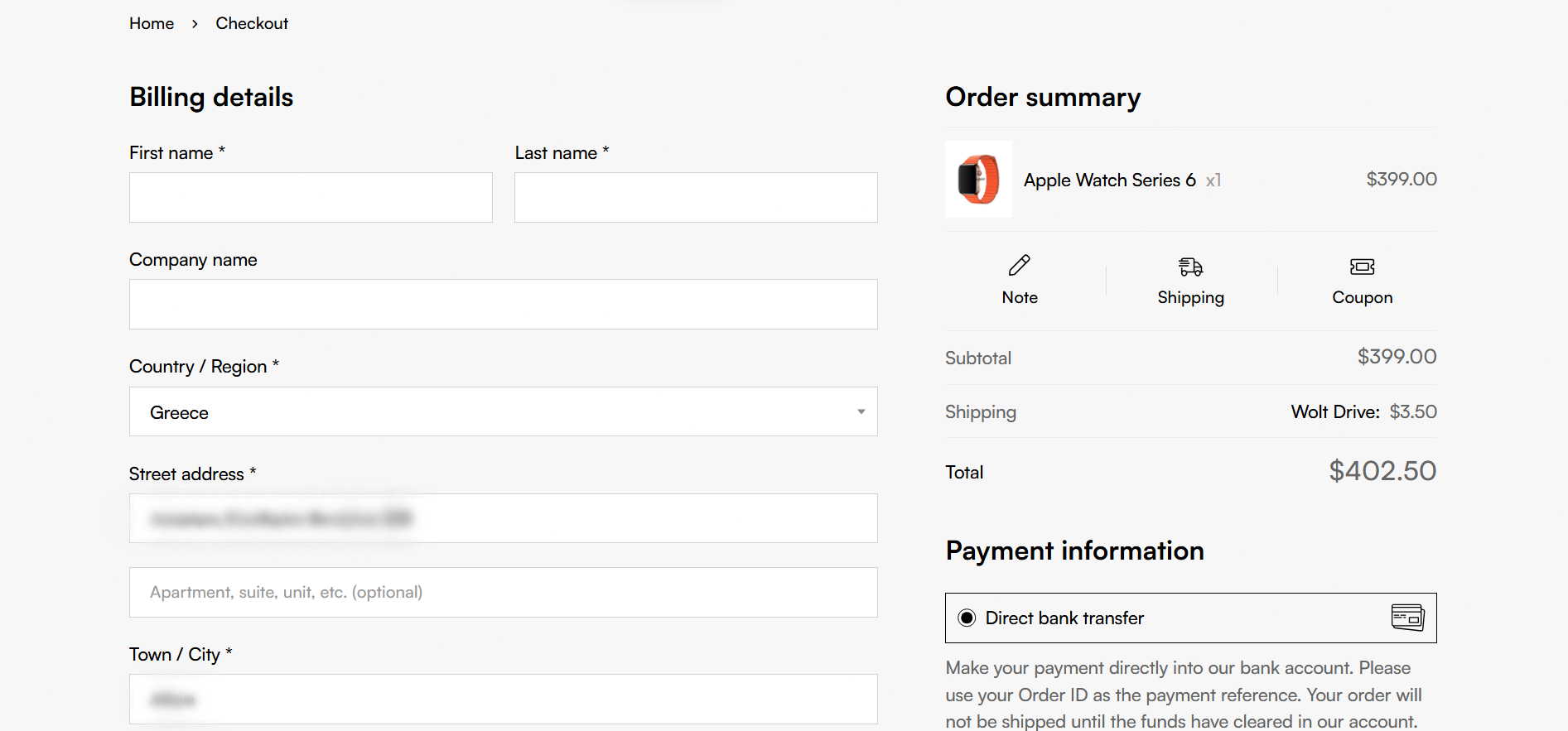
Live Wolt Fee at Checkout

  • Dedicated Wolt Drive shipping method in WooCommerce
  • Uses Wolt’s /delivery-fee endpoint to calculate cost dynamically
  • Pickup address comes from your configured merchant address
  • Optional free delivery threshold based on cart total

Flexible Pricing Logic

  • Use the live Wolt fee as-is for transparent pricing
  • Or define a fixed shipping cost in the method settings
  • Apply standard WooCommerce tax status (taxable / none)
  • Fully compatible with WooCommerce shipping zones

Order Metabox Controls

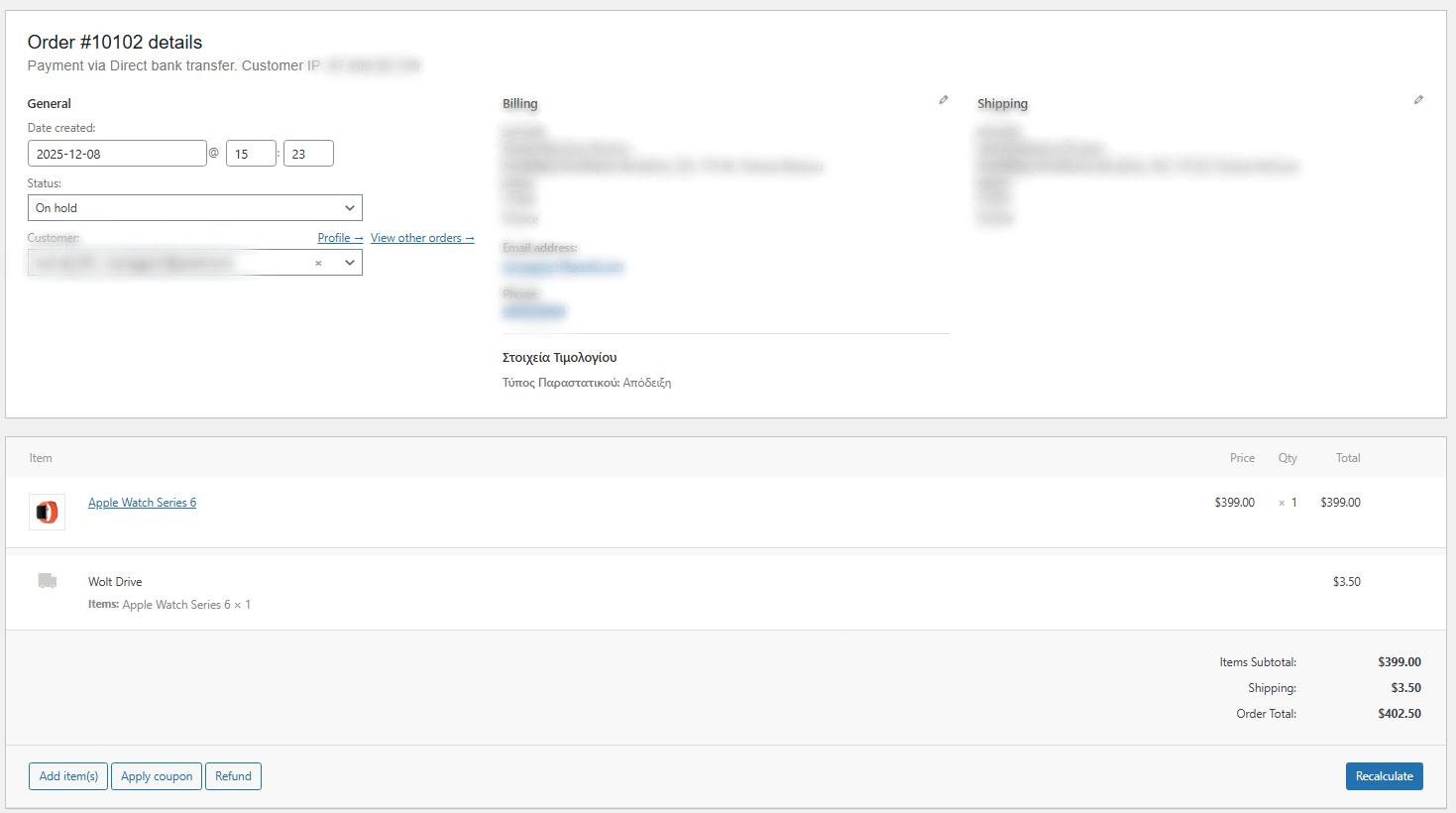
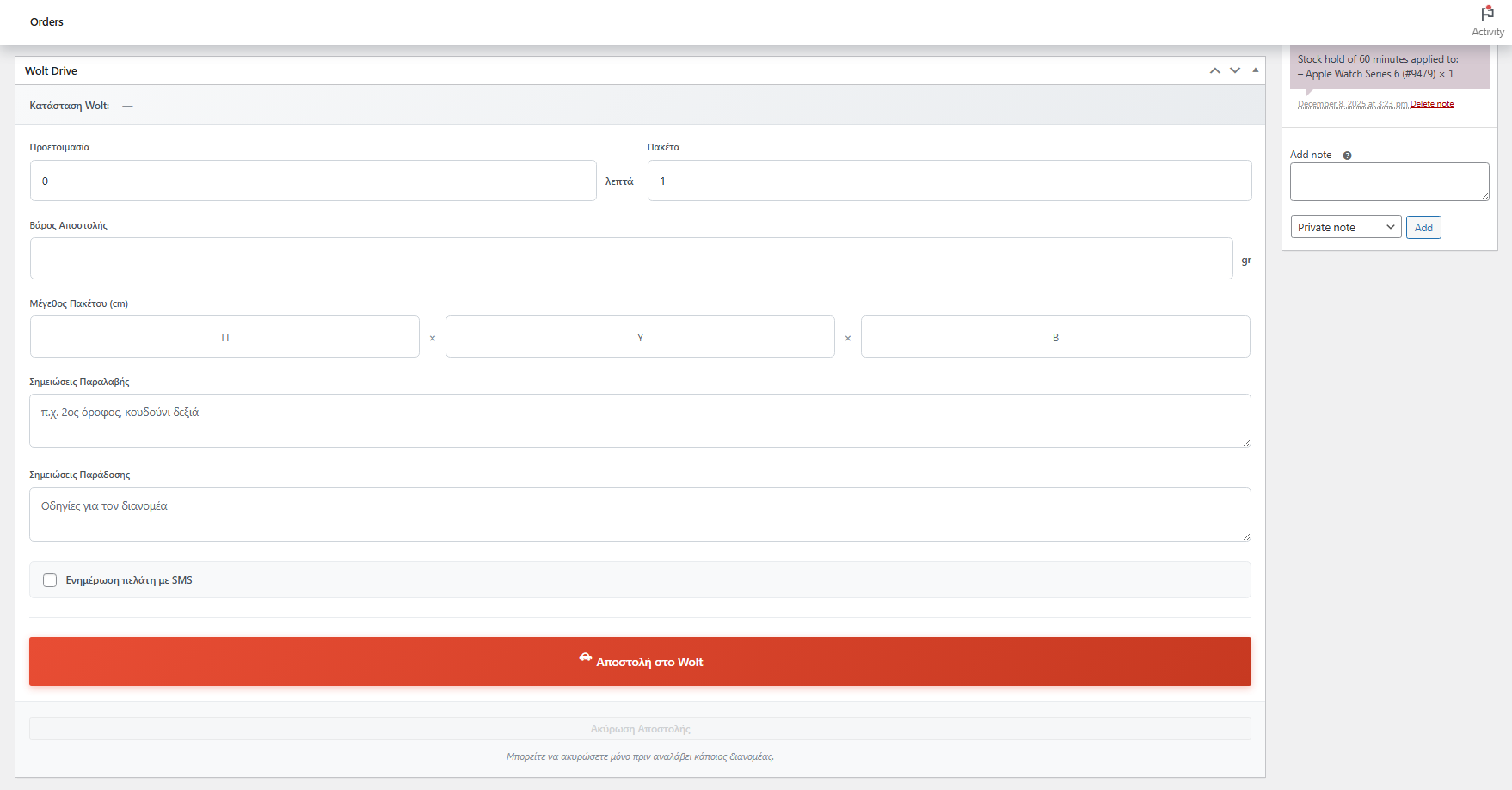
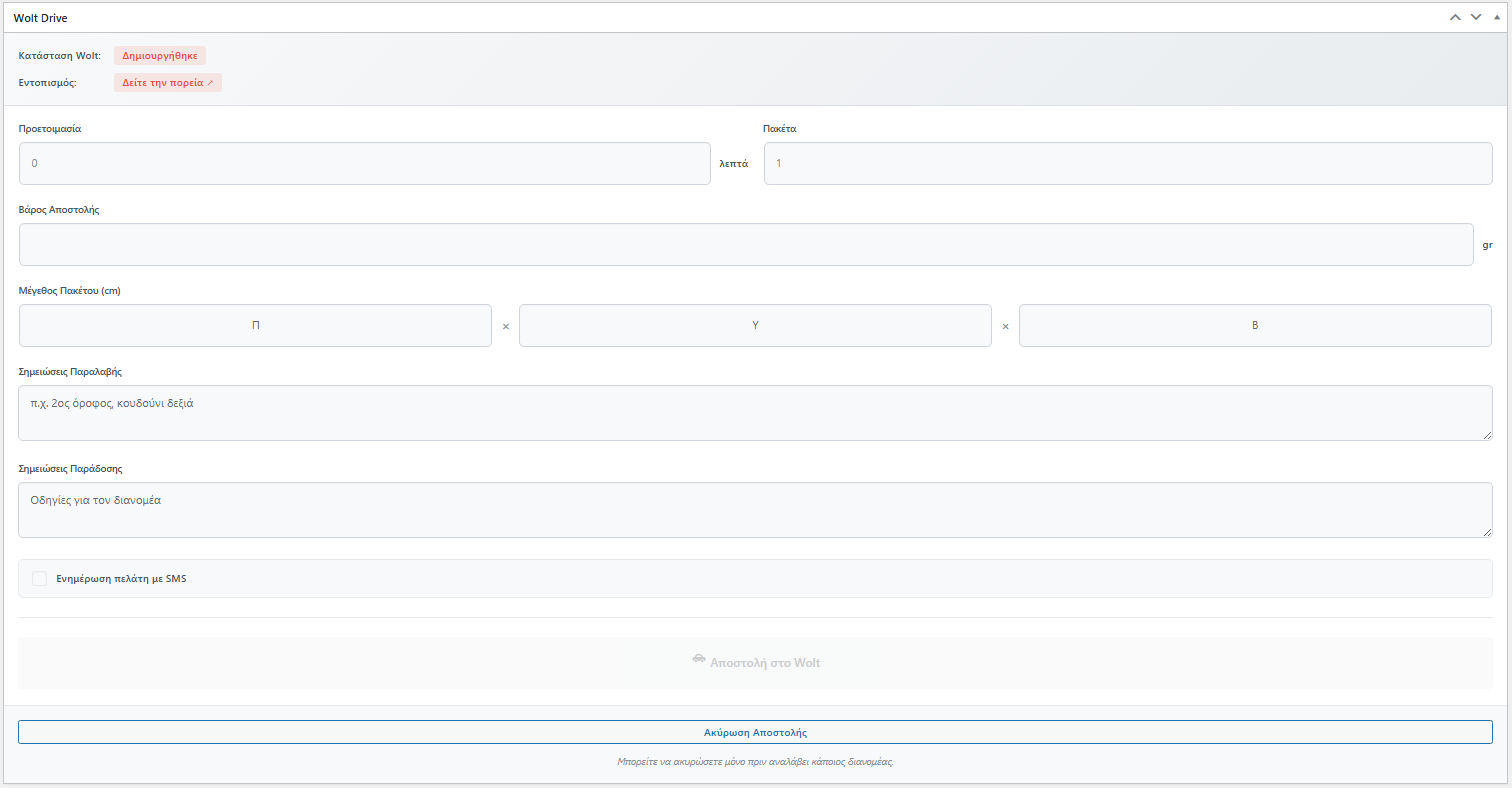
  • Wolt Drive panel in each order with current delivery status
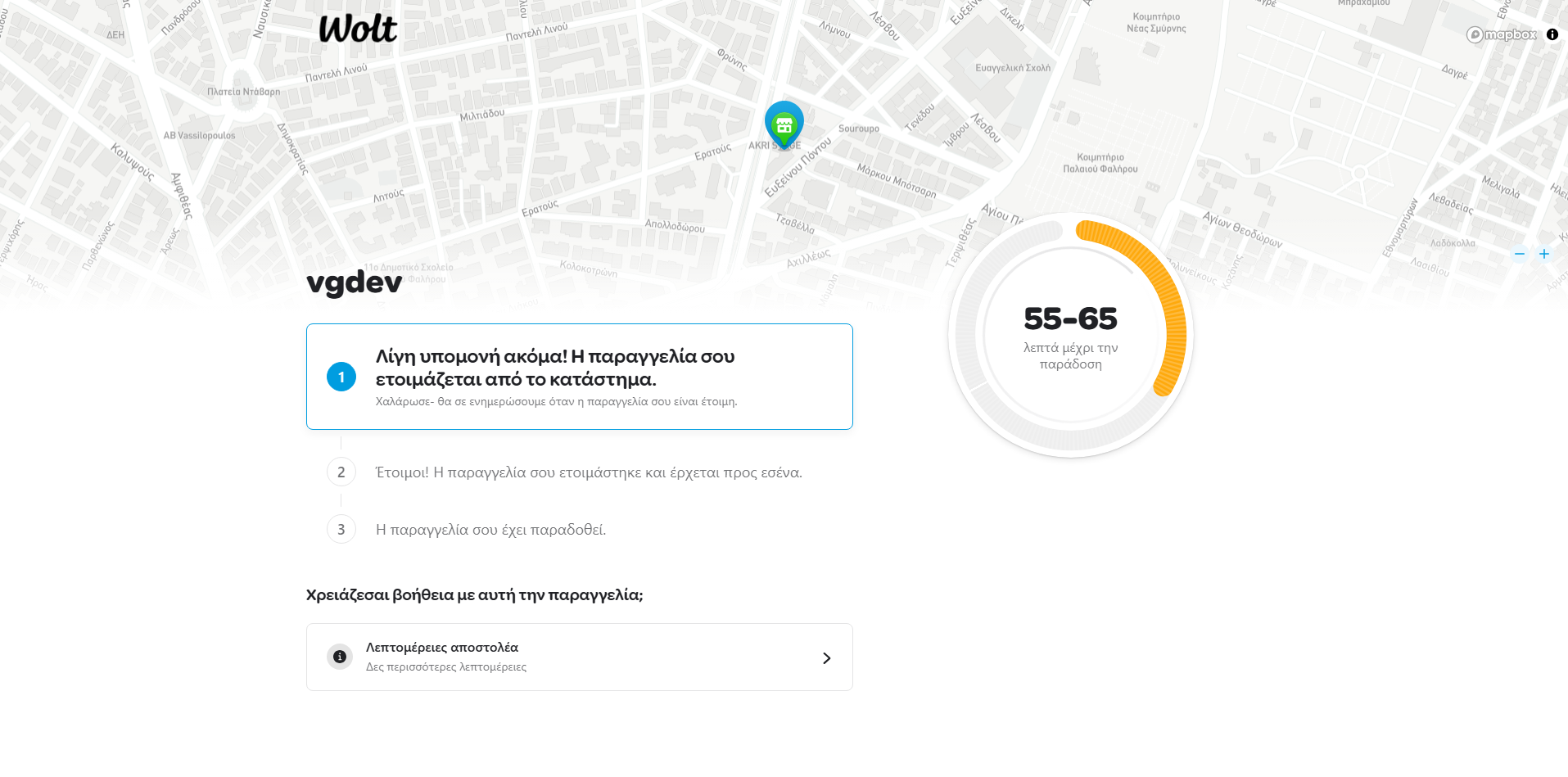
  • See and open the tracking URL directly from the order
  • Edit COD amount, parcels, weight and package dimensions
  • Add pickup/dropoff comments and choose whether to send SMS

Manual Delivery Creation

  • Create Wolt deliveries directly from the WooCommerce order page
  • Works only for orders that used the Wolt Drive shipping method
  • Control when the delivery is sent to Wolt based on your workflow
  • Stores Wolt order reference ID and tracking URL in order meta

Opening Hours Settings:

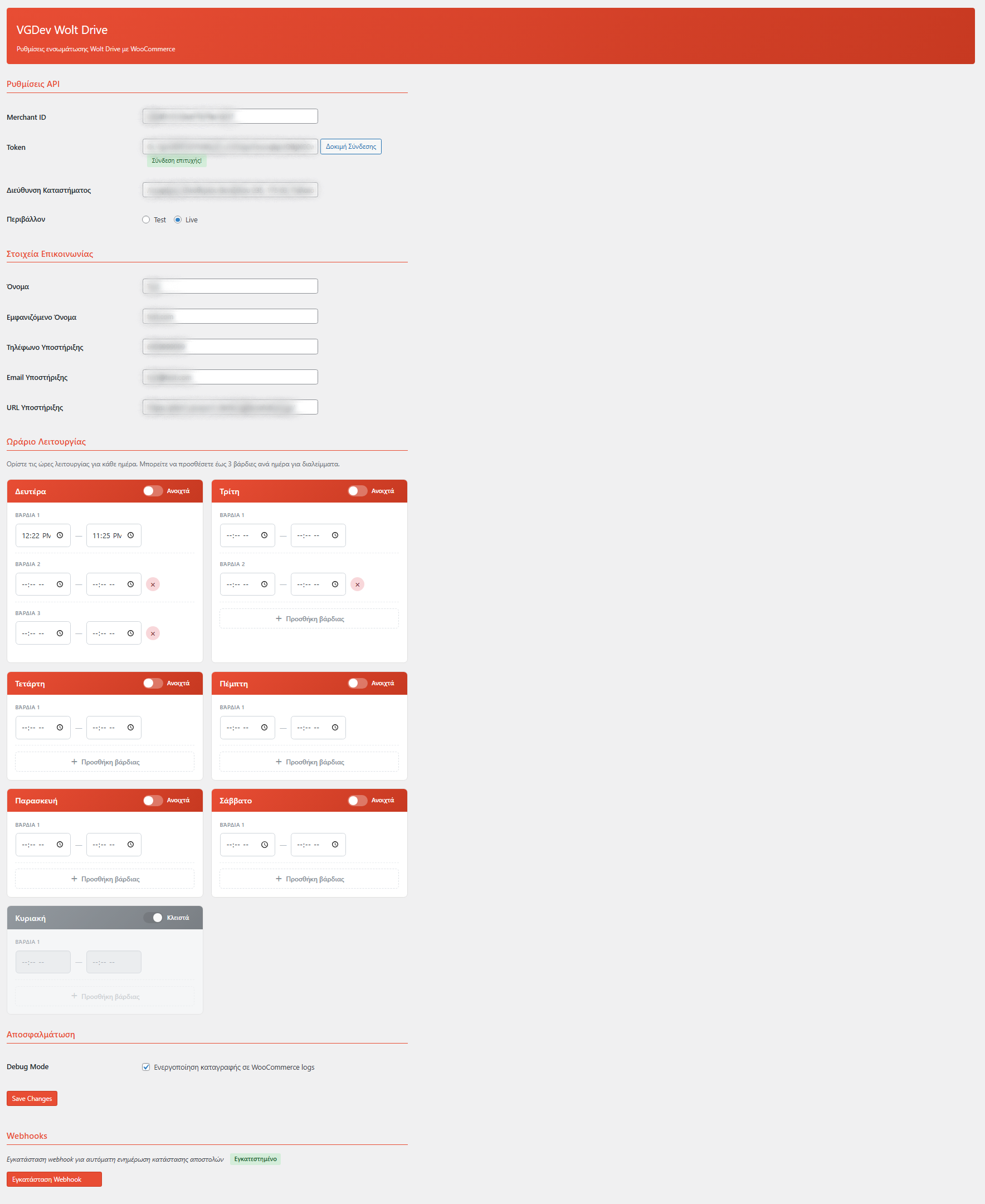
  • In the Wolt Drive settings, define your weekly schedule
  • Mark closed days and set one or two shifts per weekday
  • Specify preparation time in minutes for your team
  • Wolt Drive shipping method automatically hides outside your hours

Webhooks & Status Updates

  • Registers a dedicated REST API endpoint for Wolt webhooks
  • Decodes webhook payload and matches it to the WooCommerce order
  • Updates stored Wolt status when delivery events are received
  • Adds helpful notes in the order timeline for your team

COD & Weight Handling

  • Full support for WooCommerce Cash on Delivery payments
  • Automatically passes the COD amount to Wolt when relevant
  • Calculates weight using real and volumetric product data
  • Converts the final weight to grams as expected by the Wolt API

Tracking in Order View

  • Stores Wolt tracking ID and URL safely in order meta
  • See current Wolt status and tracking link inside the order screen
  • Adds helpful order notes when webhook updates are received
  • No extra clutter in the WooCommerce orders list table

Contact & Customer Support Info

  • Configure pickup contact name and phone for the courier
  • Pass support email, phone and URL to Wolt
  • Ensure customers see the right support details in Wolt’s interface
  • Fine-tune contact display name separately from store name

Test Mode & Debug Logging

  • Toggle between Wolt development and production endpoints
  • Enable debug mode to log API calls via the WooCommerce logger
  • Helpful logs when testing new flows or troubleshooting issues
  • Lightweight, backend-only code with HPOS compatibility

Setup Instructions

  1. Install & Activate the Plugin

    After purchasing the plugin:

    • Go to Plugins > Add New > Upload Plugin
    • Upload the ZIP file and click Install Now
    • Click Activate to enable Wolt Drive for WooCommerce
    • Make sure WooCommerce is installed and active
  2. Activate Your License

    Unlock updates and keep your integration secure:

    • Open the plugin’s License page from the WordPress admin
    • Paste your license key from your purchase email
    • Click Activate License and wait for confirmation
    • Once active, automatic updates will be enabled
  3. Configure Wolt API Credentials

    Connect your store to Wolt Drive:

    API & Merchant Settings:
    • Go to WooCommerce > Settings > Wolt Drive (or the VGDev menu entry)
    • Enter your Wolt Drive Merchant ID
    • Enter your API token (Bearer)
    • Set your merchant pickup address as used by Wolt couriers
    Contact & Support Details:
    • Set pickup contact name and phone number
    • Define customer support email, phone and website URL
    • These details are sent to Wolt in each delivery request
  4. Configure Shipping & Schedule

    Fine-tune how Wolt Drive appears at checkout:

    Shipping Method Settings:
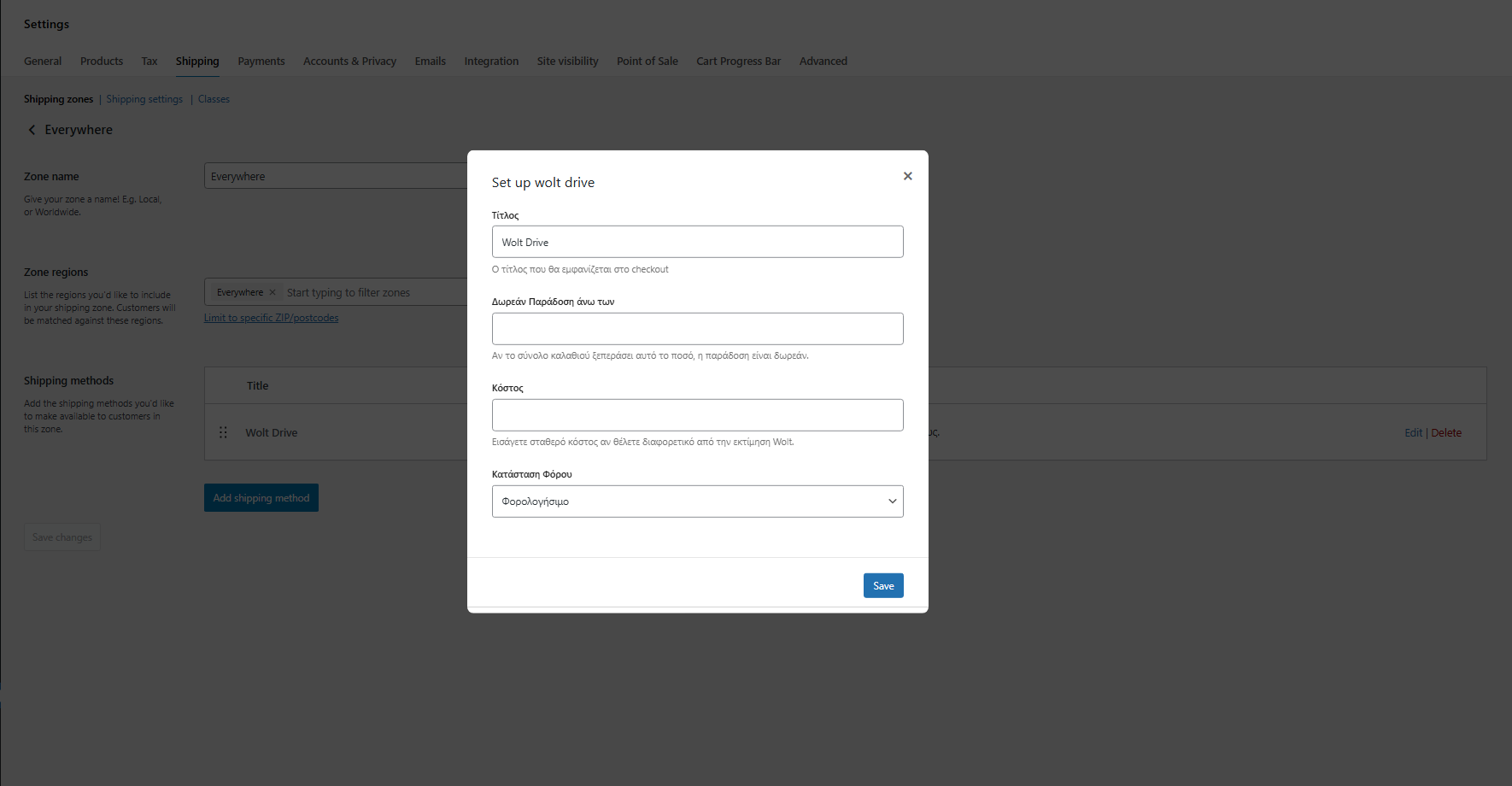
    • Open WooCommerce > Settings > Shipping
    • Edit the zones where Wolt Drive should be available
    • Add or edit the Wolt Drive shipping method
    • Set method title, free-delivery threshold and optional fixed cost
    Opening Hours & Auto-Call:
    • In the Wolt Drive settings, define your weekly schedule
    • Mark closed days and set one or two shifts per weekday
    • Specify preparation time in minutes
    • Enable automatic courier call on checkout if desired
  5. Create Your First Wolt Delivery

    Test the full flow end-to-end:

    • Place a test order using the Wolt Drive shipping method
    • Open the order in WooCommerce and review the Wolt panel
    • Adjust COD amount, weight, dimensions or comments if needed
    • Click Create Wolt Delivery to send it to Wolt Drive
    • Confirm that Wolt returns a reference ID and tracking link

How It Works

For Store Owners:

  1. Customer places an order and selects Wolt Drive at checkout.
  2. The plugin gets the live delivery fee from Wolt based on your pickup and the customer address.
  3. After payment, you open the order in WooCommerce and create the Wolt delivery from the Wolt Drive metabox.
  4. Wolt Drive returns a merchant reference ID and tracking URL which are stored on the order.
  5. Couriers pick up from your configured merchant address and deliver to the customer.
  6. Webhook events from Wolt update the stored Wolt status and add notes to the WooCommerce order.
  7. Your support team can see status and tracking information inside the order screen.

For Cancellations:

  • If the customer cancels or details change, open the order.
  • Use the Cancel delivery button in the Wolt Drive metabox.
  • The plugin calls Wolt’s cancellation endpoint with a clear reason.
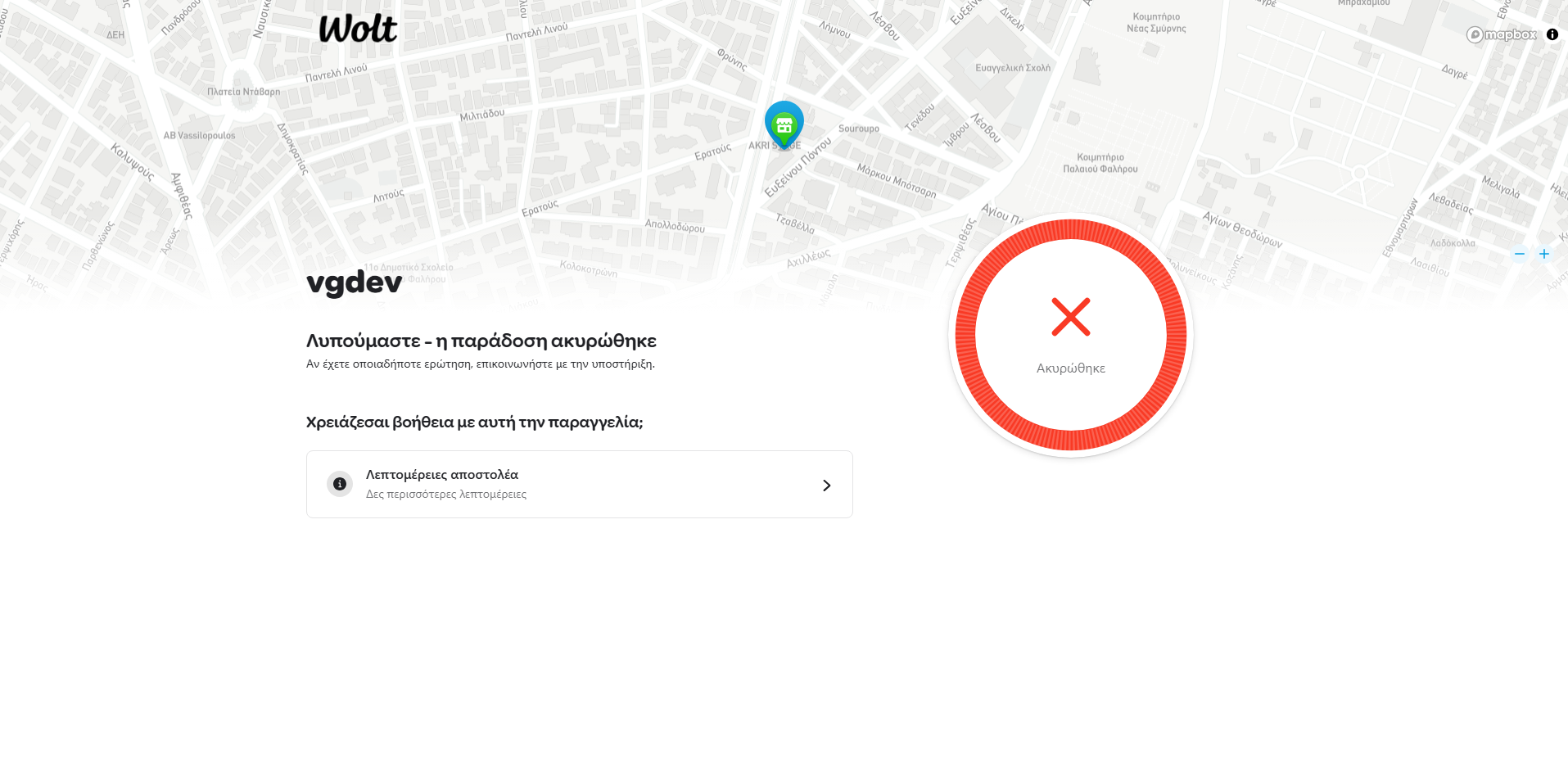
  • Order metadata is updated so you know the Wolt delivery has been cancelled.

Why Choose Wolt Drive for WooCommerce?

  • Live Pricing – Use Wolt’s real delivery-fee estimation instead of guesswork.
  • On-Demand Delivery – Trigger same-day, city-level deliveries with a few clicks.
  • Full Order Integration – Control Wolt deliveries directly from WooCommerce orders.
  • Accurate Weight Handling – Combines real and volumetric weight for realistic pricing.
  • COD Ready – Automatically passes Cash on Delivery amounts where needed.
  • Webhook Sync – Keep order notes and status in sync with Wolt events.
  • Schedule-Aware – Wolt Drive shipping method follows your defined opening hours.
  • HPOS Compatible – Fully compatible with WooCommerce High-Performance Order Storage.
  • Developer-Friendly Debug – Optional logging via WooCommerce logger for API calls.

Perfect For

  • Local WooCommerce Stores – Shops that want instant, on-demand city deliveries.
  • Food, Coffee, Grocery & Dark Stores – Businesses already using or adopting Wolt Drive.
  • Express Retail – Pharmacies, convenience stores and any fast-delivery operation.
  • COD-Based Businesses – Stores relying on cash payments on delivery.
  • Support-Heavy Teams – Shops that need clear tracking and status inside WooCommerce.

System Requirements

  • WordPress 5.0 or higher
  • WooCommerce 5.0 or higher (HPOS support included)
  • PHP 7.4 or higher
  • Active Wolt Drive merchant account
  • Valid Wolt Drive API credentials (Merchant ID & token)
  • Wolt Drive availability in your store’s service area

Connect Your Store with Wolt Drive Today

Wolt Drive for WooCommerce gives you live delivery-fee calculations, automated courier calls and webhook-powered status syncing — so you can manage on-demand deliveries without ever leaving your WooCommerce dashboard.

Questions

Does this plugin work with any Wolt account?

No. The plugin is built specifically for the official Wolt Drive (Delivery-as-a-Service) API. You need an active Wolt Drive merchant account with API access (Merchant ID and token). It does not connect to standard Wolt Food / restaurant accounts.

Can customers choose an exact delivery time slot?

At the moment, the plugin uses a global preparation time in minutes and sends the job to Wolt Drive immediately when you (or auto-call) create the delivery. There is no separate time-slot selector on the checkout page; timing is handled by Wolt based on your preparation time and courier availability.

Does the plugin create shipping labels or PDFs?

No. Wolt Drive is a fully digital courier solution, so there are no classic shipping labels to print. The plugin focuses on creating/cancelling deliveries, passing order data and exposing Wolt’s tracking URL and status inside WooCommerce.

What happens if the Wolt API cannot calculate the delivery fee?

If the fee request fails (for example, invalid address or API/network error), the plugin safely stops and the Wolt Drive shipping method may not be offered for that checkout. You can enable debug mode to log the Wolt API responses via the WooCommerce logger and see exactly what went wrong.

Is Wolt Drive for WooCommerce compatible with HPOS and other plugins?

Yes. The plugin is built with WooCommerce High-Performance Order Storage (HPOS) in mind and uses standard WooCommerce APIs, so it works alongside most payment gateways, checkout customizations and admin tools. As always, it’s recommended to test on a staging site if you have a heavily customized setup.

Reviews

{{ reviewsTotal }}{{ options.labels.singularReviewCountLabel }}
{{ reviewsTotal }}{{ options.labels.pluralReviewCountLabel }}
{{ options.labels.newReviewButton }}
{{ userData.canReview.message }}
Wolt Drive for WooCommerce 40.00 Buy Now