Version1.0.0
Requires WP5.8
Tested up to6.8
Slugwoocommerce-skroutz-bestprice-xml-feed
Changelog
  • Initial release
Skroutz & BestPrice XML Feed for WooCommerce

Skroutz & BestPrice XML Feed for WooCommerce

Skroutz & BestPrice XML Feed for WooCommerce generates fully compatible, auto-updating XML feeds for the leading Greek price comparison engines. Choose which products to include, fine-tune prices and availability, and keep your listings always in sync without heavy marketplace plugins.

20.00

Lifetime License + Lifetime Updates

14-day money-back guarantee
Pay securely with Visa Mastercard American Express Discover Klarna Revolut Pay

Want more than one plugin? Your discount is applied automatically in the cart:

  • With 2 premium plugins in your cart → 10% off both

  • With 3 premium plugins15% off all of them

  • With 4 or more premium plugins20% off your plugins

Free plugins do not count towards the bundle and are not discounted.
The discount is applied automatically in the cart and at checkout, no coupon needed.

Frequently bought together

Pick what you like and add them to your cart in one click.

Do you think something is missing from this plugin?

Request a feature

Need a different customization on your website?

Submit a customization request

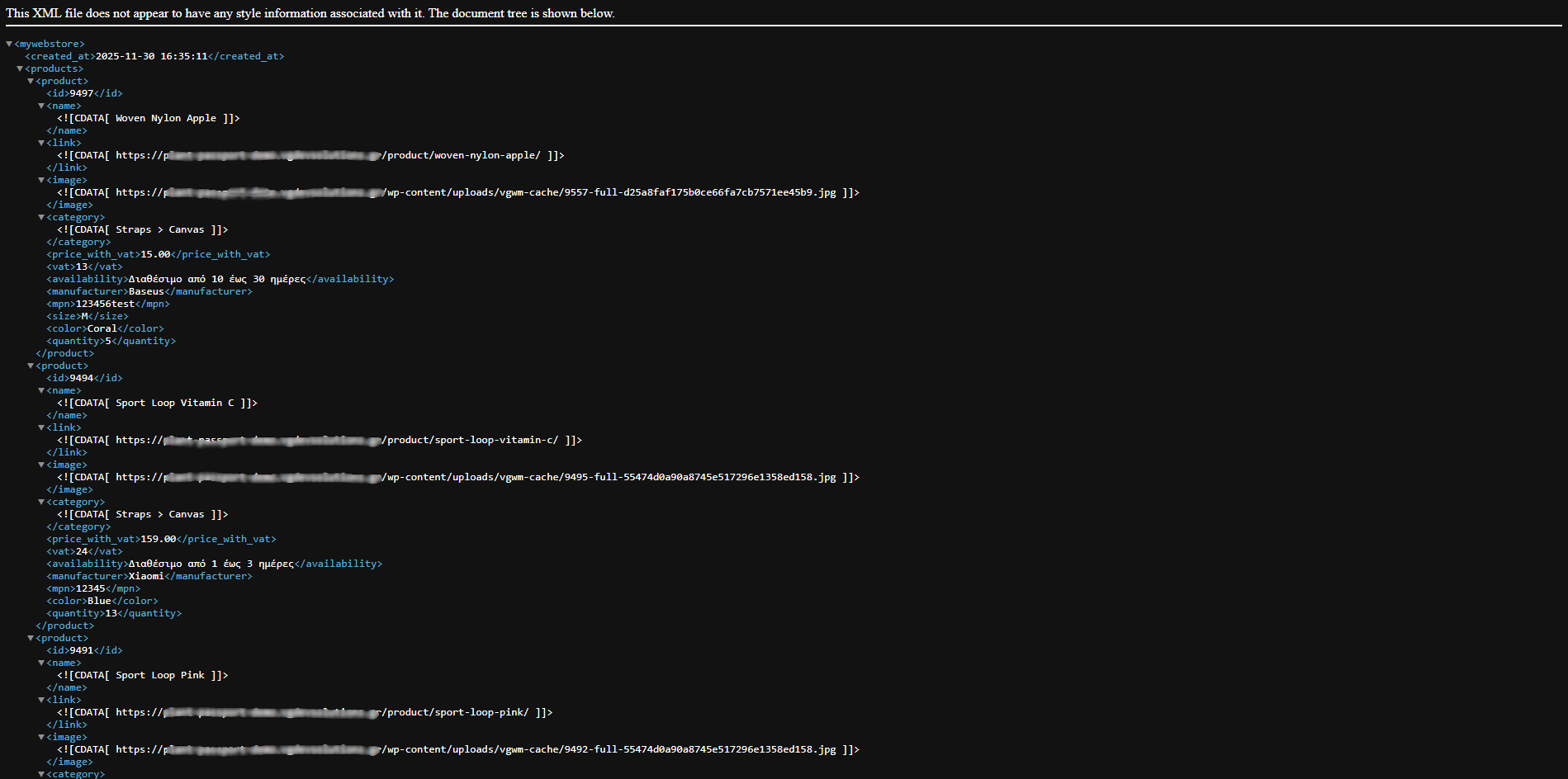
Skroutz & BestPrice XML Feed for WooCommerce is a premium feed generator that sends your WooCommerce products to the two most popular Greek price comparison engines with clean, fully compatible XML feeds. Create separate feeds for Skroutz and BestPrice, control exactly which products are exported, and keep prices, stock and availability in sync with automatic updates. No bloated marketplace plugins, no custom coding – just fast, reliable XML feeds tailored to the official specifications.

Key Features

Dedicated Feeds for Skroutz & BestPrice

  • Separate XML feed URLs for Skroutz and BestPrice
  • Each feed follows the specific fields and structure required by the platform
  • Compatible with simple and variable WooCommerce products
  • Ready to paste into your Skroutz / BestPrice merchant panel

Flexible Product Filtering

  • Include or exclude products by category, tag, or individual product
  • Skip out-of-stock products or export them with custom availability status
  • Option to export only in-stock, only on-sale, or all visible catalog products
  • Hide products that are set to “hidden” or “catalog only” in WooCommerce

Accurate Pricing & Stock Data

  • Exports WooCommerce regular and sale prices correctly
  • Supports price including or excluding VAT, based on your store configuration
  • Stock quantities and availability are synced on each feed refresh
  • Supports backorders and pre-order messaging through availability fields

Category & Brand Mapping

  • Map your WooCommerce categories to Skroutz / BestPrice categories
  • Send brand information from product attributes or custom fields
  • Include MPN, EAN/Barcode and SKU where available
  • Clean titles and descriptions optimised for price comparison listings

Shipping & Availability Fields

  • Configure default shipping cost and delivery time for each feed
  • Optional free shipping rules based on order amount
  • Custom availability messages (e.g. “In stock”, “1–3 days”, “Pre-order”)
  • Support for multiple shipping zones through simple settings

Automatic Updates & Scheduling

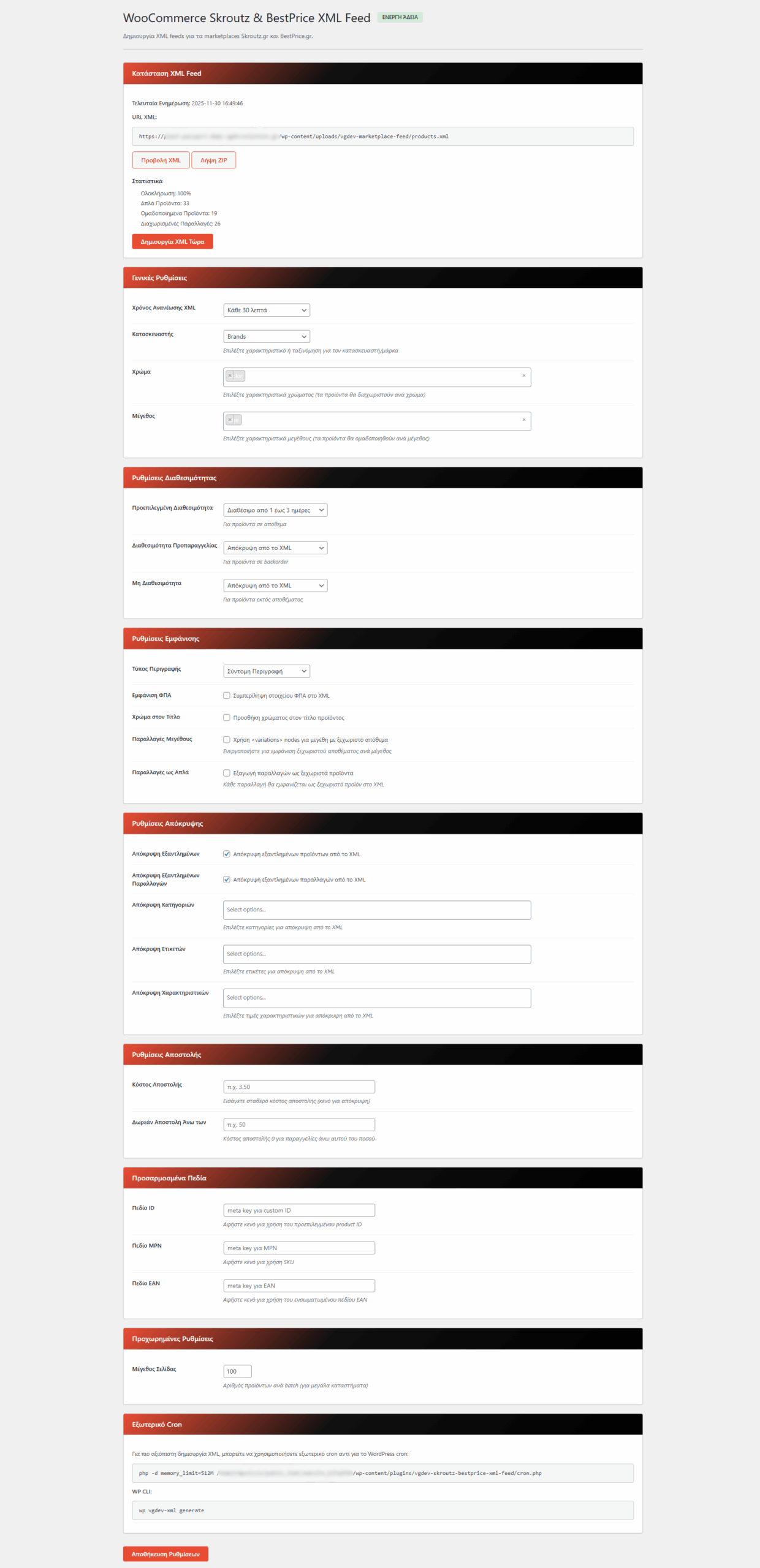
  • Feeds can be refreshed automatically via WordPress cron
  • Choose the update frequency that matches your store activity
  • Manual “Regenerate Now” button for instant refresh after big changes
  • Optimised generation so you can safely handle thousands of products

Performance-Focused Architecture

  • Streamed XML output to avoid timeouts on large catalogues
  • Lightweight plugin that doesn’t slow down the frontend
  • Respects WooCommerce product visibility and status filters
  • Works nicely alongside caching and optimisation plugins

Developer-Friendly & Extensible

  • WordPress hooks and filters for advanced customisation
  • Ability to adjust or add custom XML fields programmatically
  • Clean, readable codebase built following WordPress standards
  • Ideal foundation if you need to extend feeds for custom marketplaces

Setup Instructions

  1. Install & Activate the Plugin

    After you purchase the plugin:

    • Go to Plugins > Add New > Upload Plugin in your WordPress dashboard
    • Upload the ZIP file you received and click Install Now
    • Click Activate to enable Skroutz & BestPrice XML Feed for WooCommerce
    • Ensure WooCommerce is already active on your site
  2. Activate Your License

    Unlock automatic updates and premium features:

    • Navigate to the plugin’s License tab in your WordPress admin
    • Paste the license key you received after purchase
    • Click Activate License and wait for the success message
    • Once activated, feed settings and generation will be fully available
  3. Configure the Skroutz Feed

    Set up all Skroutz-specific options:

    Skroutz Core Settings:
    • Enable the Skroutz XML feed toggle
    • Choose which product statuses should be exported (published only, etc.)
    • Define price behaviour (including or excluding tax)
    • Set default shipping cost and delivery time text
    • Choose which attribute or field represents the brand/manufacturer
    Category & Product Selection:
    • Select which WooCommerce categories should be visible on Skroutz
    • Optionally exclude individual products (e.g. bundles, hidden SKUs)
    • Map your categories to Skroutz categories where needed
    • Save your settings and note the generated Skroutz feed URL
  4. Configure the BestPrice Feed

    Repeat the process for BestPrice with its own dedicated settings:

    BestPrice Core Settings:
    • Enable the BestPrice XML feed toggle
    • Choose which products to include (e.g. specific categories or tags only)
    • Set default shipping and availability fields as required
    • Map optional identifiers like MPN and EAN/Barcode
    Fine-Tune Feed Content:
    • Use built-in filters to skip out-of-stock items or export them as “Out of stock”
    • Clean long product titles or descriptions with provided options
    • Save your settings and note the generated BestPrice feed URL
  5. Set Product Filters & Scheduling

    Control how and when your feeds refresh:

    • Choose whether to include products that are on sale only or all products
    • Enable automatic feed regeneration using WordPress scheduled tasks
    • Select refresh interval (e.g. every hour, every 3 hours, twice per day)
    • Use the Generate Now button after large price or stock changes
  6. Connect to Skroutz & BestPrice

    Finish the integration from your merchant accounts:

    • Copy the Skroutz feed URL from the plugin settings
    • Paste it into your Skroutz merchant panel where the XML URL is requested
    • Repeat the same for the BestPrice feed URL
    • Request a feed refresh and check that all products are imported correctly

How It Works

Feed Generation Process:

  1. You configure which products, categories and fields should be exported
  2. Skroutz & BestPrice XML Feed for WooCommerce builds an optimised product query
  3. For each product, the plugin collects price, stock, brand, identifiers and images
  4. Values are mapped into the correct XML tags for Skroutz or BestPrice
  5. The XML is streamed to the browser or crawler through a clean feed URL
  6. When platforms request the URL, they always see the latest product information
  7. Automatic scheduling ensures your feeds stay in sync without manual exports

Automatic Updates & Caching:

  • Feeds can be regenerated periodically via WordPress cron
  • Heavy operations are optimised to avoid timeouts on large stores
  • Compatible with most caching setups – feeds can be excluded if needed
  • Changes in price, stock or product visibility are reflected on the next refresh

Customisation via Hooks:

The plugin provides actions and filters so developers can adjust the feed when needed:

  • Modify product titles or descriptions before they are added to XML
  • Inject additional custom fields or attributes as custom tags
  • Exclude or include products based on complex business logic
  • Adapt the feed for edge-case themes or custom WooCommerce setups

Why Choose Skroutz & BestPrice XML Feed for WooCommerce?

  • Focused on Greek Marketplaces – Built specifically for Skroutz and BestPrice instead of generic “one size fits all” feeds.
  • Clean, Compatible XML – Follows the platforms’ specifications so your products are more likely to be approved quickly.
  • Precise Product Control – Decide exactly what goes to each channel without touching your core catalog.
  • Always Up to Date – Automatic refresh and scheduling keep prices and stock in sync with your WooCommerce store.
  • Performance-Friendly – Optimised queries and streaming output mean it can handle large catalogs without crashing.
  • Developer Ready – Hooks and filters make it easy to extend and adapt for custom workflows.
  • No Vendor Lock-In – Feeds are generated directly from WooCommerce; deactivate anytime without breaking your store.
  • Professional Support – Get help from a developer who understands both WooCommerce and Greek price comparison engines.

Perfect For

  • Greek WooCommerce Stores – Any shop that wants to increase sales via Skroutz and BestPrice listings.
  • Electronics & Tech Stores – Where price comparison traffic is critical for conversions.
  • Fashion & Footwear Shops – Export hundreds of SKUs and variations without manual work.
  • Home, Furniture & Decor – Promote high-value products on multiple channels with consistent pricing.
  • Multi-Brand Retailers – Where clean brand, category and attribute mapping really matters.
  • Agencies & Freelancers – Manage feeds for multiple WooCommerce clients from a simple, predictable interface.

System Requirements

  • WordPress 5.0 or higher
  • WooCommerce 4.0 or higher (must be active)
  • PHP 7.4 or higher
  • Basic Skroutz / BestPrice merchant accounts with access to XML feed settings

Send Your Products to Skroutz & BestPrice in Minutes

The Skroutz & BestPrice XML Feed for WooCommerce plugin gives you clean, automatic XML feeds, powerful filtering and performance-friendly generation. Connect your WooCommerce store to the biggest Greek price comparison engines and keep your listings perfectly in sync with your catalog.

Questions

Does this plugin modify my products or prices in WooCommerce?

No. The plugin only reads your existing WooCommerce data and outputs it as XML. It never edits your products, prices, stock, or categories in the database.
Can I control which products are included in each feed?

Yes. You can include or exclude products by category, tag, or specific product, and you can choose to skip out-of-stock items or only export on-sale products if you prefer.

Is it compatible with variable products and their variations?

Yes. The plugin supports both simple and variable products. It can export the correct prices and stock for each product based on your WooCommerce configuration for variations.

How often are the Skroutz and BestPrice feeds refreshed?

You can configure automatic feed regeneration using WordPress cron (for example every hour or a few times per day) and you can also trigger a manual regeneration whenever you change prices, stock or product visibility.

Do I need any custom coding to connect my store to Skroutz and BestPrice?

No. The plugin generates ready-to-use XML feed URLs. You simply paste each URL into the corresponding field inside your Skroutz and BestPrice merchant accounts and request a feed refresh.

Reviews

{{ reviewsTotal }}{{ options.labels.singularReviewCountLabel }}
{{ reviewsTotal }}{{ options.labels.pluralReviewCountLabel }}
{{ options.labels.newReviewButton }}
{{ userData.canReview.message }}
Skroutz & BestPrice XML Feed for WooCommerce 20.00 Buy Now