Version1.0.0
Requires WP6.0
Tested up to6.8
Slugshipping-fees-by-state-location-for-woocommerce
Changelog
  • Initial release
Shipping Fees by State & Location for WooCommerce

Shipping Fees by State & Location for WooCommerce

Shipping Fees by State & Location for WooCommerce – Add dynamic location-based shipping fees with intelligent “Free over €X” thresholds. Configure per-location fees within states, automatic free shipping when cart totals exceed limits, and AJAX-powered location dropdowns at checkout. Perfect for regional businesses with tiered delivery zones. Classic checkout only – not compatible with WooCommerce Blocks.

30.00

Lifetime License + Lifetime Updates

14-day money-back guarantee
Pay securely with Visa Mastercard American Express Discover Klarna Revolut Pay

Want more than one plugin? Your discount is applied automatically in the cart:

  • With 2 premium plugins in your cart → 10% off both

  • With 3 premium plugins15% off all of them

  • With 4 or more premium plugins20% off your plugins

Free plugins do not count towards the bundle and are not discounted.
The discount is applied automatically in the cart and at checkout, no coupon needed.

Do you think something is missing from this plugin?

Request a feature

Need a different customization on your website?

Submit a customization request

Shipping Fees by State & Location for WooCommerce is a premium location-based shipping fee management plugin that adds dynamic location dropdowns to your checkout based on selected states. Configure per-location shipping fees and intelligent "Free over €X" thresholds (per location or globally) to automatically convert shipping methods to free shipping when cart totals exceed limits. Perfect for businesses with regional delivery zones, tiered shipping costs, and location-specific free shipping promotions!

⚠️ Important: This plugin works exclusively with the classic WooCommerce checkout shortcode [woocommerce_checkout]. It is not compatible with WooCommerce Checkout Blocks.

Key Features

State-Based Location Management

  • Configure locations within each state/region
  • Individual fee per location (e.g., Athens +€3, Piraeus +€5)
  • Per-location "Free over €X" threshold
  • Unlimited locations per state

Smart Free Shipping System

  • Per-location threshold: "Free over €50 for Athens"
  • Global fallback threshold for locations without specific limit
  • Automatic shipping method relabeling to "Free Shipping"
  • Preserves original shipping method, just removes cost

Dynamic Checkout Location Field

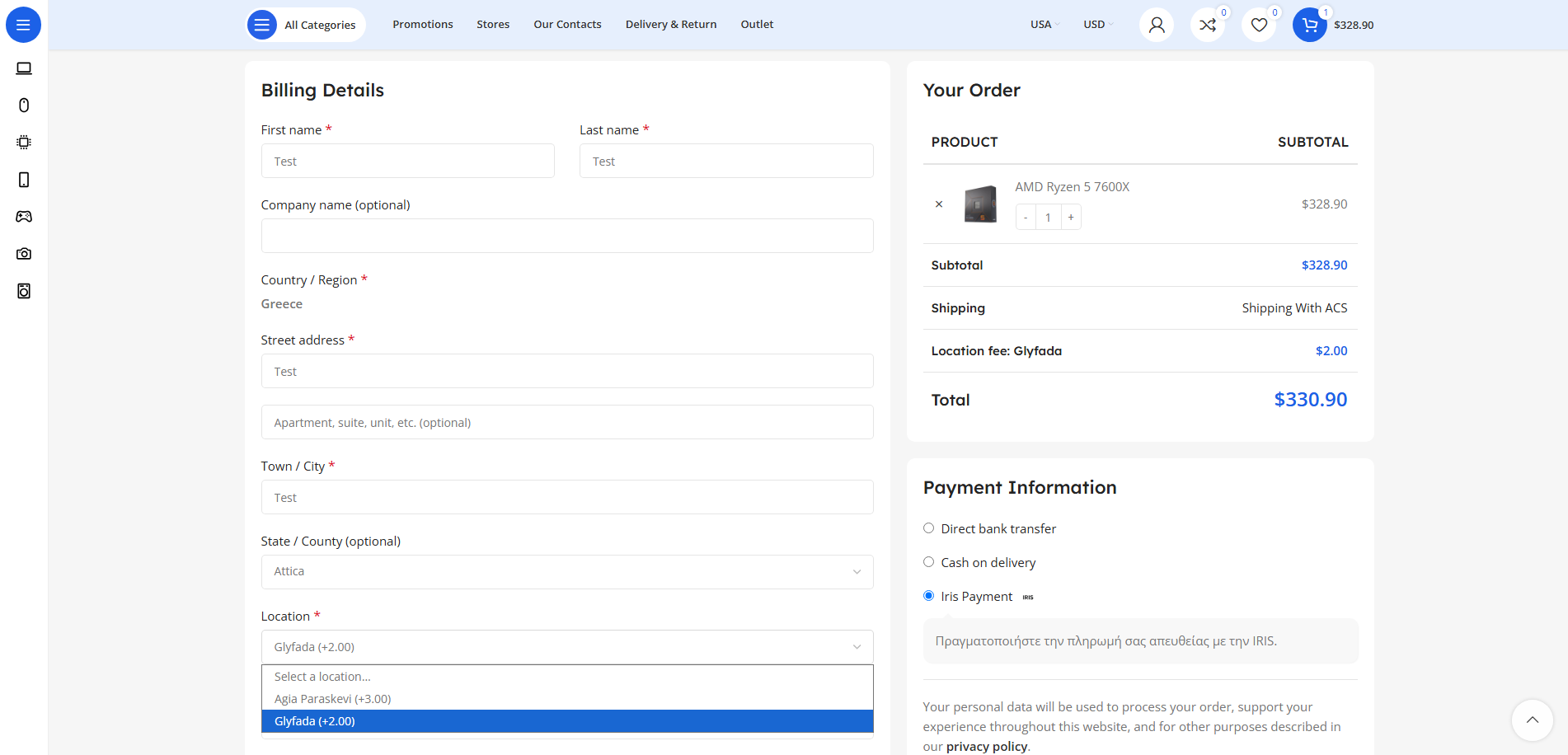
  • AJAX-powered location dropdown appears after state selection
  • Shows location name with fee and threshold in dropdown
  • Auto-populates based on customer's selected state
  • Optional required validation for location selection

State Restriction & Auto-Select

  • Limit visible states at checkout to your service areas
  • Automatic state selection when only one state available
  • Configurable per target country (e.g., Greece, Cyprus, etc.)
  • Visual pill-based state selection in admin

Shipping Method Integration

  • Select which shipping methods apply location fees
  • Organized by WooCommerce shipping zones
  • Works with flat rate, local pickup, and custom methods
  • Multiple methods can be configured simultaneously

Comprehensive Order Integration

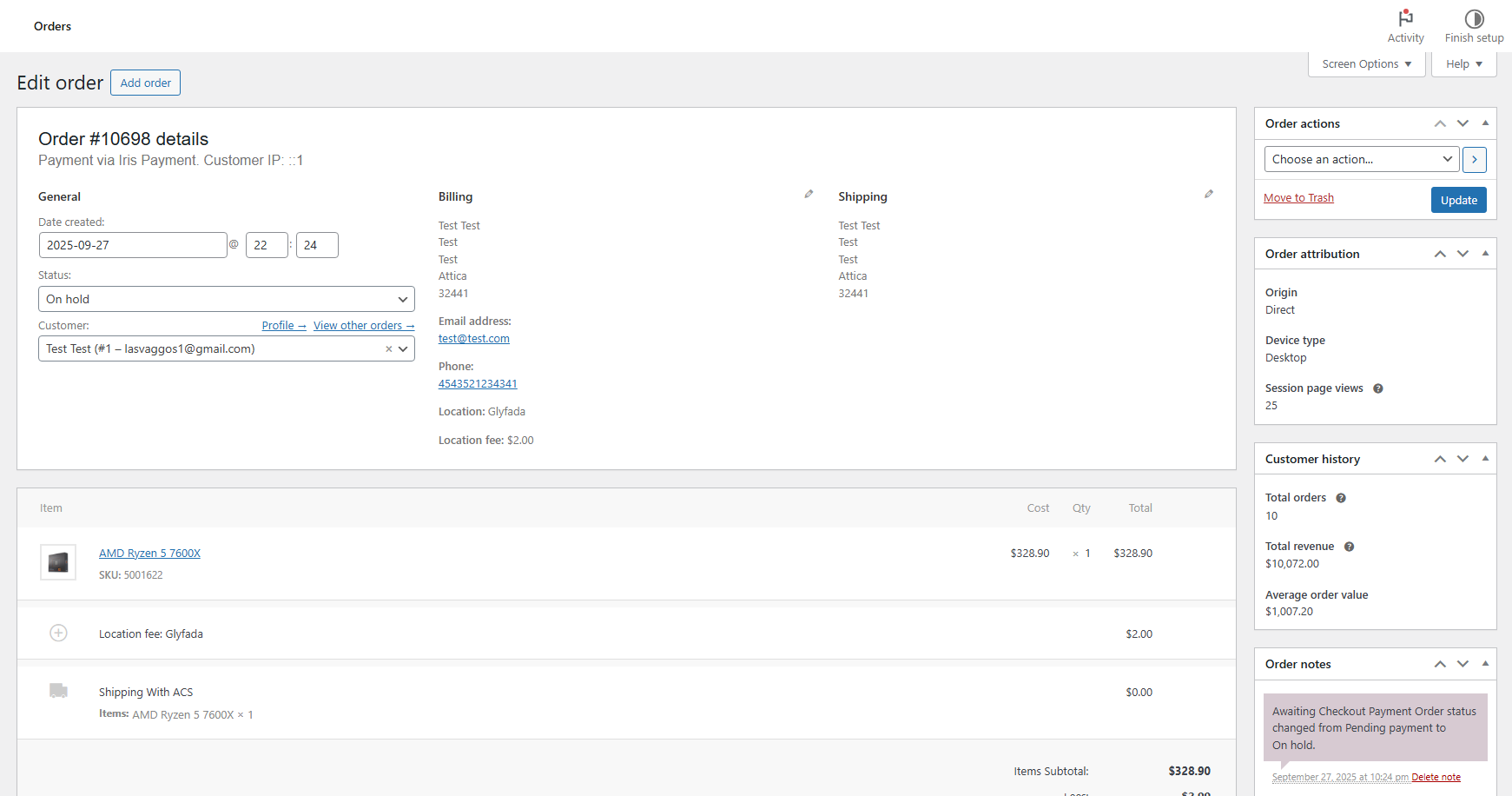
  • Location and fee stored in order metadata
  • Admin order details display selected location and cost
  • Location info included in order confirmation emails
  • HPOS (High-Performance Order Storage) compatible

Fully Multilingual

  • Complete WPML integration with string translation
  • Polylang support for multilingual stores
  • All labels, location names, and messages translatable
  • Automatic registration of dynamic strings

Customizable Labels & Text

  • Customize location field label (default: "Location")
  • Configure fee prefix (default: "Location fee")
  • Set free shipping label (default: "Free Shipping")
  • All text registered for translation systems

Setup Instructions

  1. Install & Activate License

    After purchasing and installing the plugin:

    • Upload to /wp-content/plugins/shipping-fees-by-state-location-for-woocommerce/
    • Activate through the WordPress Plugins menu
    • Navigate to Settings > License to activate your license key
    • All features are license-gated and require valid activation
  2. Configure Target Country & States

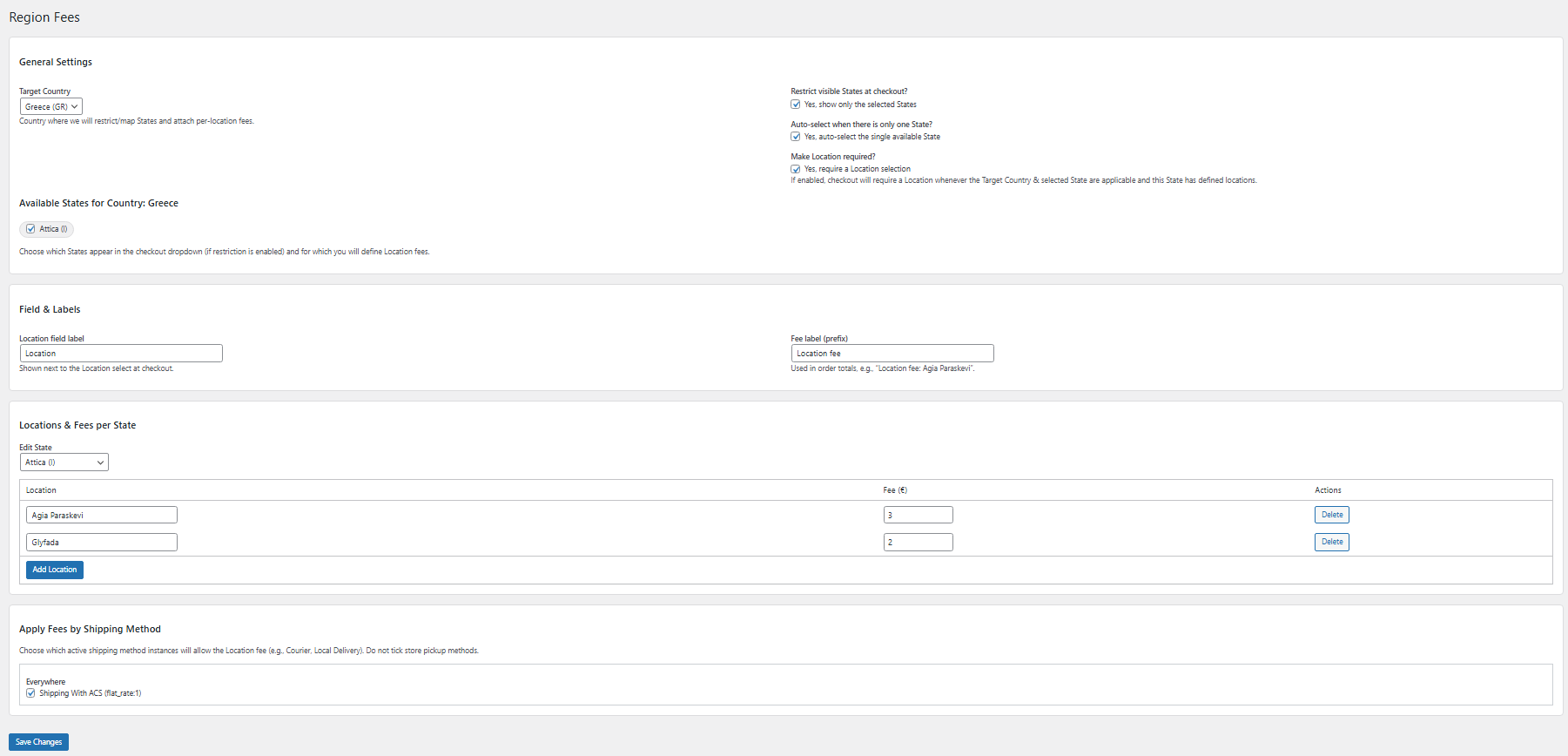
    Go to VGDEVsolutions > Region Fees settings:

    General Settings:
    • Target Country: Select the country where you offer location-based fees (default: Greece)
    • Restrict States: Check to show only selected states at checkout
    • Auto-select State: Automatically select when only one state is available
    • Make Location Required: Force customers to select a location before checkout
    Select Available States:
    • View all states/regions for your selected country
    • Check the states where you offer location-specific delivery
    • Only checked states will show locations configuration
    • Visual pill-based interface for easy selection
  3. Configure Labels & Global Threshold

    Customize the text displayed to customers:

    Label Configuration:
    • Location field label: Text for the location dropdown (e.g., "Delivery Area", "Municipality")
    • Fee label prefix: Prefix for fee in cart (e.g., "Delivery fee", "Area charge")
    • Free shipping label: Text when shipping becomes free (e.g., "Free Delivery")
    • Global "Free over" threshold: Fallback value (e.g., 65.00) used when location has no specific threshold
  4. Add Locations & Fees per State

    Configure locations within each selected state:

    Location Configuration:
    • Select a state from the "Edit State" dropdown
    • State-specific table appears with three columns:
      • Location: Name of the location (e.g., "Athens Center", "Piraeus Port")
      • Fee (€): Additional shipping fee for this location (e.g., 3.50)
      • Free over (€): Cart total threshold for free shipping (e.g., 50.00)
    • Click "Add Location" to add more rows
    • Click "Delete" to remove unwanted locations
    • Leave "Free over" empty to use the global threshold

    Example Configuration for Attica State:

    • Athens Center | Fee: €2.50 | Free over: €40.00
    • Piraeus | Fee: €3.50 | Free over: €45.00
    • Suburbs | Fee: €5.00 | Free over: €60.00
  5. Select Applicable Shipping Methods

    Choose which shipping methods use location fees:

    • All active shipping methods are listed by zone
    • Check the methods that should apply location-based fees
    • Unchecked methods will ignore location fees completely
    • Perfect for having both "Local Pickup" (no fees) and "Flat Rate" (with fees)
  6. Save & Test

    Save your configuration and test the checkout flow:

    • Click Save Changes at the bottom
    • Add products to cart and proceed to checkout
    • Select your target country and a configured state
    • Location dropdown should appear with fees shown
    • Select a location and verify fee is added to cart
    • Test threshold by increasing cart total above "Free over" amount
    • Confirm shipping method relabels to "Free Shipping" when threshold met

How It Works

Customer Checkout Experience:

  1. Customer adds products to cart and proceeds to checkout
  2. Selects billing country (must match your configured target country)
  3. Selects state/region from restricted list of available states
  4. Location dropdown dynamically appears below state field via AJAX
  5. Dropdown options show: "Athens Center (+€2.50) [Free over 40.00 €]"
  6. Customer selects their delivery location
  7. Checkout automatically updates with location fee added
  8. If cart total exceeds threshold, shipping method becomes "Free Shipping"

Free Shipping Threshold Logic:

  • Per-Location Threshold: If location has "Free over €50", that value is used
  • Global Fallback: If location has empty/0 threshold, global threshold applies
  • Calculation Base: Uses cart subtotal minus discounts (excludes shipping)
  • Threshold Met: Shipping cost set to €0 and method relabeled to "Free Shipping"
  • Threshold Not Met: Original shipping cost + location fee displayed

Location Fee Application:

  • Fee only applies if customer selects a location
  • Fee only applies if chosen shipping method is in "allowed methods" list
  • Fee appears as separate line item: "Location fee: Athens Center" with amount
  • Fee removed if location deselected or state changed
  • Fee automatically recalculated when location changed

Order Processing:

  1. Order placed with selected location and fee amount
  2. Location name stored in order metadata (_vgdev_place)
  3. Fee amount stored in order metadata (_vgdev_place_cost)
  4. Admin order details display location and fee in billing section
  5. Order confirmation email includes location information
  6. Compatible with HPOS (High-Performance Order Storage)

Why Choose Shipping Fees by State & Location?

  • Flexible Regional Pricing - Different fees for different delivery areas within states
  • Smart Free Shipping - Per-location or global thresholds to encourage higher cart values
  • Automatic Relabeling - Shipping methods elegantly renamed to "Free Shipping" when applicable
  • AJAX-Powered Interface - Location dropdown updates instantly without page reloads
  • State Restriction - Show only service areas to avoid customer confusion
  • Auto-Select Logic - Automatically select state when only one option available
  • Transparent Fee Display - Customers see fees and thresholds directly in dropdown
  • Multi-Method Support - Apply fees to specific shipping methods, not all
  • Order Integration - Location and fees stored and displayed in order details
  • Email Notifications - Location info automatically included in order emails
  • Multilingual Ready - WPML and Polylang support for international stores
  • Fully Customizable - All labels and text can be personalized and translated
  • HPOS Compatible - Works with WooCommerce's High-Performance Order Storage
  • Professional Support - Backed by VGDev Solutions with lifetime updates

Perfect For

  • Regional Businesses - Companies with delivery zones requiring different fees
  • Island & Remote Deliveries - Higher fees for distant or hard-to-reach locations
  • Urban/Suburban Pricing - Different rates for city centers vs suburbs
  • Municipality-Based Shipping - Fees based on local government boundaries
  • Tiered Delivery Services - Premium locations with faster delivery and higher fees
  • Free Shipping Promotions - Location-specific "Free over €X" marketing campaigns
  • Multi-Zone Fulfillment - Warehouses serving different regions with varied costs
  • Local Delivery Services - Restaurants, groceries, pharmacies with delivery zones
  • Regional E-commerce - Online stores serving specific states or provinces

System Requirements

  • WordPress 5.0 or higher
  • WooCommerce 5.0 or higher (tested with latest versions)
  • PHP 7.4 or higher
  • Classic WooCommerce Checkout: Uses [woocommerce_checkout] shortcode
  • Not compatible with WooCommerce Checkout Blocks
  • Valid license key for all features
  • At least one active WooCommerce shipping method

Transform Your Regional Shipping Strategy

The Shipping Fees by State & Location plugin includes lifetime updates and dedicated support. Implement sophisticated location-based pricing, increase cart values with smart thresholds, and provide transparent regional delivery costs to your customers!

Questions

Does this plugin work with WooCommerce Checkout Blocks?

No, this plugin is not compatible with WooCommerce Checkout Blocks. It requires the classic WooCommerce checkout using the [woocommerce_checkout] shortcode. The plugin uses dynamic AJAX functionality and custom checkout field manipulation that is specifically designed for the classic checkout experience. If you're using block-based checkout, you'll need to switch back to the classic shortcode-based checkout for this plugin to function properly.

How does the "Free over €X" threshold system work?

The plugin offers flexible threshold configuration at two levels:

  • Per-Location Threshold: Each location can have its own "Free over" amount. For example, Athens might offer free shipping over €40, while a remote area might require €70.
  • Global Fallback Threshold: Set once in settings and applies to any location that has an empty or zero threshold value.
  • Calculation: Based on cart subtotal minus discounts (excludes shipping cost itself).
  • Behavior: When threshold is met, the selected shipping method's cost is set to €0 and its label automatically changes to your configured "Free Shipping" text.

This gives you complete control over location-specific free shipping promotions while maintaining a safety net with the global threshold.

Can I use different fees for different shipping methods in the same location?

No, the plugin applies location fees uniformly across all selected shipping methods. However, you control which shipping methods participate in the location fee system. For example, you might configure "Flat Rate Shipping" to include location fees, while "Local Pickup" remains unaffected. The location fee is the same regardless of which participating method the customer chooses - what varies is which methods are eligible to receive the fee in the first place.

What happens when a customer changes their state or location during checkout?

The plugin uses AJAX to dynamically update the checkout experience without full page reloads:

  • State Change: Location dropdown immediately repopulates with locations for the new state. Previous location selection is cleared.
  • Location Change: Fee is recalculated and checkout totals update automatically. Previous fee is removed and new fee applied.
  • Location Deselect: If customer changes to a state with no configured locations, the location dropdown hides and any existing fee is removed.
  • Session Persistence: Selected location is stored in WooCommerce session, so it persists during checkout even if the customer navigates away and returns.

Will the location information appear in order emails and admin order details?

Yes, absolutely! The plugin provides comprehensive order integration:

  • Order Metadata: Location name and fee amount are stored in order meta fields (_vgdev_place and _vgdev_place_cost).
  • Admin Order Page: Location and fee are displayed in the billing address section of the order details page.
  • Order Emails: Location name and fee automatically appear in the order confirmation email sent to both customer and admin.
  • HPOS Compatible: Works with both traditional post-based orders and WooCommerce's High-Performance Order Storage system.

This ensures you always know which delivery location the customer selected for fulfillment purposes.

Reviews

{{ reviewsTotal }}{{ options.labels.singularReviewCountLabel }}
{{ reviewsTotal }}{{ options.labels.pluralReviewCountLabel }}
{{ options.labels.newReviewButton }}
{{ userData.canReview.message }}
Shipping Fees by State & Location for WooCommerce 30.00 Buy Now