WooCommerce One-off purchase, no subscription

Custom Cart Progress Bar with Milestones for WooCommerce

Custom Cart Progress Bar with Milestones for WooCommerce is a premium plugin that upgrades your cart UX with a sleek, real-time progress bar and milestone rewards.

€15.00

  • Lifetime updates & support
  • 1 licence per website
  • Instant download after payment
14 day money back guarantee

At a glance

  • Dual Milestone System
  • Smart Subtotal Logic (VAT Option)
  • Multi-Phase Color Progress
  • Milestone Icons that “Fill” When Reached
Custom Cart Progress Bar with Milestones for WooCommerce
Reviews
Be the first
Current version
1.1.1 changelog
Last update
February 10, 2026
Compatibility
WP 5.8+, tested to 6.8

What the plugin does

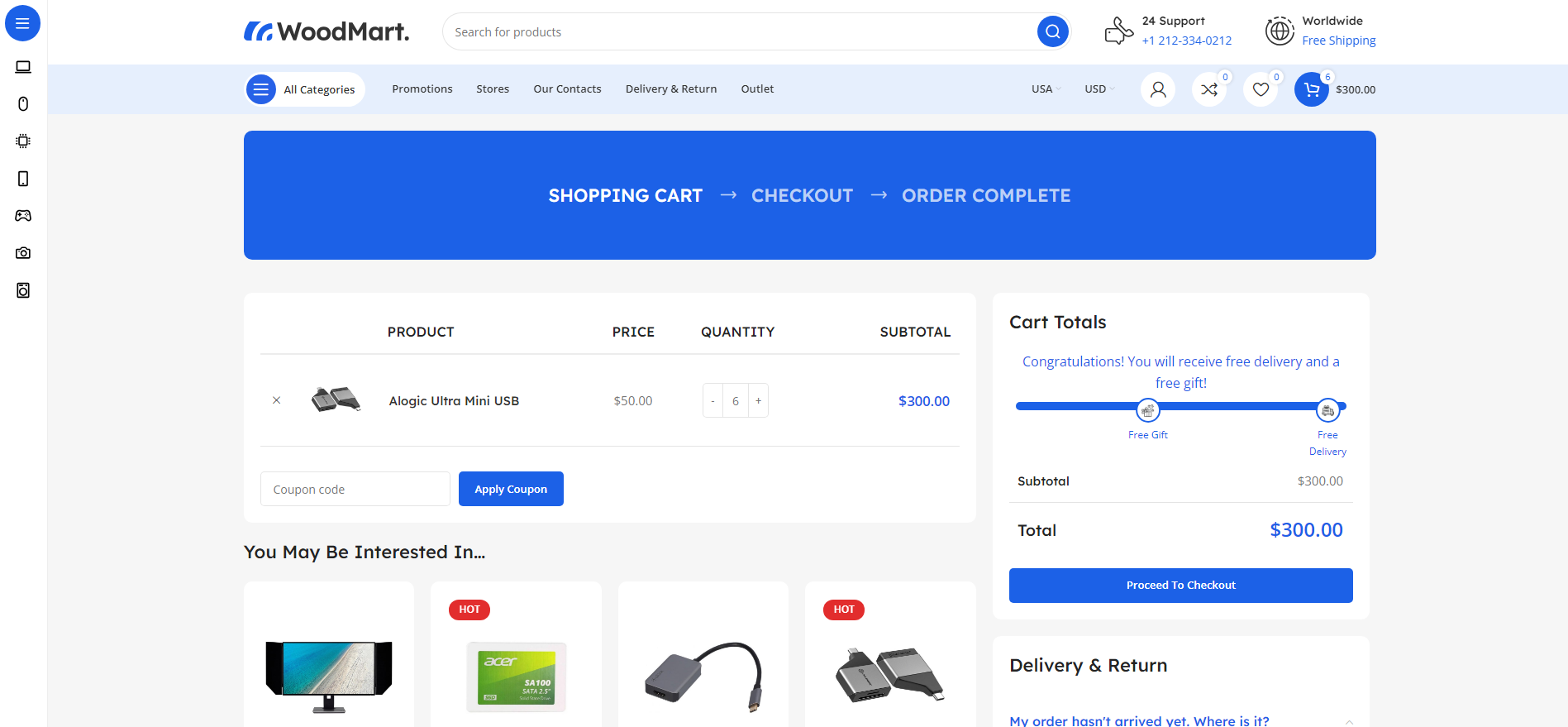
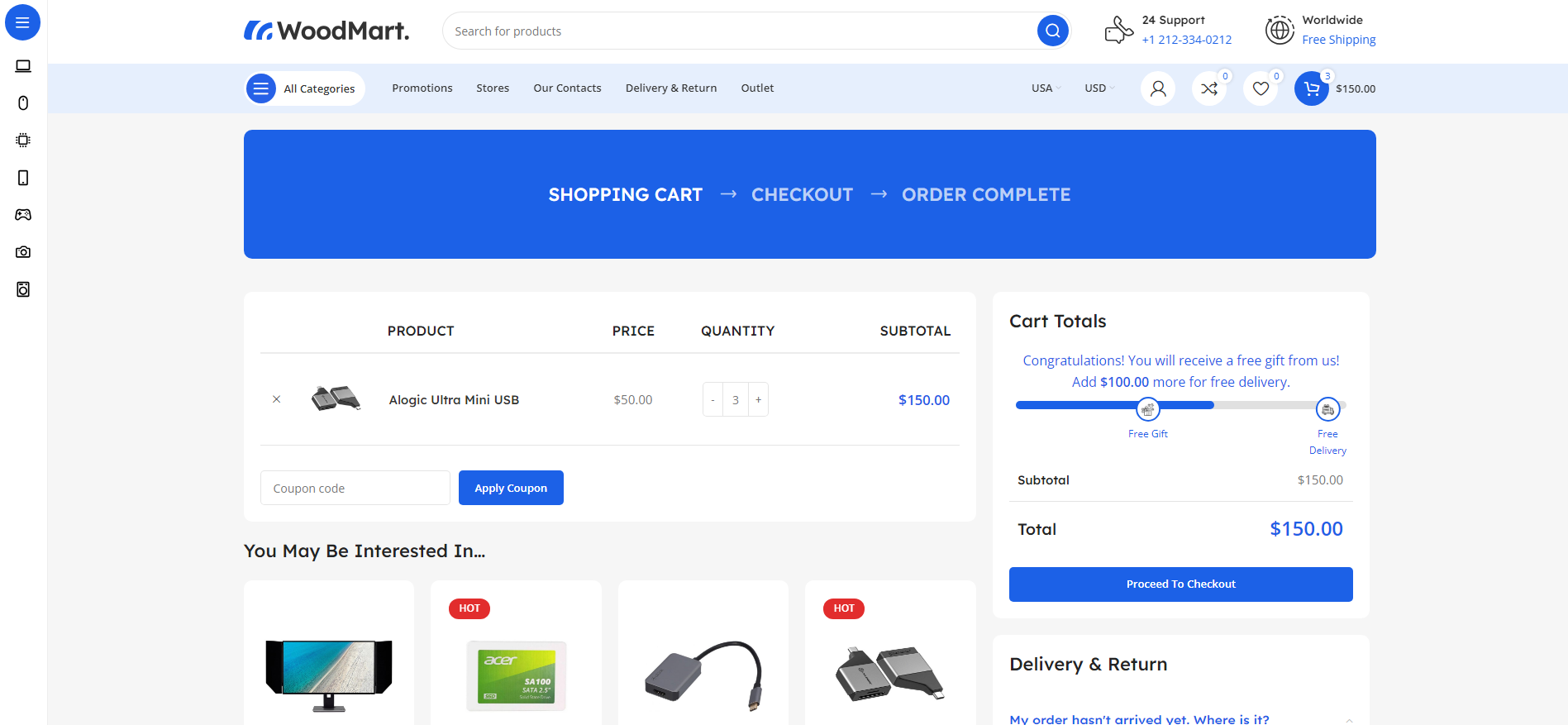
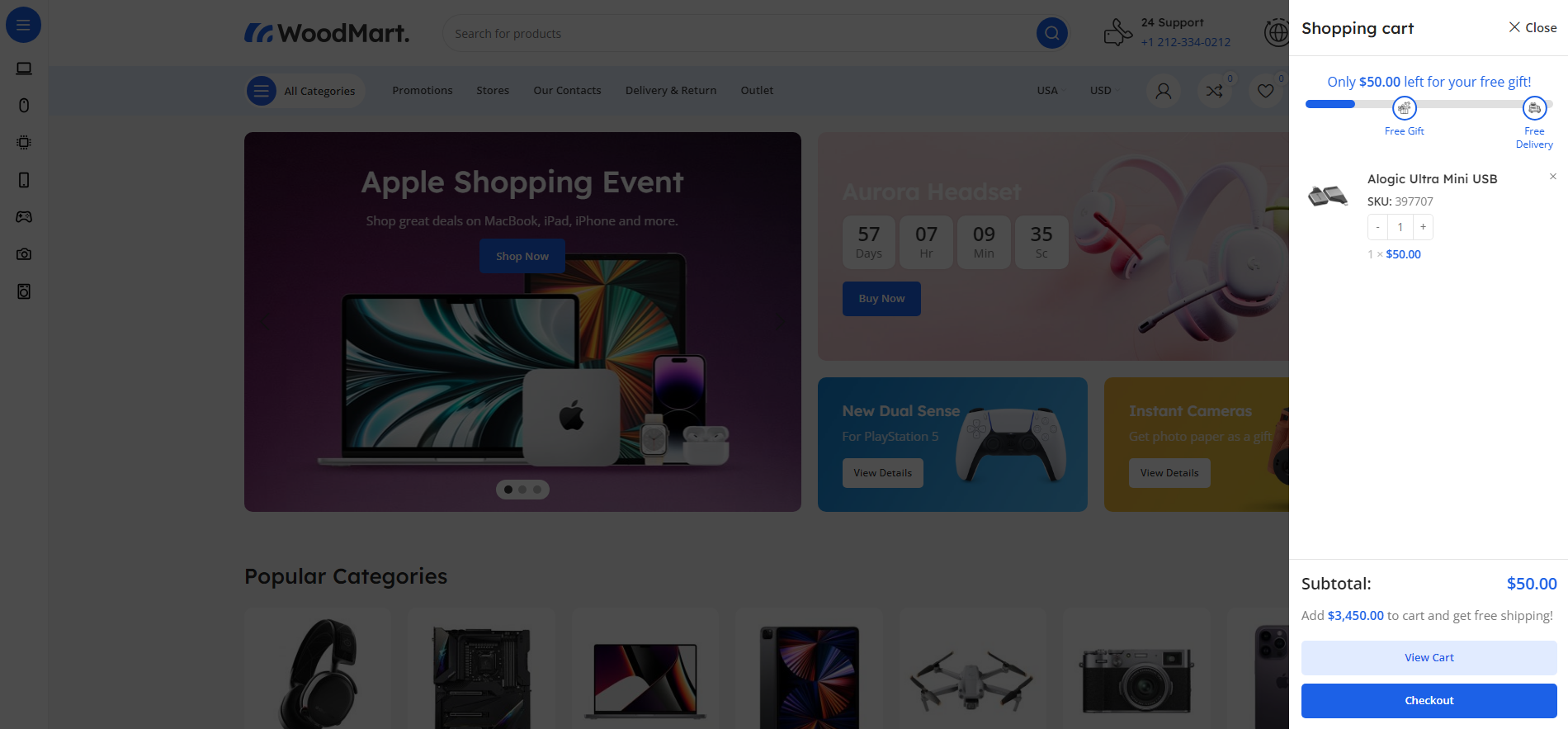
Custom Cart Progress Bar with Milestones for WooCommerce is a premium plugin that upgrades your cart UX with a sleek, real-time progress bar and milestone rewards. Motivate customers to unlock a Free Gift and Free Delivery by showing clear visual goals, dynamic remaining amounts, and icons that light up when achieved. Built for modern WooCommerce stores, including Blocks carts, and designed to increase average order value without annoying your customers.

The WooCommerce Custom Cart Progress Bar with Milestones adds an interactive progress bar to the cart and mini-cart, enhancing the shopping experience. Below are simple instructions for setting up and using the plugin to increase customer engagement and order values.

Features

Key Features

8 groups of features, all in one licence.

Dual Milestone System

  • Two goals: Free Gift + Free Delivery
  • Enable/disable each goal independently
  • Automatic milestone ordering (lowest target first)
  • Flexible targets for any store strategy

Smart Subtotal Logic (VAT Option)

  • Progress based on cart subtotal (shipping excluded)
  • New: Option to include VAT/Tax in progress calculation
  • Perfect for stores that display targets “with VAT”
  • Accurate remaining amounts in every phase

Multi-Phase Color Progress

  • Base color before reaching any milestone
  • Automatic color switch after first milestone
  • Final color after second milestone
  • 3 separate color pickers in settings

Milestone Icons that “Fill” When Reached

  • New: Icon circles fill with milestone color on success
  • Clear visual “reward unlocked” feedback
  • Custom icons for Gift and Delivery
  • Labels under icons are fully editable

Real-Time AJAX Updates Everywhere

  • Instant refresh on add/remove/qty changes
  • Cart page + mini-cart/sidebar support
  • WooCommerce Blocks compatible via store listeners
  • Mini-cart fragments supported for smooth UX

Flexible Placement (Auto Insert + Shortcodes)

  • Auto-display in Cart & Mini Cart
  • Disable auto insert and place manually via shortcode
  • Main shortcode: [cart_progress_bar]
  • Aliases: [ccpb] / [progress_bar]

Multilingual Ready

  • Full WPML compatibility
  • Polylang integration
  • Automatic string registration
  • All labels & messages are translatable

License-Protected Updates & Features

  • New: Built-in VGDEV license system
  • Settings and updates unlock after activation
  • Safe, multi-plugin namespaced licensing
  • Automatic update checks every few hours

How It Works

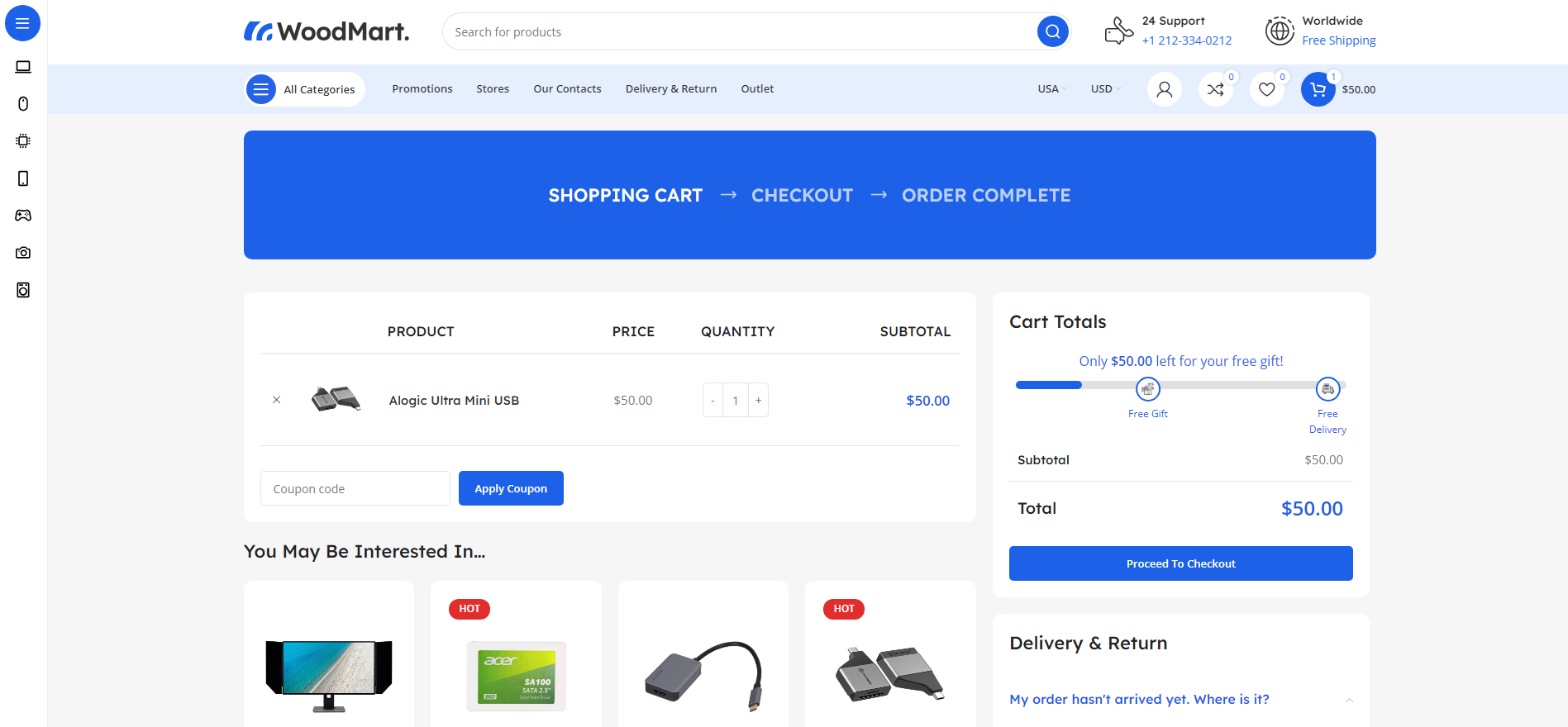
Customer Adds Products

  1. Progress bar appears with current subtotal progress
  2. Message shows remaining amount to next milestone
  3. Icons are pinned exactly on milestone positions

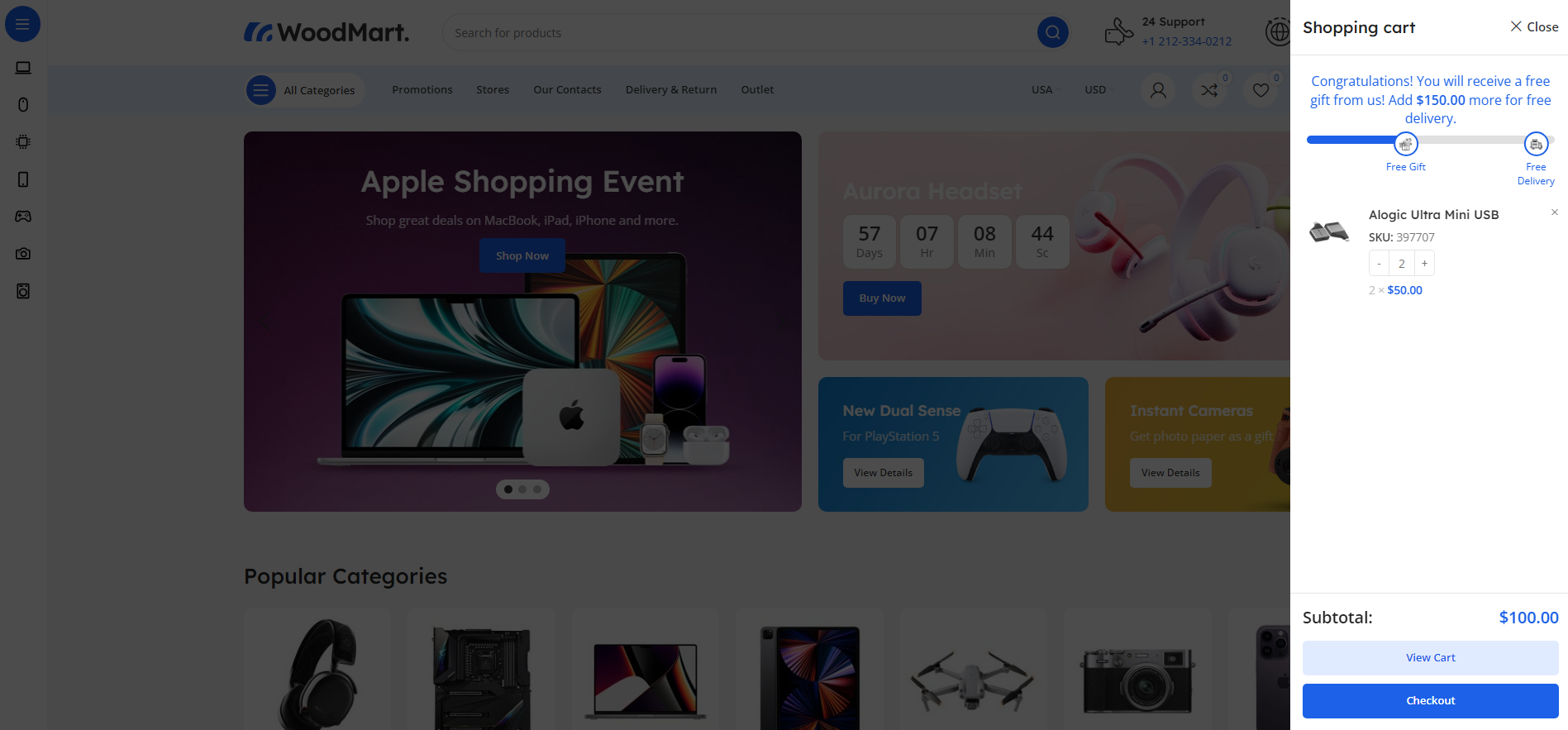
Reaching First Milestone

  1. Bar color switches to the first milestone color
  2. Gift or Delivery icon fills to show success
  3. Message updates with next goal remaining amount
  4. Customer gets a clear push to keep shopping

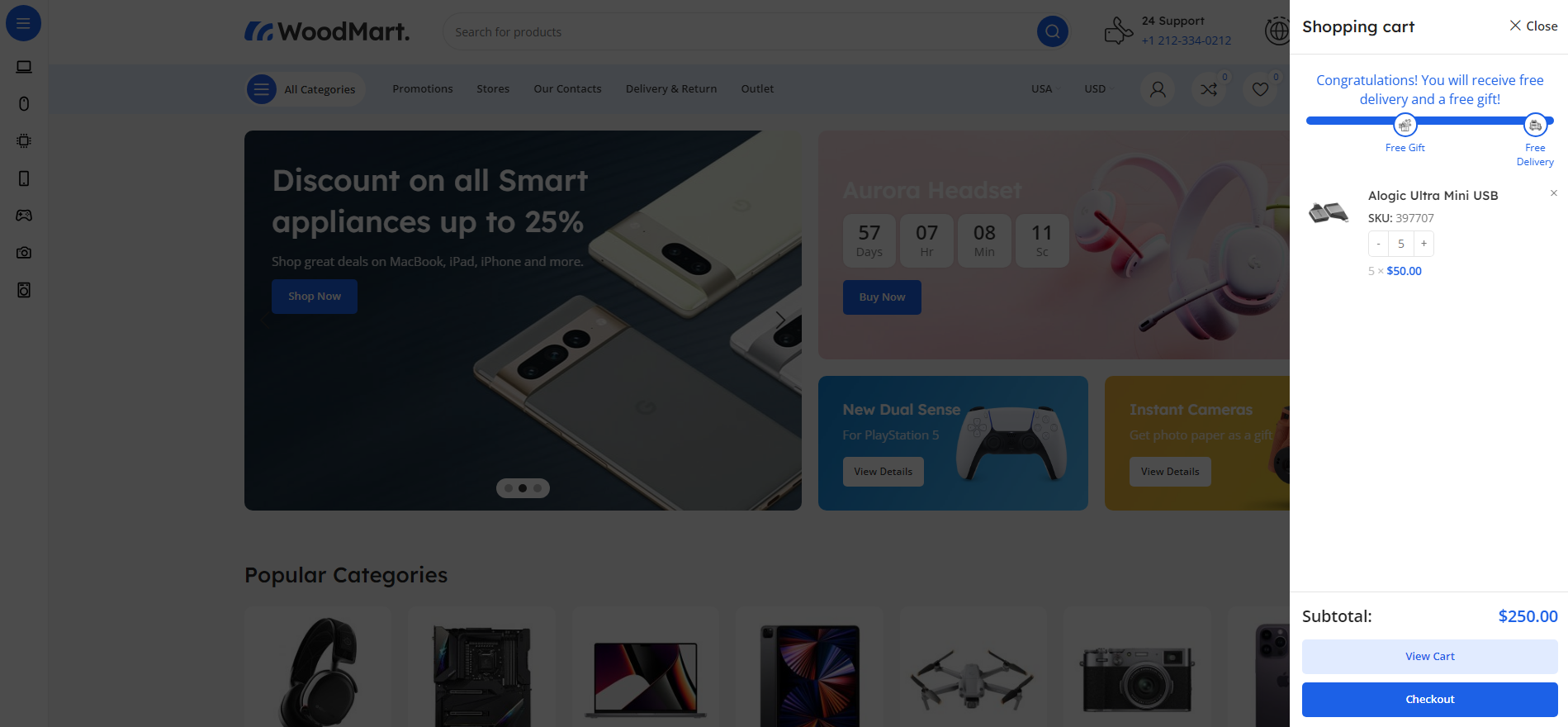
Reaching Second Milestone

  1. Progress fills to completion
  2. Final milestone icon fills + label highlights
  3. Success message confirms unlocked rewards

Real-Time Updates

  • AJAX refresh triggers on cart events and fragments
  • Blocks cart listener keeps it synced in modern themes
  • No reloads, no flicker, no lag

What you need to get started

  • WordPress 5.0 or higher
  • WooCommerce 6.0 or higher (tested up to latest version)
  • PHP 7.4 or higher
  • jQuery enabled (standard WordPress)

One-off purchase, no yearly subscription

You pay once and the purchase includes:

  • Instant download right after payment.
  • Lifetime updates, with no yearly licence renewal.
  • Support from the developer of the plugin.
  • 14-day money-back guarantee.

You pay once

This plugin €15.00 one off, 5 year total: €15.00
  • Lifetime licence, no subscription
  • Free updates
  • Instant delivery after payment

Why Choose Cart Progress Bar?

Increase Average Order Value

customers naturally chase visible goals

Reduce Cart Abandonment

progress creates commitment

WooCommerce Blocks Ready

works on classic + modern carts

Zero Code Required

everything from settings

VAT-Aware Targets

optional tax-inclusive progress mode

Beautiful Milestone Feedback

icons fill when achieved

Brand-Perfect Styling

full color + icon control

Multilingual Support

WPML/Polylang friendly

Shortcode Flexibility

place anywhere you want

Optimized for Mobile

responsive out of the box

Volume discount

Buy it together

With 2 plugins in the cart you save -10% automatically, and even more with 3 or more. No coupon needed.

Screenshots

Click an image to see it full size.
Setup Instructions

You are ready in 5 steps. Open each step for the details.

  1. 1Install & Activate + License

    After purchase:

    • Upload the plugin folder to /wp-content/plugins/
    • Activate via Plugins in WordPress
    • Go to VGDEVsolutions → Cart Progress Bar
    • Activate your license to unlock settings & updates
  2. 2Open WooCommerce Settings Tab

    All configuration lives inside WooCommerce:

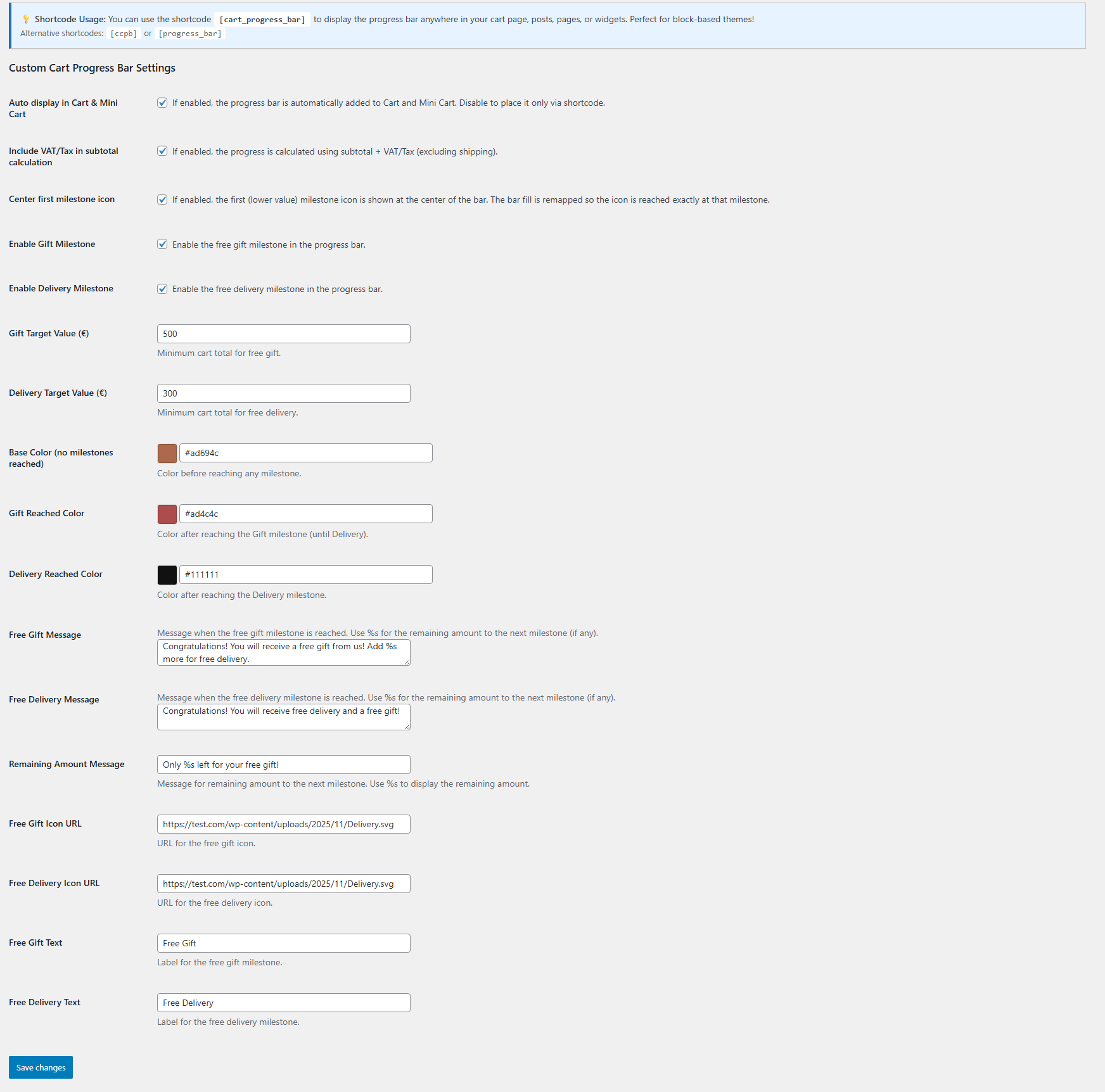
    • Navigate to WooCommerce → Settings → Cart Progress Bar
    • The tab is always visible, but settings are available only with an active license
  3. 3Configure Milestones

    Choose how your milestones work:

    Enable Milestones:
    • Enable Gift Milestone: Turn free gift goal on/off
    • Enable Delivery Milestone: Turn free delivery goal on/off
    • Gift Target Value: Minimum subtotal for gift (e.g., €50)
    • Delivery Target Value: Minimum subtotal for free delivery (e.g., €100)
    VAT / Tax Mode:
    • Include VAT/Tax in subtotal: Progress = subtotal + VAT (shipping excluded)
    • Leave it OFF if your targets are “without VAT”
    Messages & Labels:
    • Free Gift Message: Text shown after first milestone
    • Free Delivery Message: Text shown after second milestone
    • Remaining Amount Message: Used before milestones
    • Use the %s placeholder for remaining amounts
    Visual Customization:
    • Base Color: Before any milestone is reached
    • Gift Reached Color: After Gift → until Delivery
    • Delivery Reached Color: After Delivery milestone
    • Icon URLs: Upload icons to Media Library → paste URLs
    • Gift/Delivery Text: Labels under each icon
  4. 4Placement Options

    You decide where it appears:

    • Auto Insert ON: Shows automatically in Cart & Mini Cart
    • Auto Insert OFF: Use shortcode anywhere you want
    • Shortcode example: [cart_progress_bar]
  5. 5Save & Test

    Click Save Changes and test:

    • Add products and watch progress update instantly
    • Try removing items to see remaining amounts recalc live
    • Check cart page and mini-cart/sidebar cart
    • Test both VAT ON and VAT OFF modes
Changelog Version 1.1.1
  • 1.0.0 Initial release
  • 1.0.1 You can use the shortcode [cart_progress_bar] to display the progress bar anywhere in your cart page, posts, pages, or widgets. Perfect for block based themes!
  • 1.0.2 Fixed Milestone Position Issue
  • Problem: When the delivery target value was set lower than the gift target value (e.g., Gift €100, Delivery €50), the icons would position incorrectly, with the gift icon appearing beyond the visible progress bar.
  • 1.0.3 Fixed Ajax Cart issue for Block Based Themes
  • 1.0.4 Icons filling when a goal is reached + VAT option
  • 1.0.5 Added Center first milestone icon functionality - If enabled, the first (lower value) milestone icon is shown at the center of the bar. The bar fill is remapped so the icon is reached exactly at that milestone.
  • 1.0.6 Compatibility with Minimog Theme
  • 1.1.1 Added Filter for Customization

Got questions?

Can I use only one milestone instead of two?

Absolutely! You can enable or disable each milestone independently. Simply check or uncheck the "Enable Gift Milestone" or "Enable Delivery Milestone" options in the settings. This gives you complete flexibility to run promotions with just free gifts, just free delivery, or both together.

Does this work with WooCommerce Blocks (Cart and Checkout blocks)?

Yes! The plugin is fully compatible with WooCommerce Blocks. It includes AJAX functionality that listens to cart changes in block-based carts and updates the progress bar in real-time without page refreshes. You can also use the [cart_progress_bar] shortcode to manually place the progress bar anywhere in your block-based cart page.

How do I add custom icons for the milestones?

Upload your custom icon images to your WordPress Media Library, then copy the image URL and paste it into the "Gift Icon URL" or "Delivery Icon URL" fields in the plugin settings. The icons should be small square images (recommended 30x30px or 50x50px) in PNG or SVG format for best results.

Is the plugin compatible with multilingual sites (WPML/Polylang)?

Yes! The plugin is fully multilingual-ready. All custom messages, labels, and text are automatically registered with WPML and Polylang for translation. Your progress bar messages will display in the appropriate language based on your customer's language selection.

Does the progress bar calculate shipping costs or just product subtotal?

The progress bar is based on the cart subtotal only (products and their quantities), excluding shipping costs. This is the standard WooCommerce approach and ensures customers know exactly how much more they need to spend in products to reach the milestones. Shipping is typically calculated later in the checkout process.

Does it work with WooCommerce Blocks cart / mini cart?

Yes. The plugin listens to WooCommerce Blocks cart store updates and refreshes progress instantly, so it stays accurate in block-based themes.

Can I calculate progress with VAT included?

Absolutely. Enable “Include VAT/Tax in subtotal calculation” and the progress will use subtotal + tax (shipping excluded). Turn it off if your targets are VAT-free.

What happens if I disable Auto Insert?

The bar won’t appear automatically in Cart/Mini Cart. You can place it manually anywhere using [cart_progress_bar] (or the aliases) without double rendering.

Are the texts translatable?

Yes. All messages and labels are registered dynamically and can be translated through WPML or Polylang.

Is a license required?

Yes. An active license unlocks settings and automatic updates. Without activation, the plugin stays inactive to protect premium features.

How do I install the plugin?

After payment you download the ZIP file from your purchase email or from your account. In WordPress go to Plugins > Add New > Upload Plugin, choose the ZIP, click Install and then Activate.

Where do I find my licence key?

Your licence key is in your purchase email and in your account. Enter it in the plugin's licence tab to unlock every feature and automatic updates.

On how many sites can I use it?

Each licence covers 1 website (domain). For more sites you need one licence per site. When you add 2 or more plugins to the cart, the volume discount applies automatically: 2 plugins -10%, 3 plugins -15%, 4 plugins -20%.

Is there a yearly subscription?

No. You pay once and the licence includes lifetime updates, with no renewals and no hidden fees.

What if the plugin is not right for me?

Most plugins come with a 14-day money-back guarantee. See the details in our Refund Policy.

What does support include?

Help with installation and activation, answers to usage questions and bug fixes. Send your request from the support page and we usually reply within 24 hours on business days.

Can I request a new feature or a customisation?

Yes. Use the "Request a feature" and "Customisation request" forms further down this page. Requests that help many stores make it into the next releases.

6 of 17

Start Increasing Your Sales Today

The Custom Cart Progress Bar plugin includes lifetime updates and dedicated support. Turn your cart into a goal-driven sales booster that feels rewarding, not pushy.

€15.00 Add to cart One-off, with lifetime updates

Why VGDev

Instant delivery

The plugin and your licence key arrive by email right after payment.

Updates without a subscription

Lifetime updates are included in the price. Nothing to renew every year.

Built for the Greek market

Written by a Greek developer for Greek couriers, marketplaces and payment methods.

Is something missing from this plugin?

Request a feature

Need a different customization?

Send a customization request

Customer reviews

There are no reviews yet.

Only logged in customers who have purchased this product may leave a review.