WooCommerce One-off purchase, no subscription

Speedex Courier Voucher & Label for WooCommerce

Speedex Courier Voucher & Label for WooCommerce connects your WooCommerce store directly with Speedex's SOAP API services.

€35.00

  • Lifetime updates & support
  • 1 licence per website
  • Instant download after payment
14 day money back guarantee

At a glance

  • One-Click Voucher Creation
  • SOAP API Integration
  • Four Label Formats
  • Automated Delivery Tracking
Speedex Courier Voucher & Label for WooCommerce
Reviews
Be the first
Current version
1.0.2 changelog
Last update
February 27, 2026
Compatibility
WP 5.8+, tested to 6.8

What the plugin does

Speedex Courier Voucher & Label for WooCommerce connects your WooCommerce store directly with Speedex's SOAP API services. Create courier vouchers, print PDF shipping labels, track deliveries, and automate order completion – all from within WordPress. Features include automated delivery status checking via WP-Cron, multiple label formats, COD support, and seamless integration with Speedex's courier network across Greece.

Create Speedex Courier vouchers and PDF shipping labels directly from WooCommerce orders with SOAP API integration, automated delivery tracking, COD support, multiple label formats, and WP-Cron auto-completion for delivered packages.

Features

Key Features

13 groups of features, all in one licence.

One-Click Voucher Creation

  • Create Speedex vouchers directly from WooCommerce order screen
  • Quick voucher generation via modal from orders list
  • All recipient details pre-filled from order data
  • Automatic voucher code from Speedex SOAP API

SOAP API Integration

  • Secure session-based authentication with Speedex
  • CreateBOLwithOrder - Create shipping vouchers
  • CancelBOL - Void vouchers when needed
  • PrintBOL - Generate PDF labels on demand
  • TrackOrder - Real-time delivery status

Four Label Formats

  • A4 - Standard office paper (210x297mm)
  • A5 - Half A4 size (148x210mm)
  • A6 - Postcard size (105x148mm)
  • 10x21cm - Thermal label format for dedicated printers

Automated Delivery Tracking

  • WP-Cron checks delivery status periodically
  • Auto-completes orders when Speedex confirms delivery
  • Adds delivery note to order automatically
  • Configurable check intervals (5min to daily)

Cash on Delivery Support

  • Automatic COD detection from WooCommerce payment method
  • COD amount (Pod_Amount_Cash) sent to Speedex API
  • Clear indication on printed vouchers
  • Speedex handles collection and transfer to your account

Flexible Charge Options

  • Sender Pays (1) - Your business account charged
  • Recipient Pays (2) - Shipping added to delivery
  • Third Party Pays (3) - Different Speedex account charged
  • Configure default in settings, override per voucher

Cancel Voucher Functionality

  • Cancel vouchers via CancelBOL API method
  • Marks vouchers as cancelled in database
  • Removes order metadata when cancelled
  • Useful for order changes or cancellations

Real-Time Tracking Integration

  • Direct tracking links to speedex.gr
  • Track from order screen with one click
  • TrackOrder SOAP method for status info
  • Voucher code stored in order metadata

Smart Email Notifications

  • Automatically include tracking info in completed order emails
  • Custom email template with shipment details
  • Direct tracking link for customers
  • Enable/disable from plugin settings

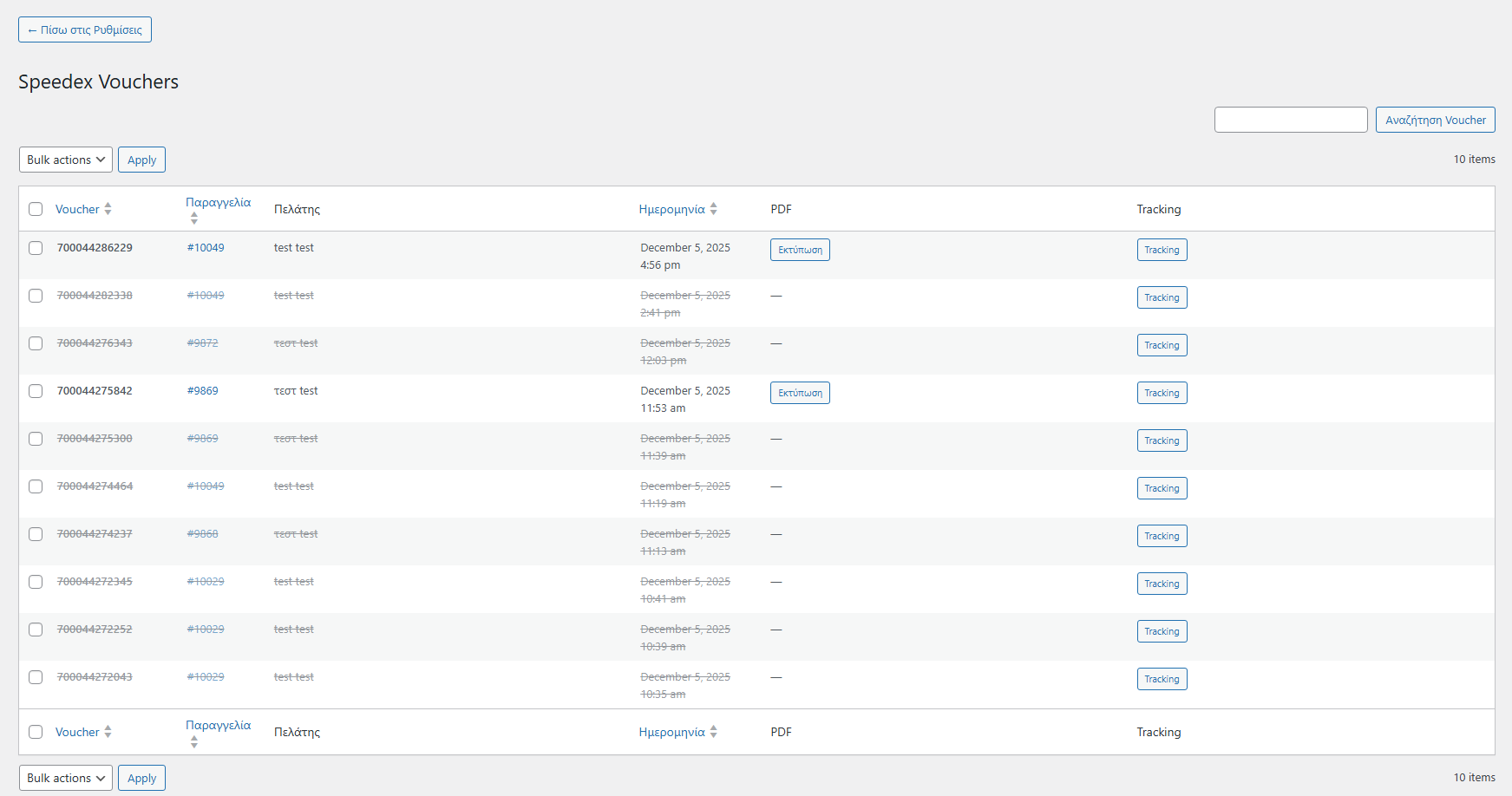
Voucher Management Dashboard

  • Dedicated admin page for all Speedex vouchers
  • Search and filter functionality
  • View voucher details, print PDFs, track shipments
  • Sortable columns (voucher, order, date)

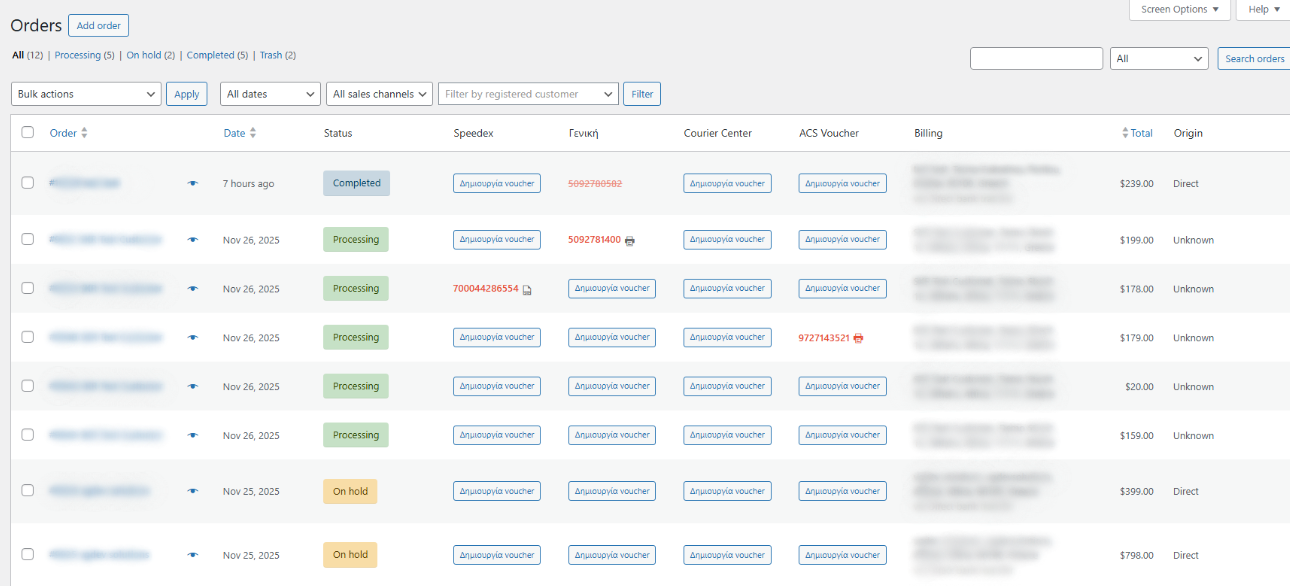
Order List Integration

  • Speedex column in WooCommerce orders list
  • Quick access to tracking, print PDF, create voucher
  • Visual indicators for voucher status
  • Optional automatic order status change after voucher creation

Greek Language Optimization

  • Automatic uppercase conversion without accents for addresses
  • Proper Greek character handling in API requests
  • Full Greek translation for admin interfaces
  • Optimized for Greek WooCommerce stores

Performance & Compatibility

  • Compatible with WooCommerce High-Performance Order Storage (HPOS)
  • Lightweight admin-only code with no frontend impact
  • Debug mode with detailed SOAP request/response logging
  • Checks for PHP SOAP extension and displays admin notice if missing

How It Works

For Store Owners

  1. Customer places order in your WooCommerce store
  2. You open the order and click "Create Voucher"
  3. Plugin establishes SOAP session with Speedex
  4. CreateBOLwithOrder sends order details to Speedex
  5. Speedex returns voucher code and sub-vouchers (if multiple items)
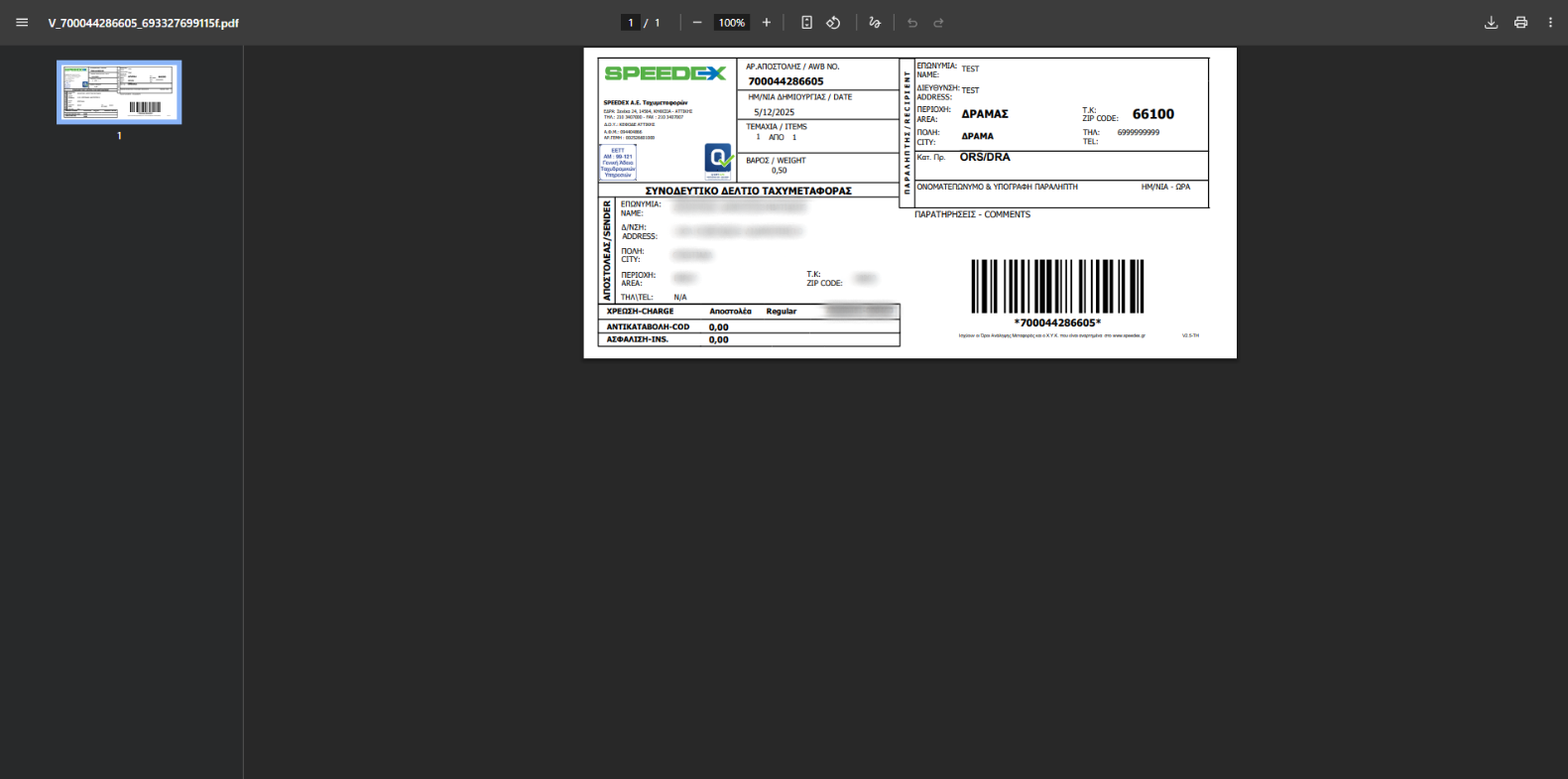
  6. PrintBOL generates PDF label in selected paper size
  7. Voucher stored in database with shipment details
  8. Print label and dispatch parcel with Speedex

For Automated Tracking

  • WP-Cron runs at configured intervals (e.g., every 30 minutes)
  • Plugin calls TrackOrder SOAP method for active vouchers
  • Checks for Rcvdate field (delivery confirmation)
  • Auto-completes orders when delivery detected
  • Adds note: "Delivered by Speedex" to order

For Cancellations

  • If order changes or customer cancels, click "Cancel" on voucher
  • Plugin calls CancelBOL SOAP method
  • Voucher marked as cancelled in database
  • Create new voucher if order is reinstated

Alternative: Quick Creation from Orders List

  • From WooCommerce > Orders, click "Create voucher" button
  • Modal opens with pre-filled data
  • Adjust details and confirm
  • Voucher created without opening full order page

What you need to get started

  • WordPress 5.8 or higher
  • WooCommerce 6.0 or higher (must be active)
  • PHP 7.4 or higher with SOAP extension enabled
  • Active Speedex courier account with SOAP API credentials
  • Valid Customer ID and Password from Speedex

One-off purchase, no yearly subscription

You pay once and the purchase includes:

  • Instant download right after payment.
  • Lifetime updates, with no yearly licence renewal.
  • Support from the developer of the plugin.
  • 14-day money-back guarantee.

You pay once

This plugin €35.00 one off, 5 year total: €35.00
  • Lifetime licence, no subscription
  • Free updates
  • Instant delivery after payment

Why Choose Speedex Courier Voucher & Label for WooCommerce?

SOAP API Integration

Enterprise-grade XML web service for reliable courier communication.

Automated Delivery Tracking

WP-Cron checks status and auto-completes orders when delivered.

Four Label Formats

From A4 office paper to 10x21cm thermal labels.

Session Management

Secure authentication with Speedex for every API call.

COD Support

Automatic cash on delivery detection and processing.

Flexible Charging

Choose who pays: sender, recipient, or third party.

Greek-Optimized

Proper Greek character handling and localization.

HPOS Compatible

Future-proof with WooCommerce High-Performance Order Storage.

No Manual Entry

All data flows automatically from WooCommerce to Speedex.

Real-Time Integration

Instant voucher creation and tracking via SOAP.

Perfect For

  • Greek WooCommerce Stores Any shop using Speedex for shipping.
  • COD Businesses Shops relying on cash on delivery payments.
  • Automated Operations Stores wanting hands-off order completion.
  • Multi-Format Printing Businesses with office and thermal printers.
  • High-Volume Sellers Scalable cron-based delivery tracking.
  • Professional Merchants Requiring flexible charge allocation options.

Volume discount

Buy it together

With 2 plugins in the cart you save -10% automatically, and even more with 3 or more. No coupon needed.

Wolt Drive for WooCommerce

Connect WooCommerce with Wolt Drive to show live delivery-fee estimates at checkout, create and cancel Wolt deliveries from...

€40.00 Add

Screenshots

Click an image to see it full size.
Setup Instructions

You are ready in 5 steps. Open each step for the details.

Full guide in the documentation
  1. 1Install & Activate the Plugin

    After purchasing the plugin:

    • Go to Plugins > Add New > Upload Plugin
    • Upload the ZIP file and click Install Now
    • Click Activate
    • Ensure WooCommerce is installed and active
    • Verify PHP SOAP extension is enabled (plugin will notify if missing)
  2. 2Activate Your License

    Unlock updates and full functionality:

    • Navigate to the plugin's License tab
    • Paste your license key from purchase email
    • Click Activate License
    • Wait for confirmation
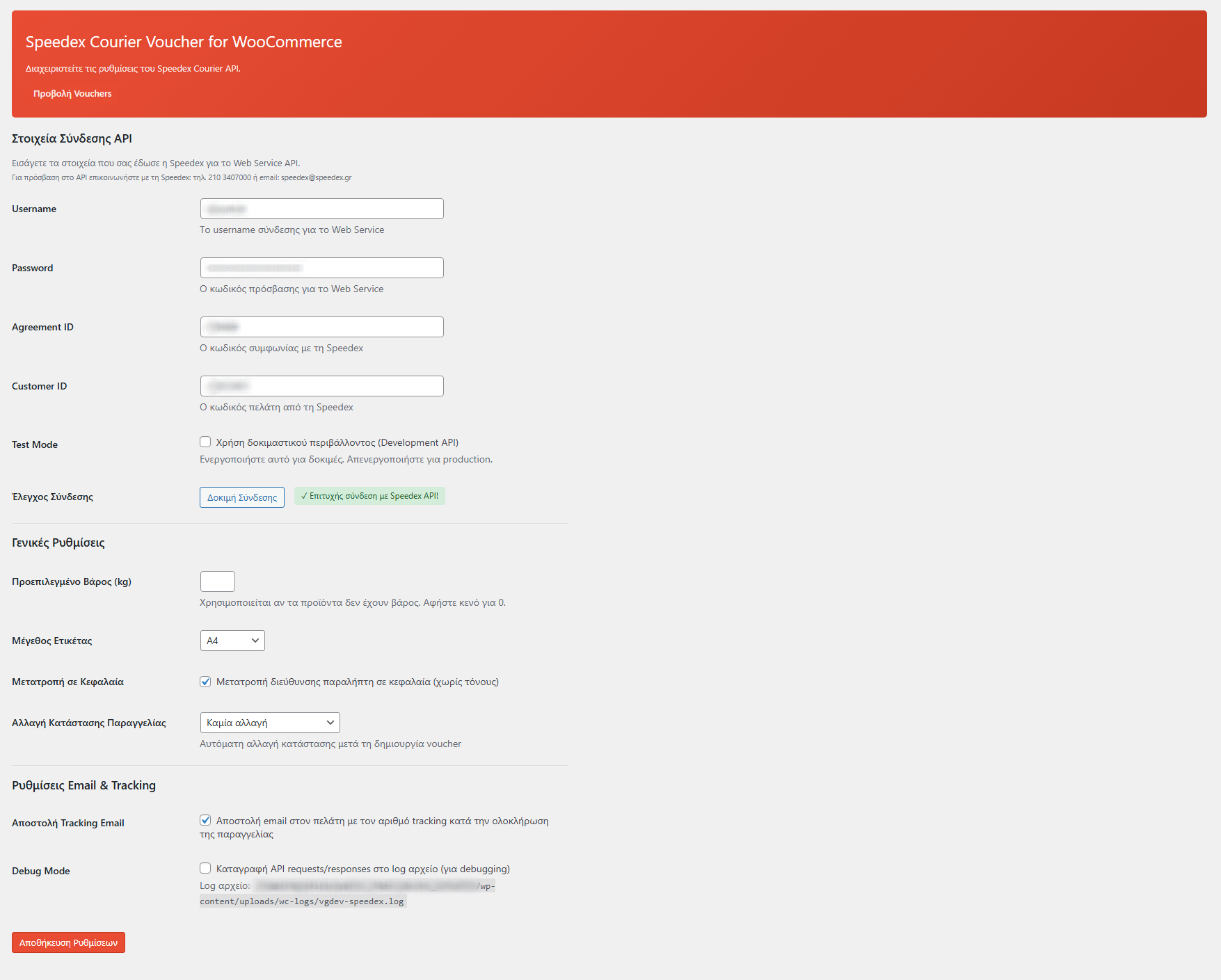
  3. 3Configure Speedex SOAP API Credentials

    Enter your Speedex API credentials:

    API Credentials Required:
    • Go to VGDev Solutions > Speedex Courier
    • Enter Customer ID (provided by Speedex)
    • Enter Password (SOAP API password)

    Note: Contact Speedex to obtain SOAP API credentials for your courier account.

    Test Your Connection:
    • Click Test Connection to verify credentials
    • Successful connection confirms SOAP session creation
    • Fix any credential errors before proceeding
  4. 4Configure Label & Order Settings

    Customize label format and order behavior:

    Label Settings:
    • Paper Size: Choose from 4 formats (A4, A5, A6, 10x21cm)
    • Default Weight: Set default parcel weight in kg
    • Uppercase Conversion: Enable for Greek addresses without accents
    Order Automation:
    • Order Status Change: Auto-change status after voucher creation
    • Delivery Check Cron: Configure how often to check tracking status
    • Email Tracking: Include tracking in completed order emails
    • Debug Mode: Enable detailed SOAP logging for troubleshooting

    Save settings when done.

  5. 5Create Your First Voucher

    Start shipping with Speedex:

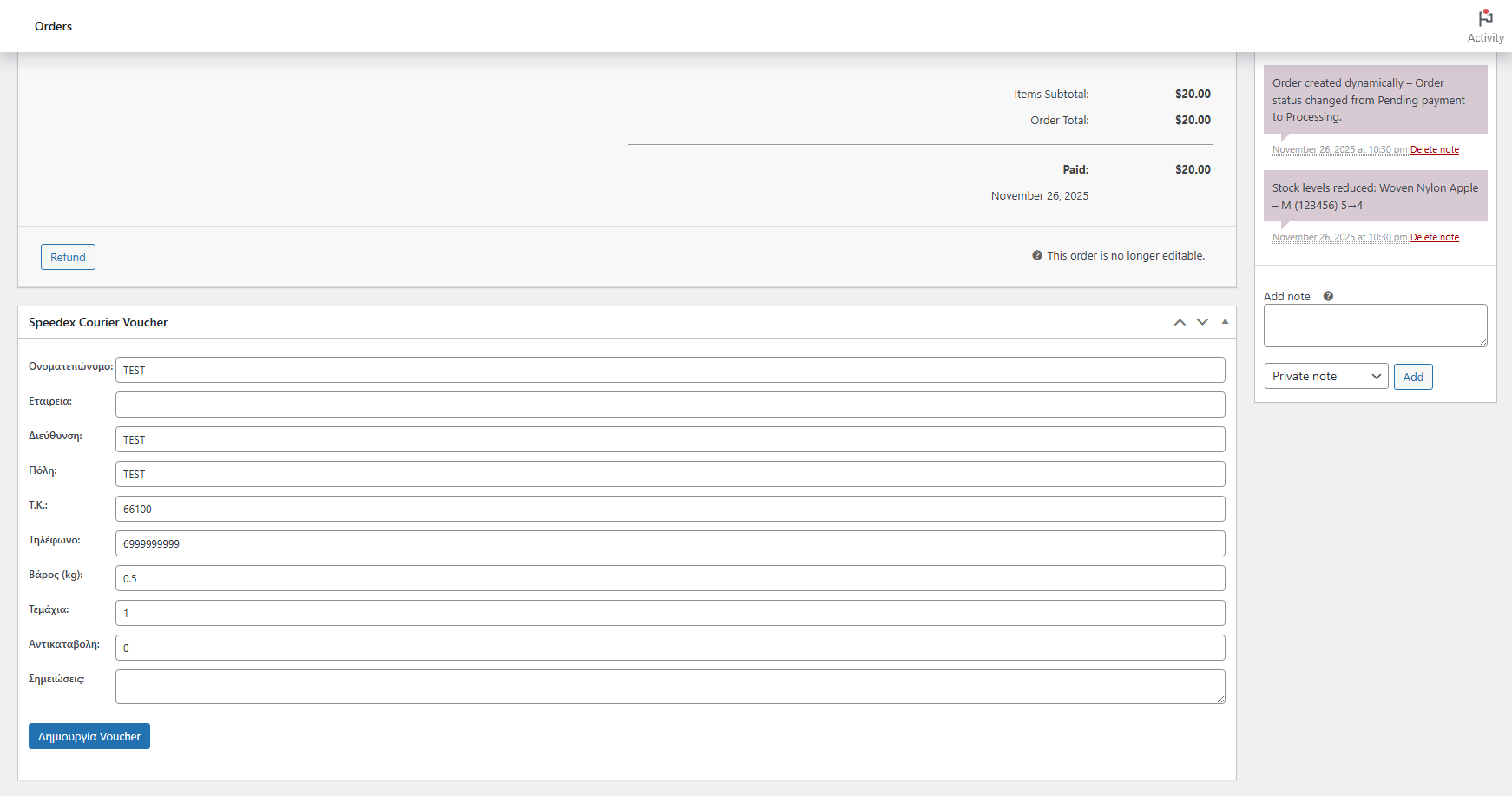
    • Open any WooCommerce order
    • Find the Speedex Courier metabox
    • Review pre-filled recipient information
    • COD amount auto-filled for COD orders
    • Select charge type (sender/recipient/third party)
    • Click Create Voucher
    • Voucher code and PDF link appear immediately
    • Print label and give parcel to Speedex courier
Changelog Version 1.0.2
  • 1.0.0 Initial release
  • 1.0.1 Fixed an issue with wrong weight on admin page
  • 1.0.2 Color selection for email tracking

Got questions?

How do I get Speedex API credentials?

Contact Speedex customer service to request SOAP API access for your business account. You'll need an active courier agreement with Speedex. Once approved, they'll provide your Customer ID and Password for API authentication. These credentials allow your WordPress site to communicate with Speedex's SOAP web services for voucher creation, tracking, and cancellation.

What paper sizes are supported for printing labels?

The plugin supports four label formats to accommodate different printing setups: A4 (standard office paper), A5 (half A4 size), A6 (postcard size), and 10x21cm (thermal label format ideal for dedicated label printers). Choose your preferred format in the plugin settings, and all vouchers will be generated as PDFs in that size automatically.

Does the plugin automatically update order status when packages are delivered?

Yes! The plugin includes a smart WP-Cron system that periodically checks Speedex tracking for all active vouchers. When Speedex reports a package as delivered (Rcvdate field populated), the plugin automatically changes the WooCommerce order status to "Completed" and adds a note indicating delivery by Speedex. This saves you from manually checking tracking and updating orders.

What is the charge type option and how does it work?

Speedex allows you to specify who pays for shipping costs. The plugin offers three charge types: (1) Sender pays - your business account is charged, (2) Recipient pays - shipping cost added to delivery amount, (3) Third party pays - a different Speedex account is charged. Configure your default preference in settings, and the plugin will send this to Speedex when creating vouchers.

Why does the plugin require PHP SOAP extension?

Speedex uses SOAP (Simple Object Access Protocol) for their courier API, which is an XML-based web service standard. PHP's SOAP extension enables your WordPress server to communicate with Speedex's WSDL endpoint, authenticate sessions, and exchange voucher data. Most modern hosting providers have SOAP enabled by default, but the plugin will display an admin notice if it's missing.

How do I install the plugin?

After payment you download the ZIP file from your purchase email or from your account. In WordPress go to Plugins > Add New > Upload Plugin, choose the ZIP, click Install and then Activate.

Where do I find my licence key?

Your licence key is in your purchase email and in your account. Enter it in the plugin's licence tab to unlock every feature and automatic updates.

On how many sites can I use it?

Each licence covers 1 website (domain). For more sites you need one licence per site. When you add 2 or more plugins to the cart, the volume discount applies automatically: 2 plugins -10%, 3 plugins -15%, 4 plugins -20%.

Is there a yearly subscription?

No. You pay once and the licence includes lifetime updates, with no renewals and no hidden fees.

What if the plugin is not right for me?

Most plugins come with a 14-day money-back guarantee. See the details in our Refund Policy.

What does support include?

Help with installation and activation, answers to usage questions and bug fixes. Send your request from the support page and we usually reply within 24 hours on business days.

Can I request a new feature or a customisation?

Yes. Use the "Request a feature" and "Customisation request" forms further down this page. Requests that help many stores make it into the next releases.

6 of 12

Connect Your Store with Speedex Today

Speedex Courier Voucher & Label for WooCommerce automates your shipping with SOAP API integration, automated tracking, and smart order completion. Create, print, track, complete – all automatically.

€35.00 Add to cart One-off, with lifetime updates

Why VGDev

Instant delivery

The plugin and your licence key arrive by email right after payment.

Updates without a subscription

Lifetime updates are included in the price. Nothing to renew every year.

Built for the Greek market

Written by a Greek developer for Greek couriers, marketplaces and payment methods.

Is something missing from this plugin?

Request a feature

Need a different customization?

Send a customization request

Customer reviews

There are no reviews yet.

Only logged in customers who have purchased this product may leave a review.