Per-Product Free Shipping Control
- Simple checkbox in product shipping settings
- Enable/disable free shipping for individual products
- Works with simple and variable products
- No complex shipping zone configuration required

WooCommerce One-off purchase, no subscription
Free Shipping by Product for WooCommerce is a premium plugin that gives you granular control over which products qualify for free shipping.
€15.00
At a glance

Free Shipping by Product for WooCommerce is a premium plugin that gives you granular control over which products qualify for free shipping. Simply enable free shipping on a per-product basis with two convenient checkboxes, and the plugin automatically sets shipping costs to €0 when customers add those products to their cart. Features customizable badges via shortcode, smart cart notices for mixed carts, full color control, and seamless WooCommerce Blocks compatibility. Perfect for promotional campaigns, high-margin products, or strategic shipping incentives!
Enable free shipping on a per-product basis with simple checkboxes! Automatically set shipping to €0 when free-shipping products are in cart. Features badge shortcode display, smart cart notices (success for all-free items, warning for mixed carts), customizable colors and text, WooCommerce Blocks support, and multilingual compatibility (WPML/Polylang). Perfect for targeted promotions, high-margin products, and strategic shipping incentives. Works with all WooCommerce shipping methods without complex zone setup. Increase conversions with granular free shipping control!
Features
8 groups of features, all in one licence.
[vgfs_free_shipping_badge] anywhere[vgfs_free_shipping_badge] added to product pageYou pay once and the purchase includes:
You pay once
Enable free shipping for specific products, not entire categories or cart totals
Offer free shipping on high-margin products or slow-moving inventory
Free shipping is the #1 factor in cart abandonment reduction
Just two checkboxes per product, no complex configuration
Guide customers toward free shipping with clear messaging
Display badges only where you want via shortcode
Edit all text, messages, and colors to match your brand
Full compatibility with modern block-based cart/checkout
WPML and Polylang compatible for international stores
Works with any shipping method without zone setup
Shipping taxes automatically zeroed for free items
Shipping costs update instantly as cart contents change
Volume discount
With 2 plugins in the cart you save -10% automatically, and even more with 3 or more. No coupon needed.
Create EU-compliant Plant Passport labels from WooCommerce products! Standard 60×30mm format with adjustable dimensions, official EU flag, and...
Create Geniki Taxydromiki vouchers and PDF shipping labels directly from WooCommerce orders with support for COD, cancel/restore functionality,...
Click an image to see it full size.
You are ready in 5 steps. Open each step for the details.
After purchasing the plugin:
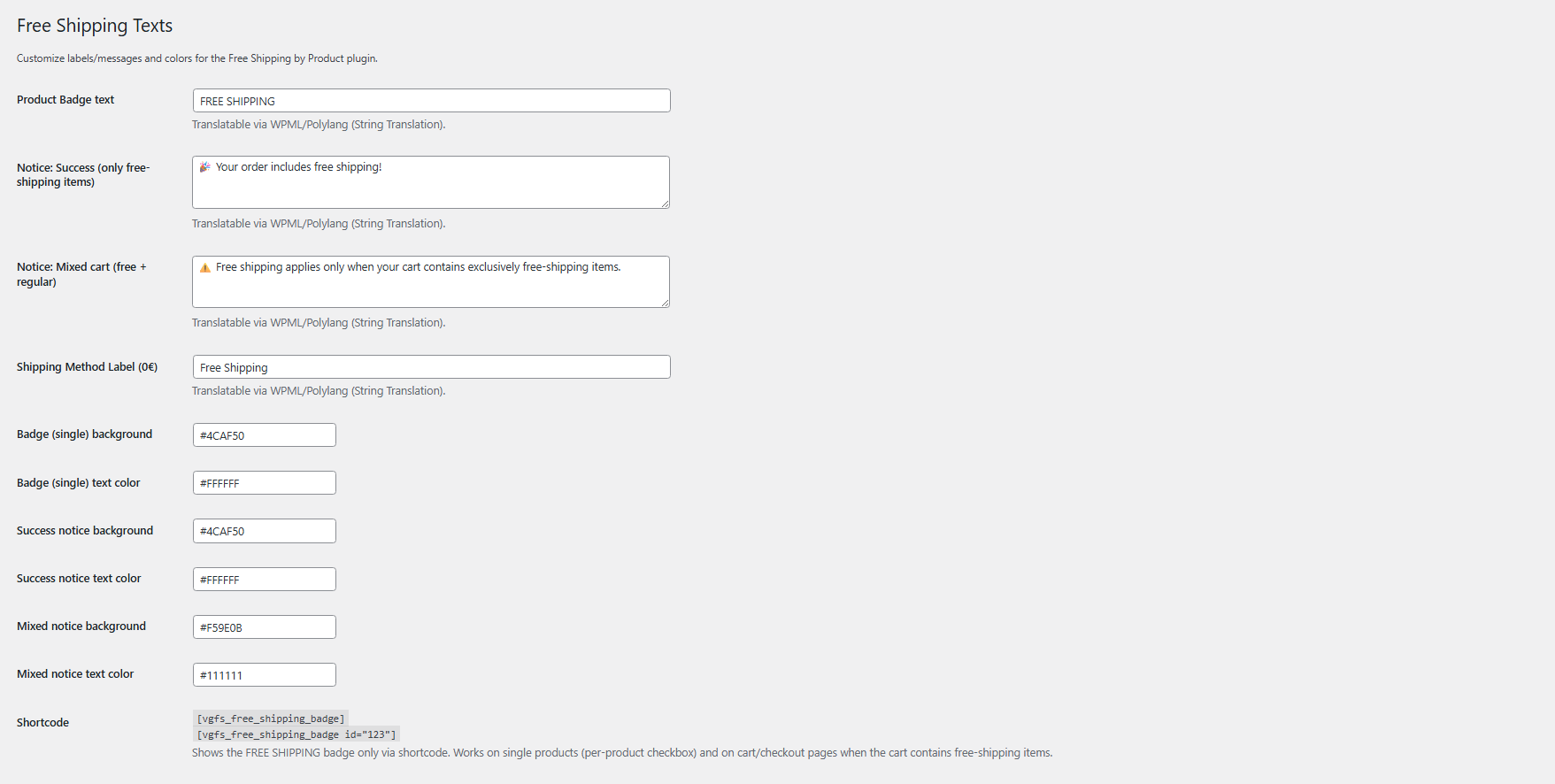
/wp-content/plugins/free-shipping-by-product-for-woocommerce/In the settings page, personalize all text and colors:
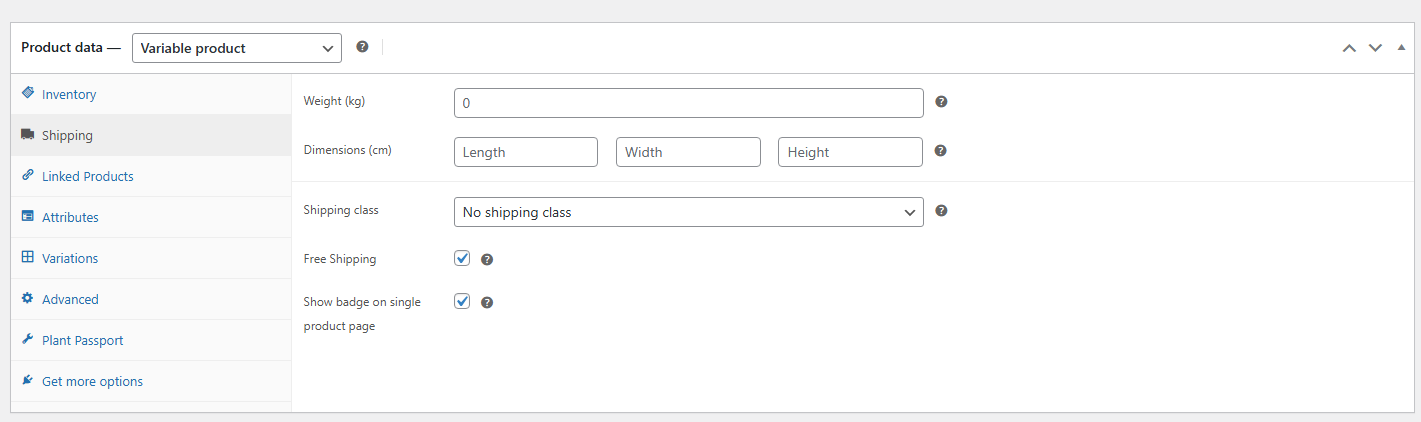
Edit each product that should qualify for free shipping:
The first checkbox enables free shipping functionality. The second checkbox controls whether the badge can be displayed via shortcode for this product.
Display "FREE SHIPPING" badges anywhere:
[vgfs_free_shipping_badge] - Shows badge if product has free shipping and badge enabled[vgfs_free_shipping_badge id="123"] - Display badge for product ID 123[vgfs_free_shipping_badge] - Shows badge if cart contains free-shipping itemsVerify everything works correctly:
The plugin displays a warning notice explaining that free shipping only applies when the cart contains exclusively free-shipping items. In this mixed cart scenario, regular shipping rates will apply to the entire cart. This encourages customers to either remove regular items to qualify for free shipping or understand why they're being charged shipping. You can fully customize this warning message and its colors in the plugin settings.
No, the badge is only displayed via shortcode for maximum flexibility. There are two steps: (1) Enable the "Allow badge (shortcode)" checkbox in the product's shipping settings, and (2) Add the [vgfs_free_shipping_badge] shortcode to your product page template, product description, or anywhere else you want it to appear. This gives you complete control over badge placement and styling to match your theme design.
Absolutely! The plugin is fully compatible with WooCommerce Blocks. The shipping cost override works seamlessly with block-based checkout, and the shortcode can be added to Cart or Checkout blocks via the Shortcode block. The plugin automatically clears shipping cache and triggers rate recalculation when cart contents change, ensuring accurate shipping costs in both classic and block-based experiences.
Yes! The free shipping checkbox is available for all WooCommerce product types including simple products, variable products, grouped products, and compatible with most subscription plugins. The free shipping flag is set at the product level, so all variations of a variable product will inherit the free shipping setting when the parent product is marked as free shipping.
Yes! The plugin has full multilingual support. All customizable text fields (badge text, cart notices, shipping label) are automatically registered with WPML String Translation and Polylang. You can translate all messages through your preferred multilingual plugin's interface, and the translated text will display automatically based on the customer's selected language. Perfect for international stores offering strategic free shipping promotions in multiple markets.
After payment you download the ZIP file from your purchase email or from your account. In WordPress go to Plugins > Add New > Upload Plugin, choose the ZIP, click Install and then Activate.
Your licence key is in your purchase email and in your account. Enter it in the plugin's licence tab to unlock every feature and automatic updates.
Each licence covers 1 website (domain). For more sites you need one licence per site. When you add 2 or more plugins to the cart, the volume discount applies automatically: 2 plugins -10%, 3 plugins -15%, 4 plugins -20%.
No. You pay once and the licence includes lifetime updates, with no renewals and no hidden fees.
Most plugins come with a 14-day money-back guarantee. See the details in our Refund Policy.
Help with installation and activation, answers to usage questions and bug fixes. Send your request from the support page and we usually reply within 24 hours on business days.
Yes. Use the "Request a feature" and "Customisation request" forms further down this page. Requests that help many stores make it into the next releases.
The Free Shipping by Product plugin includes lifetime updates and dedicated support. Give yourself granular control over shipping incentives, increase conversions with targeted free shipping, and create promotional opportunities that drive sales!
The plugin and your licence key arrive by email right after payment.
Lifetime updates are included in the price. Nothing to renew every year.
Written by a Greek developer for Greek couriers, marketplaces and payment methods.
Only logged in customers who have purchased this product may leave a review.
There are no reviews yet.