Complete Payment Integration
- Add IRIS as a payment method during checkout
- Automatic order status management (on-hold until payment confirmation)
- Stock reduction upon order placement
- Customizable payment gateway title and description

WooCommerce One-off purchase, no subscription
The IRIS Checkout Gateway for WooCommerce is a premium payment gateway plugin that seamlessly integrates IRIS instant payment services into your WooCommerce store.
FREE
At a glance

The IRIS Checkout Gateway for WooCommerce is a premium payment gateway plugin that seamlessly integrates IRIS instant payment services into your WooCommerce store. Designed specifically for Greek businesses, this plugin enables customers to pay quickly and securely through IRIS, with automatic order status management and comprehensive payment instructions.
Accept IRIS instant payments in your WooCommerce store. Automated order management with QR codes, payment instructions, and WooCommerce Blocks support. Also available on the official WordPress.org plugin repository.
Features
5 groups of features, all in one licence.
You pay once and the purchase includes:
Simple setup, no API keys or complex integrations
Use Order IDs as payment references
QR codes and formatted payment instructions
Payment details automatically included in all relevant emails
Adapt all text and labels to your business needs
Works with modern WooCommerce checkout blocks
Compatible with latest WooCommerce versions
Volume discount
With 2 plugins in the cart you save -10% automatically, and even more with 3 or more. No coupon needed.
Skroutz & BestPrice XML Feed for WooCommerce generates fully compatible, auto-updating XML feeds for the leading Greek price...
Create Speedex Courier vouchers and PDF shipping labels directly from WooCommerce orders with SOAP API integration, automated delivery...
Click an image to see it full size.
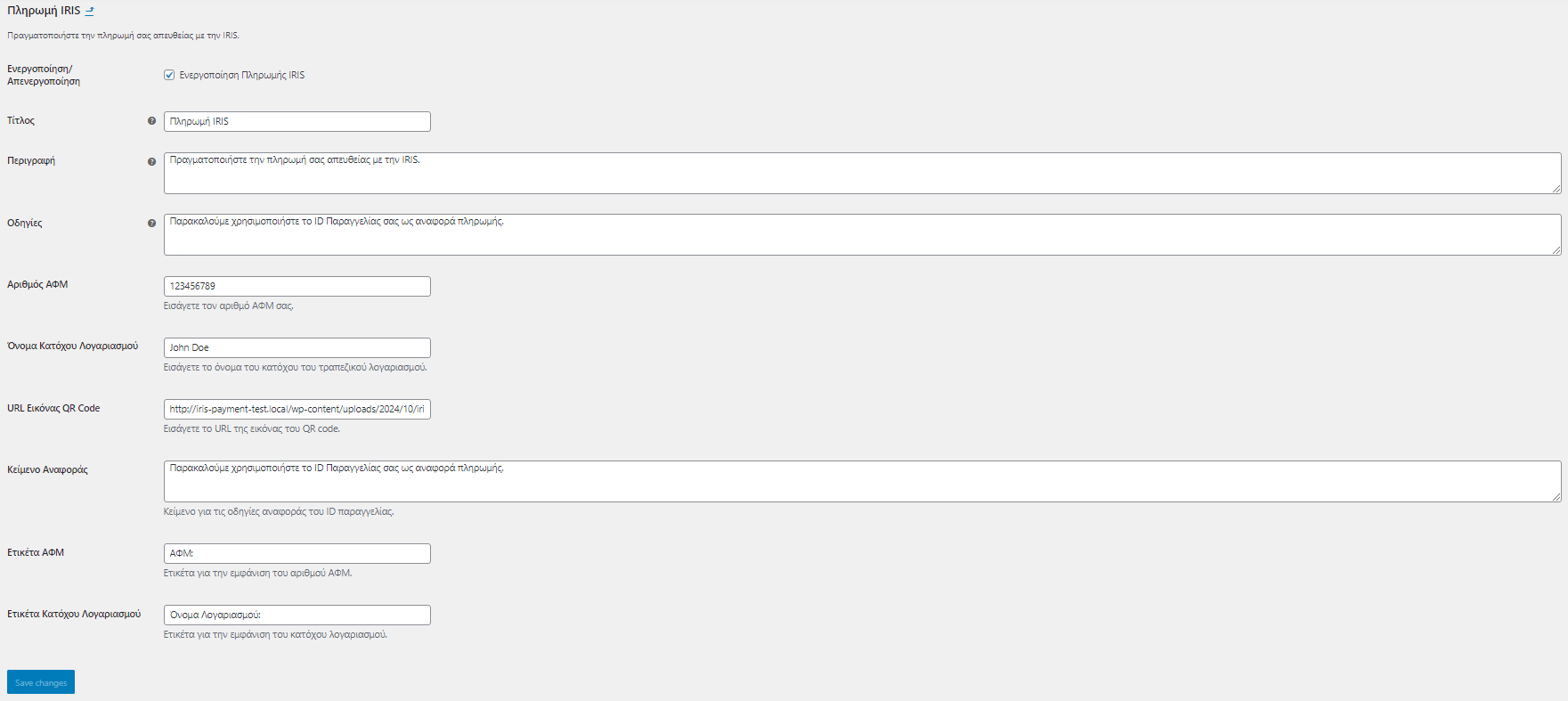
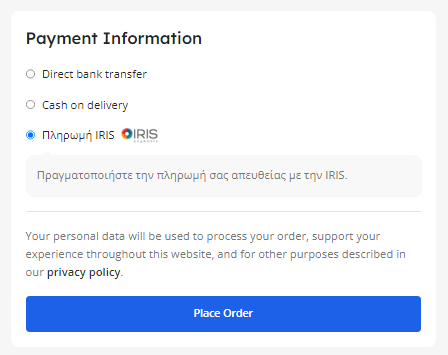
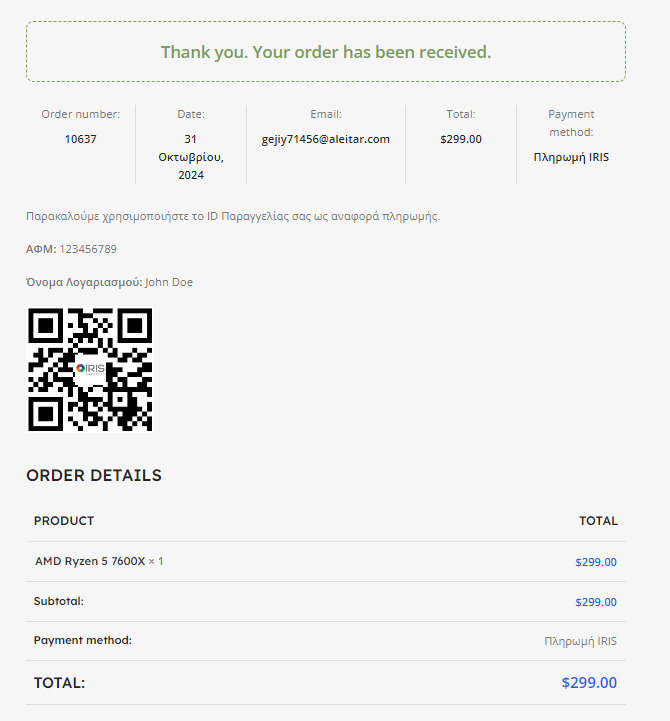

You are ready in 3 steps. Open each step for the details.
After purchasing and downloading the plugin:
/wp-content/plugins/checkout-gateway-iris/Click on IRIS Payment Gateway in the Payments tab and configure:
Click Save Changes to activate your settings.
The IRIS Checkout Gateway integrates seamlessly with WooCommerce to accept IRIS instant payments. When a customer selects IRIS as their payment method and completes the order, the system automatically sets the order to "On Hold" status. The customer receives an email with your VAT number, account holder name, QR code, and payment instructions. After you manually verify the payment in your bank account, you can change the order status to "Completed" in WooCommerce, which triggers the order fulfillment process.
No! Unlike traditional payment gateways, the IRIS Checkout Gateway doesn't require API keys, webhooks, or complex technical configurations. You simply enter your business details (VAT number, account holder name), upload a QR code for payments, and customize the text displayed to customers. The plugin handles all the order management automatically, making it perfect for businesses that want a simple, no-fuss payment solution.
Yes! The IRIS Checkout Gateway is fully compatible with both the classic WooCommerce checkout and the new WooCommerce Cart and Checkout Blocks. Whether you're using the traditional shortcode-based checkout or the modern block-based experience, the plugin works seamlessly. The payment method will appear in the blocks checkout with your configured title, description, and logo.
Absolutely! The plugin offers extensive customization options. You can modify: Payment gateway title and description at checkout Instructions displayed on the thank you page VAT number and account holder labels Payment reference instructions Completed order message in emails Whether to display the IRIS logo All text fields support Greek and English, allowing you to create a professional payment experience tailored to your brand.
When a customer places an order with IRIS payment, the order is automatically set to "On Hold" status and stock is reduced. If the customer doesn't complete the payment within your specified timeframe, you can manually cancel the order in WooCommerce, which will restore the stock. The plugin also includes a payment cancellation handler - if customers navigate away or cancel during the payment process, they're redirected back to the cart with the order marked as cancelled. This prevents abandoned orders from cluttering your system.
After payment you download the ZIP file from your purchase email or from your account. In WordPress go to Plugins > Add New > Upload Plugin, choose the ZIP, click Install and then Activate.
Your licence key is in your purchase email and in your account. Enter it in the plugin's licence tab to unlock every feature and automatic updates.
Each licence covers 1 website (domain). For more sites you need one licence per site. When you add 2 or more plugins to the cart, the volume discount applies automatically: 2 plugins -10%, 3 plugins -15%, 4 plugins -20%.
No. You pay once and the licence includes lifetime updates, with no renewals and no hidden fees.
Most plugins come with a 14-day money-back guarantee. See the details in our Refund Policy.
Help with installation and activation, answers to usage questions and bug fixes. Send your request from the support page and we usually reply within 24 hours on business days.
Yes. Use the "Request a feature" and "Customisation request" forms further down this page. Requests that help many stores make it into the next releases.
This plugin includes lifetime support and updates. Our team is ready to help you with any questions or customization needs.
The plugin and your licence key arrive by email right after payment.
Lifetime updates are included in the price. Nothing to renew every year.
Written by a Greek developer for Greek couriers, marketplaces and payment methods.
Only logged in customers who have purchased this product may leave a review.




vagelis.boitsios –
Perfect!