Withdrawal Button for WooCommerce

Lifetime license and free updates

Version1.0.0Requires WP5.8Tested up to6.8
Changelog
  • 1.0.0 Initial release

20.00

14 day money back guarantee
  • Instant download after payment.
  • Secure checkout, instant delivery by email.
  • Documentation, updates and support included.
Category:

Description

Withdrawal Button for WooCommerce adds a complete online withdrawal process to your store with two-step confirmation, order verification, automatic emails, and full request management.

VG Withdrawal Center for WooCommerce is a complete WooCommerce plugin for submitting and managing online withdrawal requests. It is designed around the technical flow described in Article 11a of Directive (EU) 2023/2673: a clear withdrawal function, a separate confirmation step, electronic request recording, and prompt acknowledgement of receipt on a durable medium. It also adds WooCommerce order verification, a full Case Desk, audit trail, customer status updates, My Account visibility, flexible field and design controls, and HPOS compatibility.

Key Features

Two-Step Withdrawal Flow

  • First-step withdrawal statement with a clear, configurable label
  • Dedicated review step so customers can check their details before final submission
  • Separate “Confirm withdrawal” button for the second action
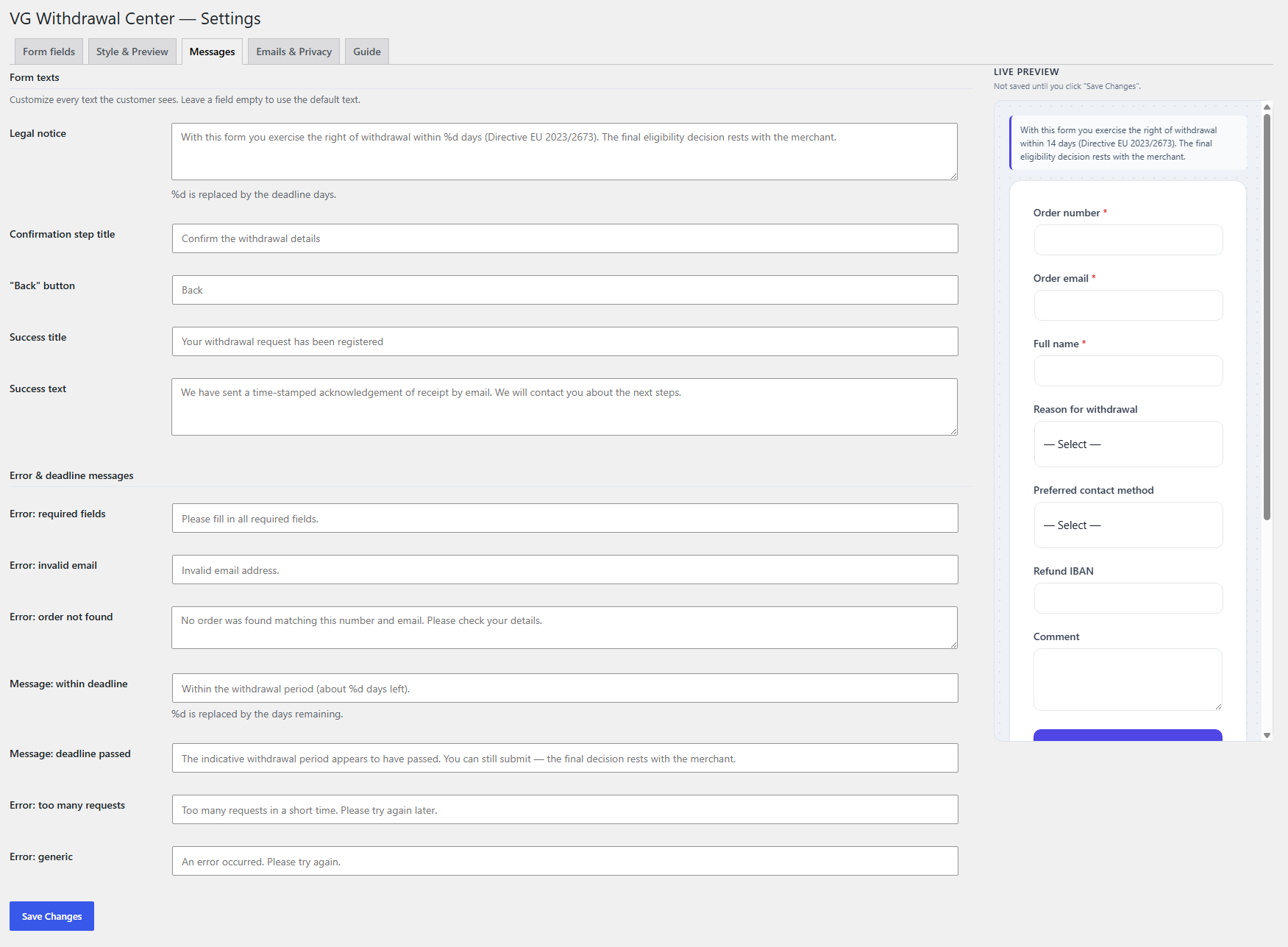
  • Main labels and customer-facing messages are configurable from WordPress admin

Order Verification

  • Live AJAX check of order number and email before the review step
  • HPOS-safe order lookup through WooCommerce APIs
  • Strict mode that blocks unmatched requests or soft mode for manual review
  • Indicative withdrawal-deadline check with remaining-day feedback

Acknowledgement of Receipt

  • Automatic customer email immediately after a successful submission
  • Exact submission date and time are recorded
  • Unique case code and SHA-256 receipt hash for integrity reference
  • Separate admin notification with a direct link to the case

Case Desk & Workflow

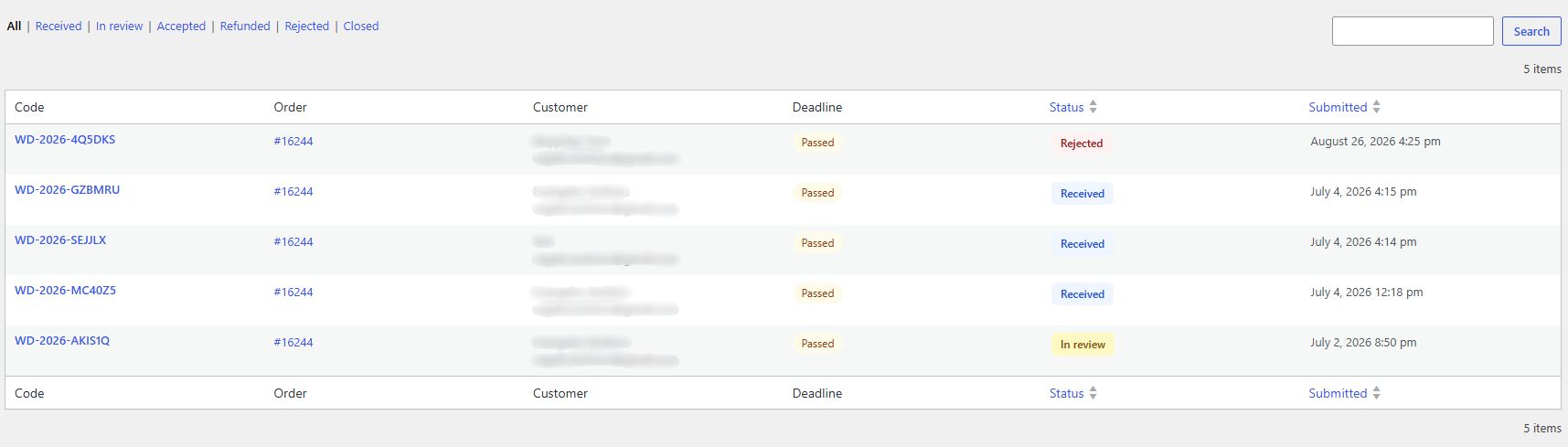
  • Central request list with search, filters, sorting, and pagination
  • Statuses: Received, In Review, Accepted, Refunded, Rejected, Closed
  • Refund reference and resolution-note fields
  • CSV export with UTF-8 BOM for reliable spreadsheet handling

Audit Trail

  • Logs the creation of every withdrawal case
  • Status-change history with actor and timestamp
  • Logs refund-reference updates
  • Records success or failure of the main customer emails

Customer Status Updates

  • Status-update email when the case changes and notification is enabled
  • Status-specific message and visual badge
  • Refund reference and resolution note are included where relevant
  • Global enable/disable setting plus a checkbox for each case update

Guidance & Email Preview

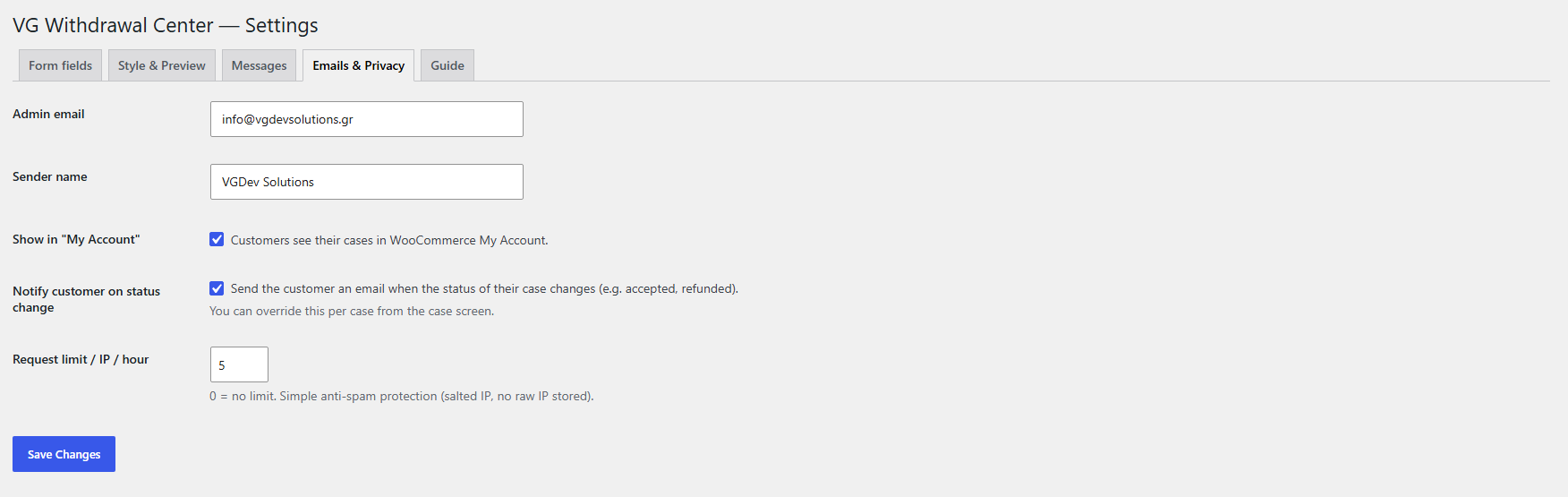
  • Contextual admin guidance based on the selected case status
  • Live customer-email preview directly inside the case screen
  • The preview changes as the status selection changes
  • Store managers can see what the customer will receive before sending an update

WooCommerce My Account

  • Optional “Withdrawals” endpoint in the customer account
  • Shows case code, order, date, and current status
  • Cases are matched by customer ID or email
  • Displays a link to the withdrawal form when no previous requests exist

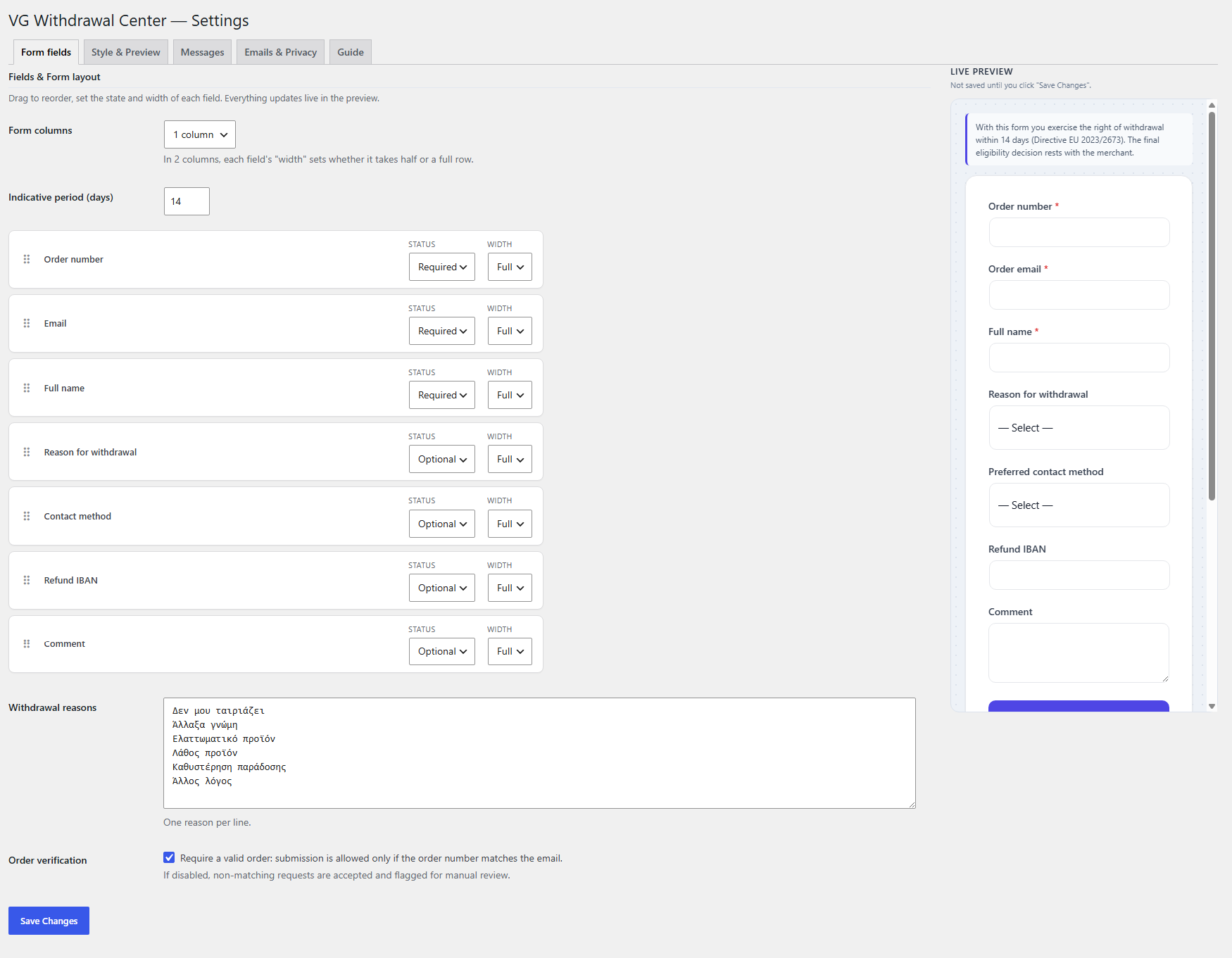
Drag-and-Drop Fields

  • Reorder fields with drag-and-drop from the settings screen
  • Each field can be hidden, optional, or required
  • One- or two-column layouts with full/half width per field
  • Automatically collapses to a single column on smaller screens

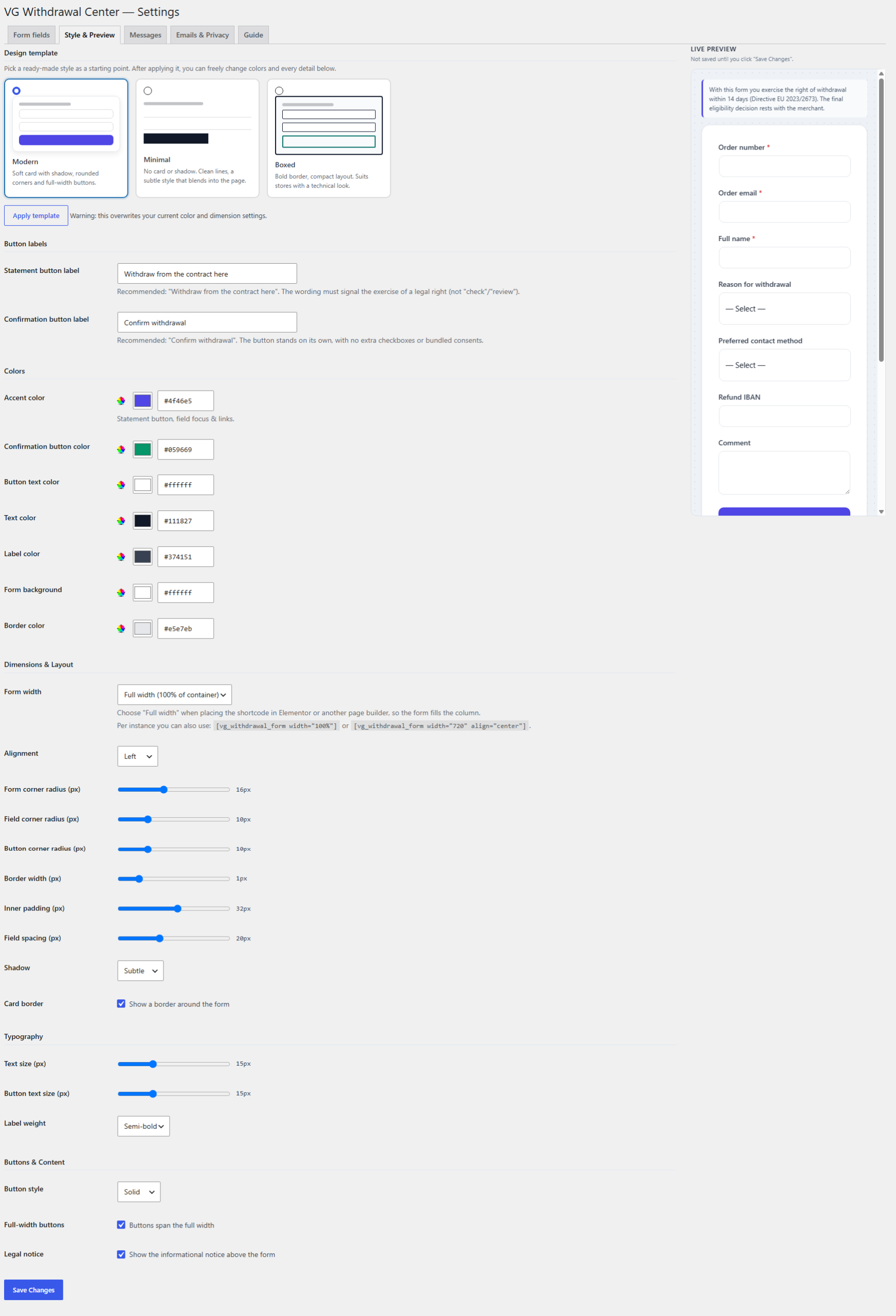
3 Design Templates & Live Preview

  • Modern: card layout with shadow, rounded corners, and full-width buttons
  • Minimal: clean, understated design without card or shadow
  • Boxed: compact layout with a stronger border and outline buttons
  • Sticky live preview in admin before settings are saved

Full Styling Control

  • Colors, borders, radius, padding, spacing, typography, and shadows
  • Button styles: solid, outline, or soft
  • Fixed width or 100% width, plus shortcode-level width/alignment overrides
  • Scoped frontend CSS designed to reduce conflicts with theme styling

Privacy, Security & Licensing

  • WordPress nonce validation and input sanitization on AJAX endpoints
  • Rate limiting with a salted IP fingerprint; raw IP addresses are not stored
  • WordPress Privacy Exporter & Eraser integration with anonymization instead of destroying the audit trail
  • License client and automatic update checks, while the public withdrawal form remains active even without an active license

Setup Instructions

  1. Install & Activate

    Upload the ZIP from Plugins > Add New > Upload Plugin, activate the plugin, and make sure WooCommerce is active.

  2. Activate Your License

    Enter your license key under Settings > VG Withdrawal Center License to access case management, settings, and updates.

  3. Create the Withdrawal Page

    Form shortcode:
    • Create a new page, for example “Withdrawal”
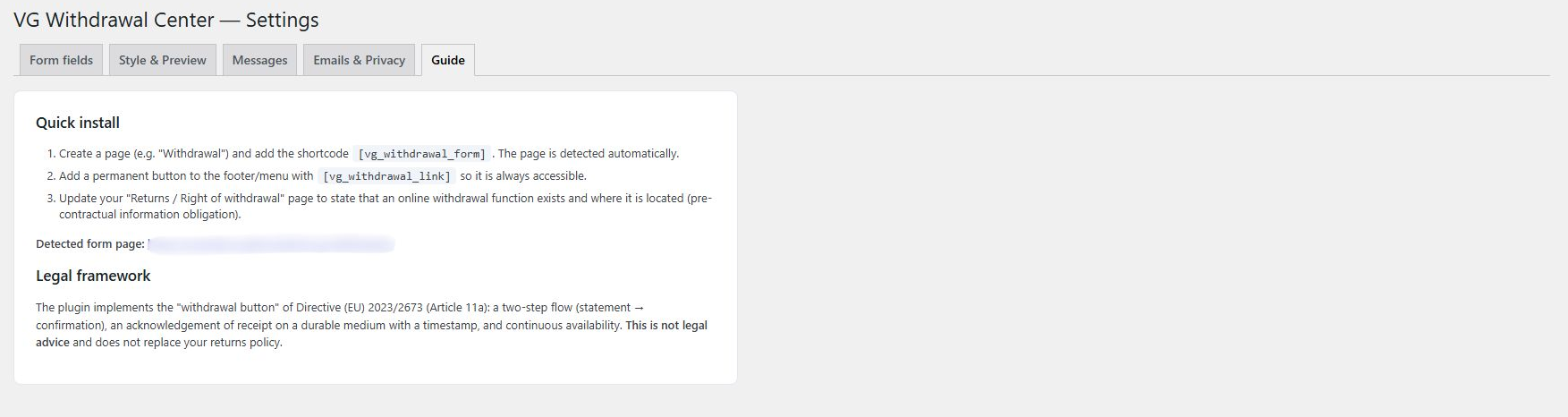
    • Add the shortcode [vg_withdrawal_form]
    • The plugin automatically detects the page containing the shortcode
    • For page builders, you can use overrides such as [vg_withdrawal_form width="100%" align="center"]
  4. Add a Permanent Entry Point

    Use [vg_withdrawal_link] in a footer, widget, or other suitable location so customers can easily reach the form. The shortcode supports custom text and button/link display.

  5. Configure Flow & Appearance

    From Withdrawal > Settings, configure fields, order, required/optional state, indicative deadline, labels, customer messages, emails, colors, layout, and design template.

How It Works

For Customers:

  1. The customer opens the withdrawal page from the permanent link/button.
  2. They enter the required order details and any optional fields enabled by the store.
  3. The plugin can verify the order number/email pair and display the indicative deadline status.
  4. The customer reviews the information they entered.
  5. They complete the process using the separate confirmation button.
  6. They receive an acknowledgement email with a case code, timestamp, and receipt hash.
  7. If the My Account endpoint is enabled, they can view the current request status from their account.

For Store Owners:

  1. The new request appears in the Case Desk with a unique case code.
  2. The manager can review customer/order details, deadline status, and audit history.
  3. They can change status, add a refund reference, and enter a resolution note.
  4. Contextual guidance and an email preview are available before the status update is saved.
  5. If notifications are enabled, the customer receives a status-update email.
  6. Core actions remain recorded in the audit trail and cases can be exported to CSV.

Why Choose VG Withdrawal Center?

  • Designed for the Article 11a flow — It is not a generic contact form, but a dedicated withdrawal submission and confirmation workflow.
  • WooCommerce-native logic — Verifies orders and billing emails through WooCommerce and declares HPOS compatibility.
  • Workflow from submission to resolution — Case statuses, refund references, notes, audit trail, and CSV export.
  • Clear customer communication — Acknowledgement email, status notifications, and My Account visibility.
  • No-code configuration — Drag-and-drop fields, templates, live preview, and detailed visual controls.
  • Privacy-aware design — No raw IP storage and integration with WordPress Privacy Export/Erase tools.
  • Greek & English — Includes EL/EN translation files and uses the standard WordPress localization system.

Perfect For

  • WooCommerce stores that need a structured online withdrawal workflow.
  • Greek and EU-facing online shops that want to adapt the workflow to the rules that apply to their business.
  • Agencies & freelancers managing multiple WooCommerce projects and needing a repeatable setup.
  • Higher-volume stores that benefit from search, filters, statuses, history, and CSV export.
  • Documentation-focused businesses that want a recorded workflow from submission through final handling.

System Requirements

  • WordPress 6.2 or higher
  • WooCommerce 7.0 or higher and active
  • PHP 7.4 or higher
  • Compatible with WooCommerce High-Performance Order Storage (HPOS)

Build a structured WooCommerce withdrawal workflow

VG Withdrawal Center for WooCommerce combines a two-step submission flow, order verification, acknowledgement of receipt, Case Desk, audit trail, and flexible design controls in one dedicated WooCommerce plugin.

Note: The plugin is a technical tool that supports the withdrawal process and does not constitute legal advice. Businesses should review their returns policy, pre-contractual information, applicable exceptions, and national law with their legal adviser.

Frequently asked questions

What exactly does VG Withdrawal Center for WooCommerce do?

It adds a structured online withdrawal workflow to WooCommerce: a two-step form with review and separate confirmation, order verification, acknowledgement email, an admin Case Desk, audit trail, and customer status-update emails.

Does it verify that the order number and email belong to the same order?

Yes. The plugin can run an AJAX check before the review step and performs the verification again server-side during submission. In strict mode, an unmatched request is blocked; in soft mode, the request can continue for manual review.

What does the customer receive after submitting a withdrawal request?

After successful confirmation, the plugin creates a unique case and sends an acknowledgement email containing the case code, order details, submission date and time, and a SHA-256 receipt hash. The store administrator receives a separate notification with a direct link to the case.

Can I customize the form and its design without coding?

Yes. You can reorder fields with drag-and-drop, set each field as hidden, optional, or required, choose one or two columns, assign full/half widths, start from Modern/Minimal/Boxed templates, and customize colors, dimensions, typography, buttons, and shadows with a live preview.

What happens if the license expires or is deactivated?

The public withdrawal form remains active. Without an active license, premium/admin functions such as viewing and managing cases, changing settings, and exporting CSV are locked. This behavior is intentional so the public-facing withdrawal function is not automatically interrupted by licensing status.

Is something missing from this plugin?

Request a feature

Need a different customization?

Send a customization request

Customer reviews

There are no reviews yet.

Only logged in customers who have purchased this product may leave a review.